
OpenClash for Omarchy
A native Omarchy bar widget for controlling a remote Mihomo/OpenClash instance. Switch traffic modes and proxy groups without opening the full web dashboard.
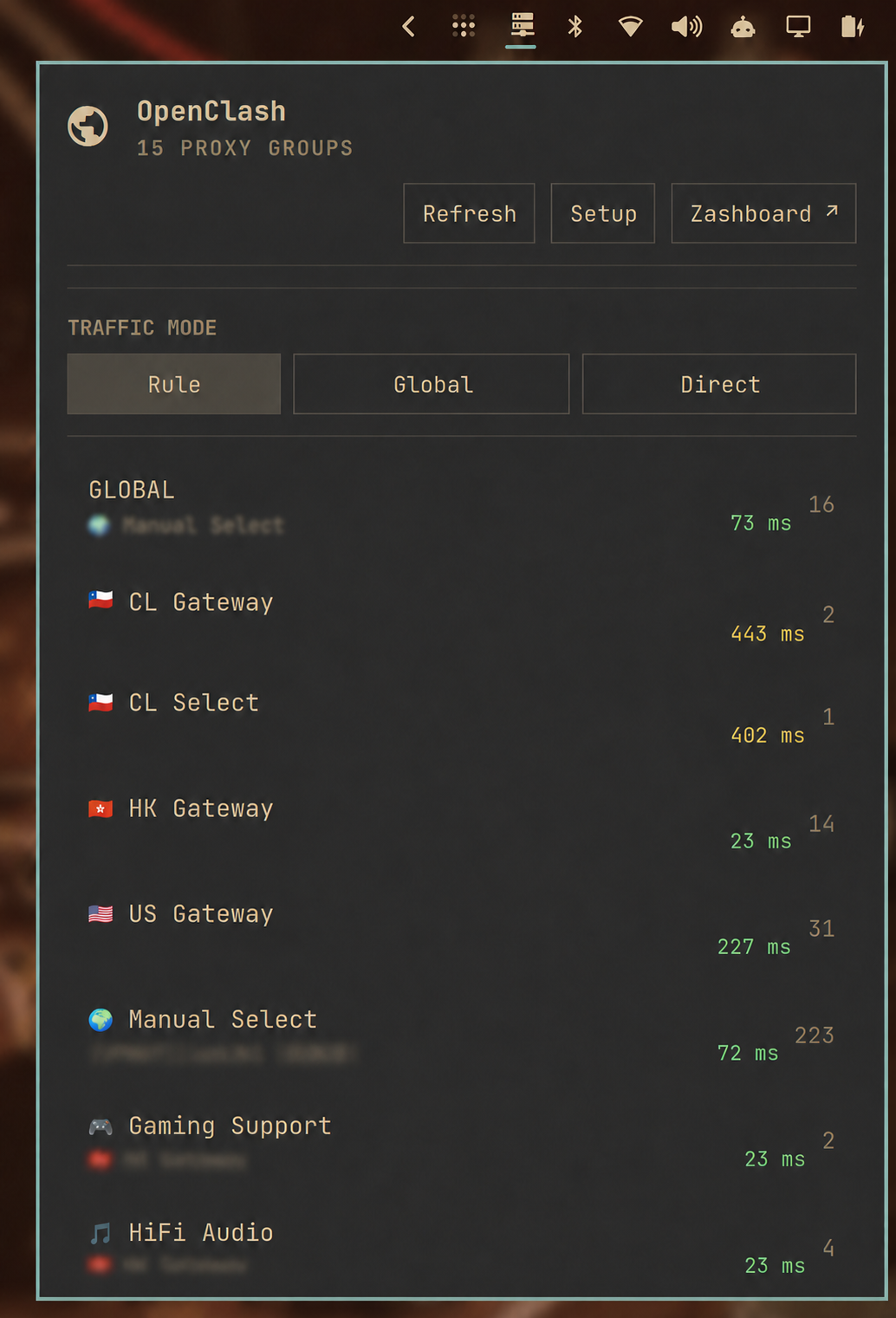
Features
- Switch between Rule, Global, and Direct traffic modes.
- View proxy groups and their active server.
- Show the active server's measured latency beside each group.
- Hide servers reported as unreachable by Mihomo.
- Optionally sort reachable servers from lowest to highest latency.
- Color latency values green below 300 ms, yellow from 300–500 ms, and red above 500 ms.
- Open Zashboard, MetaCubeXD, Yacd, Razord, or another configured dashboard.
- Handle unreachable LAN, VPN, and Tailnet controllers without affecting the desktop shell.
- Configure the controller URL and secret inside the widget on first use.
Requirements
- Omarchy Quattro with the current shell plugin system.
- Python 3 (included with Omarchy); the helper uses only the standard library.
- A Mihomo-compatible controller exposing
/version,/configs,/proxies, and/providers/proxies. - Network access to that controller and a valid Mihomo controller secret.
The controller may be available only over a LAN, VPN, or Tailscale. It does not need to be exposed publicly.
Install
Install and enable the plugin directly from GitHub:
omarchy plugin add https://github.com/cbayschm74/omarchy-openclash.git --enable
The widget defaults to the right side of the bar. Omarchy clones third-party
plugins into ~/.config/omarchy/plugins/ and warns before enabling their
unsandboxed code; review the repository before accepting that prompt.
First-run setup
Open the bar widget and enter:
- Controller URL — the Mihomo external-controller origin, including
http://orhttps://, but not a dashboard path. For example,https://openclash.example.net. - Dashboard URL — optional. If omitted, the plugin uses
<controller-url>/ui/. - Controller secret — the Mihomo
secret, not an HTTP Basic Auth password.
The plugin tests /version and /proxies before saving anything. Use
Setup later to change the connection. When editing an existing connection,
leave the secret blank to keep the saved value.
The dashboard button recognizes Zashboard, MetaCubeXD, Yacd, and Razord from the configured URL. Other interfaces use the generic Dashboard label.
Controls
- Left-click the bar icon to open or close the panel.
- Middle-click to refresh controller data.
- Right-click to open the configured dashboard.
- Select Rule, Global, or Direct to change traffic mode.
- Open a proxy group to choose a reachable server.
- Toggle Lowest ping first to sort measured servers by latency.
Update
Update this plugin through Omarchy:
omarchy plugin update cbayschm.openclash
Omarchy shows the incoming diff before fast-forwarding the installed Git checkout.
Uninstall
Remove the plugin from Omarchy:
omarchy plugin remove cbayschm.openclash
The uninstall intentionally leaves the connection settings in
~/.config/omarchy/openclash/, so reinstalling does not lose the setup. To
also erase the controller URL and secret, remove that directory after
uninstalling:
rm -r -- ~/.config/omarchy/openclash
Security and privacy
- The controller secret is sent to the local Python helper over standard input, never as a command-line argument.
- Settings are stored under
~/.config/omarchy/openclash/; the directory is owner-only (0700) and both files are owner-readable/writable only (0600). - The secret is used only as the Bearer token for requests to the configured controller. The plugin has no telemetry and contacts no other service.
- Controller API redirects are rejected, preventing the Bearer token from being forwarded to a redirected origin.
- API responses are streamed under a 16 MiB ceiling.
- Saved setup files are opened without following symlinks and must be bounded, owner-only regular files.
- HTTPS uses Python's normal system certificate validation. Prefer HTTPS when the controller crosses an untrusted network.
- An unreachable controller produces an offline state in the widget. It does not change system proxy settings, routing, DNS, firewall rules, or the Omarchy shell process.
If a reverse proxy also requires HTTP Basic authentication, configure that
proxy to authenticate the client and replace the upstream Authorization
header with the Mihomo Bearer token. One request cannot carry both Basic and
Bearer credentials in the same header.
See SECURITY.md for vulnerability reporting.
Troubleshooting
The widget remains offline
- Confirm the controller URL reaches the Mihomo API rather than only the web dashboard.
- Confirm the saved value is the Mihomo controller secret.
- Check that
/versionand/proxiesare permitted through any reverse proxy or firewall. - Verify that split DNS, LAN routing, VPN, or Tailscale is connected when the hostname is private.
No servers are shown
The plugin hides servers explicitly reported as unreachable. Refresh once the
controller's health checks have completed. Groups without an all list are
not selectable and are omitted.
Dashboard opens the wrong page
Open Setup and provide the full dashboard URL. The dashboard URL is independent of the controller API origin.
Development
Validate a checkout with the same manifest checker used by Omarchy:
omarchy plugin validate .
python3 -m unittest discover -s tests -v
For local testing, install the checkout by path:
omarchy plugin add "$PWD" --enable
Contributions are welcome; see CONTRIBUTING.md.
License
MIT © 2026 Carlos Bay-Schmith.
OpenClash, Mihomo, and the named dashboards are separate projects. This plugin is not affiliated with or endorsed by them or by Omarchy.