
Omarchy AWS Console
Your Amazon Web Services infrastructure, directly in the Omarchy bar.
Omarchy AWS Console is a fast, keyboard-friendly command center for monitoring Lightsail virtual servers, S3 storage buckets, Route 53 DNS hosted zones, EC2 compute instances, serverless Lambda functions, CloudWatch alarms, and Month-to-Date FinOps spend—without keeping AWS Console browser tabs open.
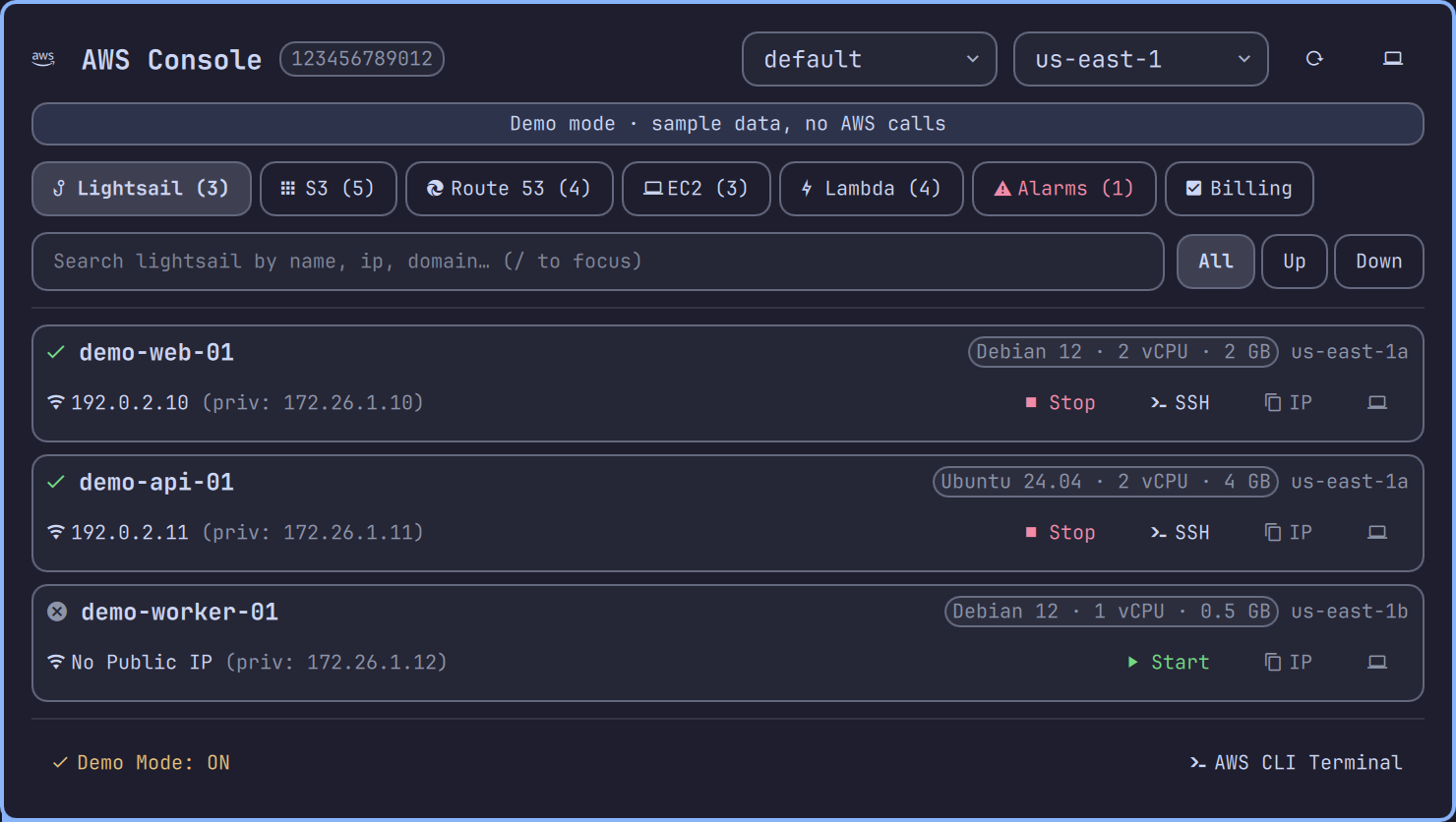
Features
Amazon Lightsail Virtual Servers
- Real-time instance states (
running,stopped,pending,stopping) - Hardware specs and OS blueprints (e.g. Debian, Ubuntu, CPU counts, RAM, and SSD disk sizes)
- One-Click Actions:
- Start, stop, or reboot Lightsail instances
- Direct SSH Terminal Connect (
ssh user@public-ip) launched into your native Omarchy terminal - Instant copy of Public / Private IPs to clipboard
- Direct deep-links to the Lightsail Web Console
S3 Object Storage
- Browse all S3 buckets with creation timestamps
- Instant search and filtering across bucket catalogues
- One-click copy of
s3://URIs - Direct links to browse buckets in the AWS Web Console
s3api list-bucketsis a global call and does not report per-bucket regions, so none is shown rather than guessing from the selected region.
Route 53 DNS Management
- Browse all hosted zones and domain registrations
- View record set counts and zone IDs
- One-click copy of Hosted Zone IDs
- Direct links to manage record sets in Route 53 Web Console
EC2 Compute Management
- Real-time instance states, instance types (
t3.medium,c6i.xlarge), and public/private IPs - Start, stop, or reboot instances with instant UI state updates
- Connect via AWS Systems Manager (SSM) Session Manager directly in your Omarchy terminal
Lambda Serverless Functions
- Track active functions, runtimes (
python3.12,nodejs20.x,go, etc.), allocated memory, and execution timeouts - Quick copy of Function ARNs and direct console links
CloudWatch Alarms and Proactive Alerts
- Monitor metric alarms across services (EC2 CPU, ELB 5XX errors, ElastiCache memory, Lambda throttles)
- Visual state badges (
ALARMurgent red,OKgreen,INSUFFICIENT_DATAdim) - Native desktop notifications via
notify-sendwhen an alarm entersALARMstate
FinOps and Billing Tracking
- Live Month-to-Date (MTD) spend, and an end-of-month projection prorated from
the observed daily burn (
MTD ÷ days elapsed × days in month) - Top AWS services ranked by cost (Registrar, Lightsail, Route 53, EC2, S3, RDS, NAT Gateways, etc.)
- Direct shortcut to AWS Cost Management Console
Multi-Profile and Multi-Region Support
- Discovers AWS profiles configured in
~/.aws/configand~/.aws/credentials - Profile and region dropdowns in the panel header; switching either re-queries
- An unknown profile is reported as an error rather than silently substituted
Demo Mode
- Toggle Demo Mode in the footer to render synthetic sample data and make no AWS calls at all. Useful offline, for screenshots, and for trying the widget out.
- Sample data uses reserved documentation values only (account
123456789012, RFC 5737192.0.2.0/24addresses, RFC 2606example.*domains). - If credentials are missing or expired the backend falls back to the same sample data, but the panel says so explicitly in a red banner and the bar icon goes urgent — the fallback never silently masquerades as your real account, and it clears itself as soon as credentials work again.
Requirements
- Omarchy with Quickshell status bar support
- AWS CLI v2 (
awsonPATH) - Python 3.10+ (
python3onPATH) wl-copy(Wayland clipboard utility, included in Omarchy)- A Nerd Font (e.g.
JetBrainsMono Nerd Font, included in Omarchy)
Installation
Method 1: Install via Omarchy CLI
omarchy plugin add https://github.com/craigderington/omarchy-aws.git --enable
Method 2: Manual / Local Installation
# Clone or copy into your Omarchy plugins directory
git clone https://github.com/craigderington/omarchy-aws.git ~/.config/omarchy/plugins/cd.aws

# Validate plugin manifest
omarchy plugin validate ~/.config/omarchy/plugins/cd.aws

# Enable the widget in your bar
omarchy plugin enable cd.aws right
Keyboard Shortcuts
| Key | Action |
|---|---|
1 |
Switch to Lightsail tab |
2 |
Switch to S3 Buckets tab |
3 |
Switch to Route 53 tab |
4 |
Switch to EC2 Instances tab |
5 |
Switch to Lambda Functions tab |
6 |
Switch to CloudWatch Alarms tab |
7 |
Switch to Billing & Cost tab |
R |
Trigger background data refresh |
/ |
Focus the search field |
Esc |
Clear the search, else close the panel |
While the search field has focus every key goes to it, including the digits and
h/j/k/l/r/x.
Bar Mouse Controls
- Left Click: Open / Close AWS Console popup panel
- Middle Click: Force immediate data refresh
Configuration
In ~/.config/omarchy/shell.json:
{
  "plugins": {
    "cd.aws": {
      "refreshIntervalSec": 120,
      "idleRefreshIntervalSec": 900
    }
  }
}
| Setting | Default | Meaning |
|---|---|---|
refreshIntervalSec |
120 |
Polling frequency while the panel is open |
idleRefreshIntervalSec |
900 |
Polling frequency while the panel is closed, when only the bar badge and alarm notifications need to stay current. Clamped to at least refreshIntervalSec. |
Required IAM permissions
Read-only display needs sts:GetCallerIdentity, lightsail:GetInstances,
ec2:DescribeInstances, s3:ListAllMyBuckets, lambda:ListFunctions,
route53:ListHostedZones, cloudwatch:DescribeAlarms and
ce:GetCostAndUsage. Any of these that is denied is reported per-service in the
panel rather than rendered as an empty list. The start/stop/reboot buttons
additionally need the matching lightsail:*Instance / ec2:*Instances actions.
Development
The backend and the panel's JS helpers have unit tests, both fully offline and
dependency-free (no AWS credentials, no aws binary, no npm install needed):
# Backend: 71 tests over parsing, validation, action dispatch and CLI safety
python3 -m unittest discover -s tests

# Model.js: panel formatting/filter/alarm-transition logic
node --test tests/model.test.mjs
License
MIT License © 2026 cd