
Omarchy DigitalOcean Console
A native, theme-aware DigitalOcean command center for the Omarchy Quickshell bar.
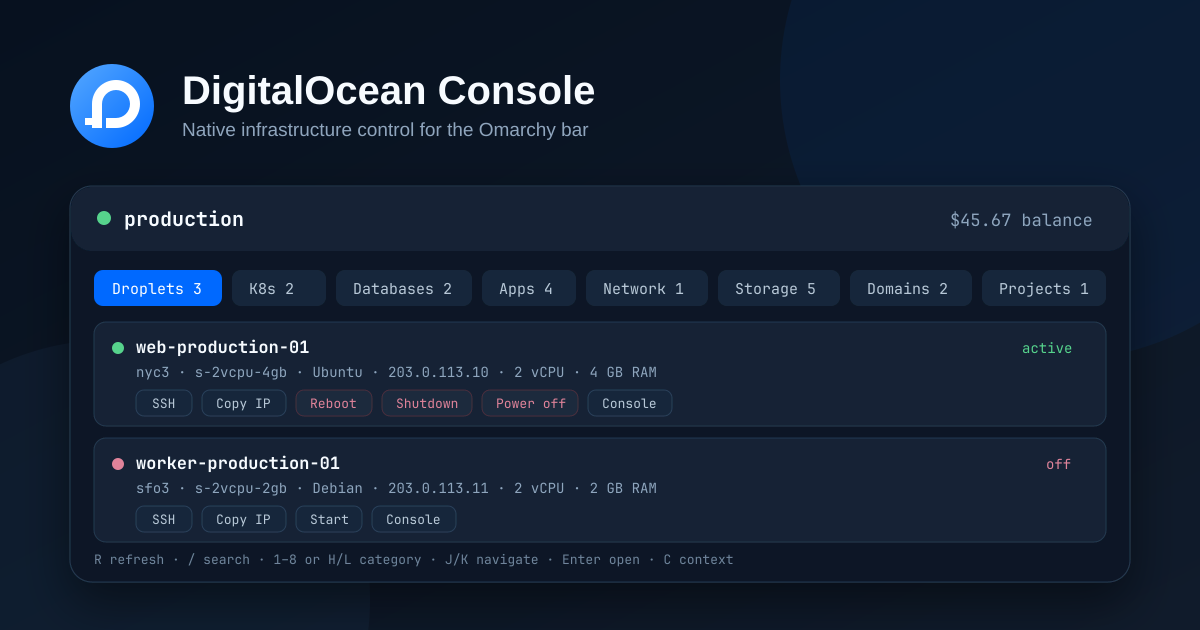
It monitors your infrastructure through the official doctl CLI and its existing authentication contexts. The plugin never reads, stores, logs, or asks for an API token.
Capabilities
- Droplets — state, region, image, size, public/private addressing, CPU, memory, and disk
- Kubernetes — cluster health, version, region, endpoint, node-pool count, and kubeconfig launch
- Managed databases — engine, version, health, region, size, and node count
- App Platform — active deployment state, region, ingress, and direct application links
- Networking — load balancer health, IP, algorithm, size, and attached Droplets
- Storage — volumes, attachment state, snapshots, capacity, and regions
- Domains — managed domains and TTLs
- Projects — environment, purpose, description, and default-project state
- Billing — current balance and month-to-date usage
- Multiple accounts — discovers and switches among existing
doctlcontexts - Native alerts — health regression and low-balance notifications through
notify-send
Safe operations
The panel intentionally exposes a narrow action surface:
| Resource | Operations |
|---|---|
| Droplet | Start, graceful shutdown, emergency power off, reboot, SSH, copy address, open console |
| Kubernetes | Save kubeconfig through doctl, open console |
| App Platform | Open live app, open console |
| Load balancer | Copy IP, open console |
| Database, volume, snapshot, project, domain | Copy the non-secret identifier and open the relevant web console |
Shutdown, emergency power off, and reboot require explicit in-panel confirmation. The confirmation is bound to the selected doctl context and is invalidated if that context changes. Create, delete, destroy, rebuild, resize, restore, and credential-management operations are deliberately absent.
Requirements
- Omarchy with Quickshell bar plugin support
- Python 3.10 or newer
doctl- A configured
doctlauthentication context wl-copy,notify-send, and a Nerd Font (included with Omarchy)
Configure authentication outside the plugin:
doctl auth init

doctl account get
For multiple accounts:
doctl auth init --context production
doctl auth init --context staging
doctl auth list
Do not place DigitalOcean tokens in shell.json, plugin files, command arguments, screenshots, issues, or logs.
Installation
omarchy plugin add https://github.com/craigderington/omarchy-digital-ocean.git --enable
Manual installation:
git clone https://github.com/craigderington/omarchy-digital-ocean.git \
  ~/.config/omarchy/plugins/cd.digitalocean
omarchy plugin validate ~/.config/omarchy/plugins/cd.digitalocean
omarchy plugin enable cd.digitalocean right
Controls
Mouse
- Left click: toggle the panel
- Middle or right click: refresh immediately
- Click a resource row: open it in the DigitalOcean web console
Keyboard
| Key | Action |
|---|---|
1–8 |
Select a resource category |
H / L, ← / → |
Move between categories |
J / K, ↑ / ↓ |
Move through resources |
Enter |
Open the selected resource |
/ |
Focus resource search |
C |
Open the account context picker |
R |
Refresh |
Tab |
Switch to the neighbouring bar panel |
Esc |
Clear search, cancel confirmation, or close |
Configuration
Configure the widget through Omarchy's plugin settings UI or ~/.config/omarchy/shell.json:
{
  "plugins": {
    "cd.digitalocean": {
      "refreshIntervalSec": 60,
      "idleRefreshIntervalSec": 600,
      "notificationsEnabled": true,
      "lowBalanceThreshold": 10
    }
  }
}
| Setting | Default | Range | Purpose |
|---|---|---|---|
refreshIntervalSec |
60 | 30–3600 | Poll interval while the panel is open |
idleRefreshIntervalSec |
600 | 60–7200 | Poll interval while closed; clamped to the open interval |
notificationsEnabled |
true |
— | Health-regression and low-balance notifications |
lowBalanceThreshold |
10 | 0–10000 | Urgent state below this positive USD balance; 0 disables it |
A failed service request is reported independently. For example, missing database permissions will not make healthy Droplets disappear or appear as an empty account.
doctl access
Read-only display uses the access needed by the corresponding doctl ... list and account/balance commands. Droplet power controls additionally require write access for Droplet actions. DigitalOcean team roles and scoped tokens remain authoritative.
The helper:
- invokes
doctlwith argument arrays and--interactive=false, never a shell; - applies strict allowlists to mutations and disables HTTP retries for them;
- re-fetches a Droplet immediately before an action and rejects incompatible state transitions;
- accepts only numeric Droplet IDs for power actions;
- removes connection credentials and other secrets from normalized output;
- parses structured CLI errors without surfacing raw database output;
- preserves the last successful category snapshot and marks partial refresh failures instead of replacing data with a false empty state;
- continues rendering successful resource categories when another category fails.
Development
python3 -m unittest discover -s tests -v
node tests/test_model.mjs
omarchy plugin validate .
The CI workflow runs the portable Python, JavaScript, and source-policy suites. Runtime QML verification is performed against Omarchy's installed shell because qs.Ui and qs.Commons are Omarchy modules.
License
MIT © 2026 Craig Derington