
Workspace Tags
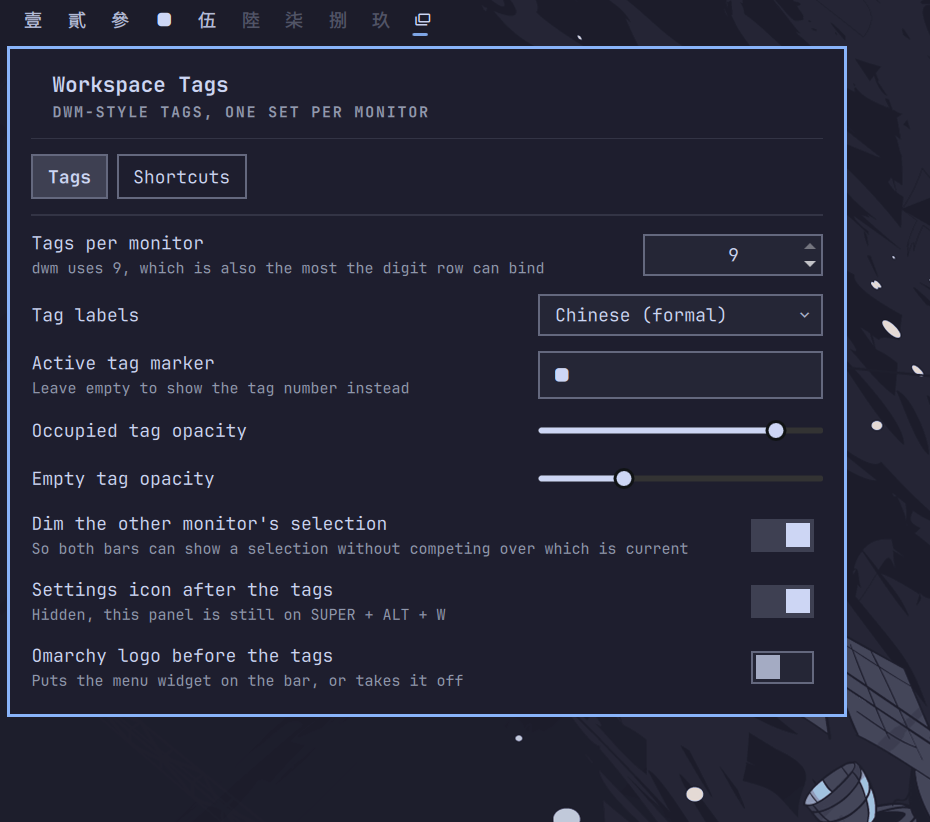
Per-monitor workspace tags for Omarchy, in the style of dwm. A bar widget that belongs to the monitor it is drawn on, plus an optional Hyprland config giving each screen its own private set of tags. Configured entirely from its own settings panel.
Omarchy's stock workspace widget lights whichever workspace is globally focused, so on two monitors both bars draw the same row and one of them is wrong:
                      stock                        this plugin
  left monitor    [1] 2  3  4  5              [1] 2  3  4  5  6  7  8  9
  right monitor   [1] 2  3  4  5               1  2  3  4  5 [6] 7  8  9
                   └── both bars agree,        └── each bar shows its own
                       and one of them lies        screen's tags
Requirements
- Omarchy with
omarchy-shell(Quickshell) - Hyprland 0.56+ for per-monitor tags (Lua config API)
- A CJK font for the two Chinese label styles only
No network access, no privileged operations, no bundled binaries.
Install
omarchy plugin add https://github.com/chagel/omarchy-workspace-tags.git --enable
It lands at the left of the bar and stands Omarchy's own workspace widget down
so you are not left with two rows. Move it with
omarchy bar move chagel.workspace-tags --section center.
Click the icon after the tags to open settings, or press SUPER+ALT+W.
Clicking a tag only ever views that tag.
The widget works on stock Omarchy as-is — each bar showing its own screen's
state. For the full dwm behaviour, turn on Per-monitor tags in the settings.
That appends one fenced block to your ~/.config/hypr/hyprland.lua (backed up
first, removed again when you switch it off), which is where keybindings and
workspace rules have to live.
Bindings
All editable in the Shortcuts tab.
| Key | dwm | Action |
|---|---|---|
CTRL + 1–9 |
view |
Show tag N on this monitor. Asking for the tag you are on does nothing, as in dwm |
SUPER+SHIFT + 1–9 |
tag |
Move the window to tag N here, and follow it |
SUPER+SHIFT+ALT + 1–9 |
tag |
Move it there and stay put |
SUPER + [ / ] |
focusmon |
Focus the monitor left / right |
SUPER+SHIFT + , / . |
tagmon |
Move the window to the monitor left / right |
SUPER + wheel |
Previous / next tag, wrapping within this monitor | |
SUPER+ALT + L |
layout keys | Cycle this tag's layout: dwindle → master → scrolling |
SUPER+ALT + W |
Open the settings panel |
To go back to the tag you came from, use Omarchy's own SUPER+CTRL+Tab
("Former workspace"). Note its "previous" is Hyprland's and therefore global —
change monitors in between and it can send you to the other screen.
All three of Omarchy's digit rows are unbound, not just the colliding ones: they switch by absolute workspace, which once ids are partitioned means teleporting to whichever monitor owns that id. Digit bindings of your own are unaffected.
How per-monitor tags work
Each monitor gets a block of ten workspace ids, and every binding resolves a tag against the focused monitor's block — so a digit key can never move focus between screens:
| monitor | tags | workspace ids |
|---|---|---|
| leftmost | 1–9 | 1–9 |
| next | 1–9 | 11–19 |
| next | 1–9 | 21–29 |
An id reads on sight: tens digit is the monitor, units the tag, so 16 is
monitor 2's tag 6.
Monitors need no setting up — each is detected and remembered the first time it
appears, left to right, and keeps its block whether or not it is plugged in, so
unplugging one never renumbers the others. To reorder or prune, edit the
monitors entry in shell.json.
Turning it on moves existing workspaces into the block that now owns them, windows included. To keep a window on a particular screen, renumber its workspace into the right block first:
hyprctl dispatch 'hl.dsp.workspace.change_id({ workspace = 6, id = 16 })'
Per-tag layouts
dwm's other half: each tag remembers its own arrangement. SUPER+ALT+L
cycles dwindle → master → scrolling for the tag you are on. The choice is
written where Omarchy already keeps per-workspace layouts, so its own layout
toggle and this one cannot disagree.
Settings
| Setting | Default | |
|---|---|---|
tags |
9 |
Tags per monitor, 1–9 |
monitors |
(detected) | Remembered monitors, left to right. Edit shell.json to reorder or prune |
tagLabels |
numbers |
Label style — see below |
showSettingsIcon |
true |
Show the settings icon after the tags |
settingsGlyph |
|
That icon's glyph |
activeGlyph |
|
Marker for the active tag; empty shows its label |
dimUnfocusedMonitor |
true |
Dim the selection on the monitor you are not on |
occupiedOpacity |
0.85 |
Opacity of tags holding windows |
emptyOpacity |
0.3 |
Opacity of empty tags |
Every keybinding is a setting too (viewMods, moveMods, moveSilentMods,
focusMonitorLeft/Right, moveMonitorLeft/Right, nextTag, previousTag,
cycleLayout, openSettings), all edited from the Shortcuts tab.
Labels
tagLabels |
1–9 |
|---|---|
numbers |
1 2 3 4 5 6 7 8 9 |
roman |
I II III IV V VI VII VIII IX |
greek |
α β γ δ ε ζ η θ ι |
chinese |
一 二 三 四 五 六 七 八 九 |
chinese-formal |
壹 貳 參 肆 伍 陸 柒 捌 玖 |
letters |
A B C D E F G H I |
dots |
● ● ● ● ● ● ● ● ● |
What it writes
~/.config/omarchy/shell.json |
its own settings entry, and the bar layout when a master switch stands another widget down |
~/.config/hypr/hyprland.lua |
one fenced block, only while Per-monitor tags is on. Backed up first; nothing else touched |
~/.config/hypr/workspace-tags.lua |
generated config, created and owned by this plugin |
~/.local/state/omarchy/workspace-layouts/<id>.lua |
one line per tag whose layout you cycled |
Nothing under ~/.config/hypr is written until you turn per-monitor tags on.
Remove
Turn Per-monitor tags off first — that takes the line back out of your
hyprland.lua and gives Omarchy's workspace widget back. Then:
omarchy plugin remove chagel.workspace-tags
Removing the plugin while tags are still on leaves both behind, since nothing of
ours runs afterwards to undo them. By hand: delete the fenced workspace-tags
block from hyprland.lua, then rm ~/.config/hypr/workspace-tags.lua, then
omarchy plugin enable omarchy.workspaces.
Windows keep their ids — 16 stays 16, now an ordinary workspace. Renumber
with hyprctl dispatch 'hl.dsp.workspace.change_id({ workspace = 16, id = 6 })'.
Notes
- The generated config is build output. Saving in the panel rewrites it and reloads Hyprland; hand edits do not survive. Change the settings instead.
omarchy refresh hyprlandoverwriteshyprland.lua, so the switch will read as off afterwards.omarchy updateis safe.- There is deliberately no
swap_monitorsbinding. It would put a pinned id on the wrong screen and fight the workspace rules. Move the windows instead.
Development
Link the plugin folder at your checkout and the QML reloads as you save it:
ln -s "$PWD" ~/.config/omarchy/plugins/chagel.workspace-tags
Generator.js does not follow — the QML engine loads a .pragma library once
and keeps it, so the shell has to restart before an edit takes effect. Two
scripts cover that:
scripts/apply    # restart the shell, then check the generated config matches
scripts/watch    # do it automatically as files are saved
node test/generator.test.js
Plain node, no dependencies. Generator.js holds everything that turns settings
into Lua and is kept free of Qt so it can be tested outside the shell.