
Omablur
A bar panel ("kind": "bar-widget") to tune window corner rounding and blur
intensity for Omarchy, without opening a config file.
Click the bar chip, pick a preset or drag a slider — the change applies to
the running Hyprland session immediately.
Install
omarchy plugin add https://github.com/Charlieras262/omarchy-omablur.git --enable
omarchy plugin update later pulls new versions the same way any
git-managed plugin does.
Use
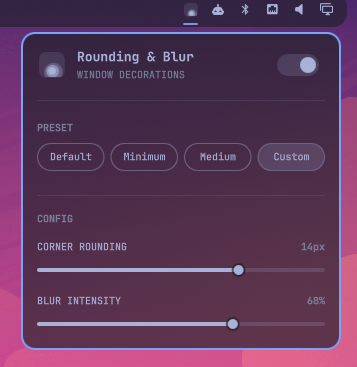
Click the chip in the bar to open the panel:
- The switch next to the title turns everything off (rounding to 0, blur off) or back on — it remembers whatever was set before turning it off, for the current session, and falls back to Default if there's nothing to restore yet (e.g. right after a shell restart).
- Default / Minimum / Medium apply a fixed rounding + blur-intensity pair immediately. The active one is detected from Hyprland's own live values, not stored separately, so it stays correct even if you change something outside the panel.
- Custom reveals two sliders instead: corner rounding (0-20px,
mapped 1:1 to Hyprland's
decoration:rounding) and blur intensity (0-100%, converted todecoration:blur:size, 1-20 linear, anddecoration:blur:passes, 1-3 stepped — each extra pass roughly doubles the GPU cost for a much smaller visual gain past 2-3, so a straight linear mapping would make the top half of the slider barely distinguishable but noticeably heavier).
Dragging a slider (or picking a preset) previews the change live via
hyprctl eval — nothing is written to disk until you release it or the
click lands. Once it does, the setting is persisted as a marked block in
your own ~/.config/hypr/looknfeel.lua, so it survives a Hyprland restart:
-- BEGIN charlieras262.omablur
hl.config({
  decoration = {
    rounding = 8,
    blur = {
      enabled = true,
      size = 8,
      passes = 2,
      new_optimizations = true,
      ignore_opacity = true,
    },
  },
})
-- END charlieras262.omablur
Only the lines between those two markers are ever touched — anything else
you already have in looknfeel.lua is left exactly as it was.
Rounding also applies to the shell itself
Corner rounding isn't only a window thing: Omarchy's own Style.cornerRadius
(used by every popup panel — Display, network, bluetooth, audio, etc.) already
mirrors decoration:rounding live, and
omarchy-floating-bar
1.4.0+ defaults its own corners to that same value when you haven't set an
explicit cornerRadius in its own config. Dragging Omablur's rounding slider
calls Omarchy's own Style.refresh() after each change, so both follow the
slider live, with no direct coupling between the three plugins — they all
just read the one shared value.
Making blur actually visible
Hyprland only renders blur behind a surface that isn't fully opaque — an
opaque window, bar, menu, or notification shows none of it, no matter how
strong decoration:blur is set.
The shell itself — bar, popup panels (Display, network, bluetooth,
audio, etc.), notifications, and the menu — can dim in sync with blur too,
but only after a one-time, manual edit to four of Omarchy's own files
(this plugin deliberately does not ship a script that runs as root against
its own git-managed checkout — that checkout can change on every omarchy plugin update, which would make an auto-run sudo script a code-execution
path into a user-writable directory). Open each file as root (e.g.
sudoedit /usr/share/omarchy/shell/Commons/Style.qml) and add the marked
line yourself:
shell/Commons/Style.qml, right after property int gapsOut: 5:
property real shellOpacity: 1
shell/Ui/KeyboardPanel.qml, change the card's color: and opacity:
lines (look for color: Color.popups.background and
opacity: root.open || root.popoutSwitching ? 1.0 : 0) to:
color: Qt.rgba(Color.popups.background.r, Color.popups.background.g, Color.popups.background.b, 1)
opacity: (root.open || root.popoutSwitching ? 1.0 : 0) * Style.shellOpacity
shell/plugins/notifications/components/NotificationCard.qml, change
color: Color.notifications.background to:
color: Qt.rgba(Color.notifications.background.r, Color.notifications.background.g, Color.notifications.background.b, 1)
opacity: Style.shellOpacity
shell/plugins/menu/Menu.qml, change the card's color: root.background
to:
color: Qt.rgba(root.background.r, root.background.g, root.background.b, 1)
opacity: Style.shellOpacity
Then omarchy restart shell. shellOpacity defaults to 1 (fully
opaque); Omablur sets it to 0.62 while its own blur is on and back to 1
when it's off. Forcing each color's own alpha to 1 first makes those two
states absolute, not stacked on top of whatever background-alpha your
theme's own shell.toml already bakes into that color. An Omarchy update
to any of these four files will silently drop the edit — just reapply the
relevant line above if the shell stops dimming with blur again.
Regular app windows are a separate story — Hyprland has no idea which
of your windows you want see-through, so that's a per-app choice you make
yourself with a window rule. Omarchy's o.window(match, rules) helper (see
$OMARCHY_PATH/default/hypr/windows.lua for more examples) sets it:
-- ~/.config/hypr/hyprland.lua, or your own module required from it
o.window("firefox", { opacity = "0.90 0.90" })
o.window("^(kitty)$", { opacity = "0.85 0.80" })
The two numbers are active/inactive opacity (0.0-1.0). Without a rule like
this for an app, that app stays fully opaque and blur has nothing to show
through, even with Omablur's blur switched on. decoration:blur:enabled
itself is already global — there's no per-app blur rule to add, only the
opacity that lets it show.
A note on hardware: blur is a compositor/GPU feature, not something
this plugin renders itself — Omablur only sets the Hyprland options above.
On some GPU/driver combinations (NVIDIA in particular has had a history of
blur-related quirks with Hyprland), windows can stay genuinely unblurred
even with correct opacity and decoration:blur:enabled — the same
sharp background visible through a translucent window either way is the
tell. If that happens, it's a Hyprland/driver-level limitation to chase
separately, not something to expect this plugin to work around.
Remove
omarchy plugin remove charlieras262.omablur
This removes the plugin's files, but leaves the marked block above in
looknfeel.lua (Hyprland keeps using that rounding/blur setting after
removal, same as it would if you'd typed it in by hand). To drop it too:
python3 ~/.config/omarchy/plugins/charlieras262.omablur/compat/uninstall-looknfeel.py charlieras262.omablur
Run that before omarchy plugin remove (once removed, the script above
is gone too — in that case just delete the marked block from
~/.config/hypr/looknfeel.lua by hand).
Dependencies
hyprctl (ships with Hyprland/Omarchy) for reading and applying live
values, and python3 for the config-file writer. Everything else is plain
QML on Omarchy's own qs.Commons/qs.Ui modules — no external packages or
services.
License
MIT — see LICENSE.