
omarchy-agent-gemini 🌟
Google Gemini / Antigravity usage, token collector, and rate limits plugin for Omarchy Linux.
Integrates Google Gemini and Antigravity CLI (agy) tracking into Omarchy's official Agents (omarchy.agents) bar widget and dashboard.
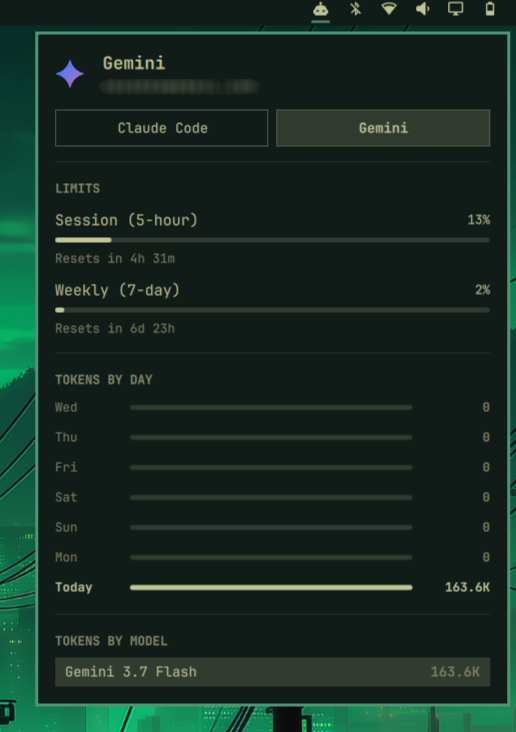
✨ Features
- 📊 Daily Token Consumption: Displays 7-day token bar charts directly in the Omarchy panel.
- ⏱️ Rate Limits & Quotas: Draws the 5-hour session and 7-day weekly Gemini meters with their reset countdowns, plus any other bucket
agyreports as used (the separate Claude/GPT weekly, for instance). - 🤖 Model Breakdown: Shows token metrics grouped by model (e.g.
gemini-3.7-flash,gemini-2.5-pro,gemini-2.5-flash). - 💬 Gemini CLI Support: Reads the chat sessions the Gemini CLI records under
~/.gemini/tmp/<project>/chats/, taking the token split straight from each response'susageMetadata. - ⚡ Antigravity CLI Support: Reads sessions, prompt history, transcripts, and active account from
~/.gemini/antigravity-cli/. - 🔌 Multi-Harness Scans: Automatically aggregates Gemini sessions run through
opencode,pi, andomp. - 🎨 Official Logos: Ships the Google Gemini sparkle for dark and light surfaces (
install.sh --icons-onlyputs it in the panel's root-owned assets dir). - 🔒 Zero-Config & Seamless: Works alongside Omarchy's built-in Claude, Codex, and Fireworks collectors.
🚀 Installation
omarchy plugin add https://github.com/Chispes/omarchy-agent-gemini.git --enable
That is the whole install for the data: the plugin ships the collector and
runs it itself, so the Gemini tab, charts, and rate limits appear with no
sudo at all.
The Gemini mark needs one root step
The Agents panel resolves a provider's icon by convention and by convention
only — Qt.resolvedUrl("assets/<id>.svg") against its own directory,
$OMARCHY_PATH/shell/plugins/agents/assets/, which is owned by root. A plugin
installed under ~/.config/omarchy/plugins cannot write there, and the panel
never looks anywhere else, so until the mark is in place the tab is drawn with
the generic robot glyph. There is no plugin-side workaround; there is a
one-line install:
~/.config/omarchy/plugins/chispes.agent-gemini/install.sh --icons-only
omarchy restart shell
That copies gemini.svg and gemini-light.svg (light and dark surfaces) into
the panel's assets directory and touches nothing else. uninstall.sh removes
them again.
You do not have to remember it: after its first collect the plugin checks whether the mark is there, and if it is not, sends one Omarchy notification offering to install it. Clicking it opens a terminal, runs exactly the command above, and restarts the shell. It is asked once — never again on that machine, unless the mark later disappears (an Omarchy reinstall, say), which arms the offer afresh. It stays quiet while there is no usage record either, since the panel draws no tab at all for an agent with nothing to report.
Requirements
- Omarchy, with the Agents widget available (
omarchy.agents) python3— the only runtime dependency; the collector uses the standard library alone.- Antigravity CLI (
agy) onPATH, for the rate-limit meters only. Without it the quotas are simply absent — token and session stats are read from files and need no CLI at all. Limits are probed withagy -p /usage --output-format json; the Gemini CLI has no/usagecommand, and an unknown slash command there would be sent to the model as a prompt, so it is never probed.
Optional: install system-wide
~/.config/omarchy/plugins/chispes.agent-gemini/install.sh
The same script with no options installs the mark and the one other thing
that needs root: /usr/bin/omarchy-agent-usage-gemini plus the
$OMARCHY_PATH/bin/omarchy-agent-usage-gemini symlink, so Gemini refreshes as
part of omarchy agent usage-update alongside Omarchy's own collectors. The
plugin's own service already keeps the record fresh, so this is a convenience,
not a requirement.
It writes nowhere else and reads no user configuration. See Uninstallation to undo it.
🔍 How it Works
The Agents panel is strictly a display: it watches
~/.local/state/omarchy/agents/usage/ and draws every record it finds there,
whoever wrote it. That is the seam this plugin uses.
omarchy-agent-usage-update — the path Omarchy's own collectors take — only
globs $OMARCHY_PATH/bin/omarchy-agent-usage-*, a directory no plugin can
write to without root. So the plugin does not depend on it. Service.qml runs
the collector out of the plugin directory every 15 minutes with --write, and
the collector writes its own record. A system-wide install adds the update path
back; both refresh the same record by create-and-rename, so neither can be read
half-written.
Each run:
- Reads the Gemini CLI's own chat sessions in
~/.gemini/tmp/<project>/chats/session-*.jsonl, taking the token split from each response'susageMetadata. - Analyzes local Antigravity history (
~/.gemini/antigravity-cli/history.jsonl&conversation_summaries.db). - Checks transcripts in
~/.gemini/antigravity-cli/brain/for step and token metrics. - Queries
~/.local/share/opencode/opencode.db,~/.pi/agent/sessions/, and~/.omp/agent/sessions/for assistant messages whose provider is Google. - Probes Antigravity rate limit quotas and reset timestamps, when
agyis installed. - Detects the signed-in Google account from
~/.gemini/google_accounts.json. - Writes the merged record to
~/.local/state/omarchy/agents/usage/gemini.json.
Why the tab may not appear
The panel hides an agent that has nothing to say: providerHasData in the
Agents widget requires at least one prompt, session, active day, or rate limit
before a tab is drawn, and the module leaves the bar entirely when no agent
qualifies. A machine that has never run Gemini therefore shows nothing, by
design — the tab arrives on its own at the next refresh once there is usage.
To see what the collector finds right now, without waiting for the service and
without writing anything:
python3 ~/.config/omarchy/plugins/chispes.agent-gemini/bin/omarchy-agent-usage-gemini --force | python3 -m json.tool
And to see the record the panel is actually drawing:
python3 -m json.tool ~/.local/state/omarchy/agents/usage/gemini.json
🛡 Resource bounds
The collector reads local history that the user's own tooling produces, so its
cost is bounded on every axis rather than left to grow with that history. All
limits are constants at the top of bin/omarchy-agent-usage-gemini:
| Bound | Value | What it protects |
|---|---|---|
HISTORY_CUTOFF_DAYS |
30 | Work scales with a fixed window, not with total history |
MAX_DIR_ENTRIES_SCANNED |
200000 | Global scan-work budget for one traversal |
MAX_ENTRIES_PER_DIR |
4000 | One directory cannot spend the whole global budget |
MAX_DIRS_TO_SCAN / MAX_PENDING_DIRS |
300 / 1000 | Directories visited, and pending paths retained |
MAX_TRANSCRIPT_FILES |
100 | Files opened per scan |
MAX_FILE_SIZE_BYTES |
4 MB | Per-file read budget, enforced on the open descriptor |
MAX_LINE_BYTES |
256 KB | One line cannot be buffered without limit |
MAX_TAIL_BYTES |
256 KB | history.jsonl is read as a seeked tail, never whole |
MAX_SESSIONS_RECORDED / MAX_MODELS_RECORDED |
500 / 15 | Bounds the in-memory maps and the emitted JSON |
Directory traversal is a priority walk ordered by mtime (newest directories first), so the budget is spent on recently active sessions before anything else: what a truncated walk drops is the least recently touched material, which the 30-day cutoff would discard anyway.
File size is checked with os.fstat() on the descriptor being read, not with
stat() on the path, so a file swapped or grown between check and read cannot
escape the cap; opens use O_NOFOLLOW. Reads are chunked, so a file containing
no newlines is not pulled into memory as one enormous line.
🛠 Manual Usage & Testing
You can run the collector manually at any time:
python3 ~/.config/omarchy/plugins/chispes.agent-gemini/bin/omarchy-agent-usage-gemini --force --write
--force skips the 20-second scan cache, and --write updates the record the
panel reads; without --write it only prints. --limits-only reuses the
cached scan and refreshes just the rate-limit meters.
Omarchy's own refresh path discovers collectors by globbing
$OMARCHY_PATH/bin/omarchy-agent-usage-*, so it includes Gemini only after the
system-wide install:
omarchy agent usage-update --force        # every installed collector
omarchy agent usage-update gemini --force # just this one
To toggle the Agents panel from the terminal:
omarchy-shell omarchy.agents toggle
🗑 Uninstallation
Run uninstall.sh first, while the plugin directory still exists — it lives
inside it, and it is what removes anything the plugin could not have written
itself:
~/.config/omarchy/plugins/chispes.agent-gemini/uninstall.sh
omarchy plugin remove chispes.agent-gemini
uninstall.sh removes the Gemini mark, the system-wide collector and its
symlink if you installed them, and the generated record in
~/.local/state/omarchy/agents/usage/gemini.json. Each is removed only if
present, so it is safe after an --icons-only install, or after no install at
all.
Removing the plugin on its own leaves that record behind, and the panel draws every record it finds regardless of who wrote it: the Gemini tab stays, frozen at its last values, until the file is gone.
rm -f ~/.local/state/omarchy/agents/usage/gemini.json
📄 License
MIT © Chispes