
Firefox Passwords for Omarchy
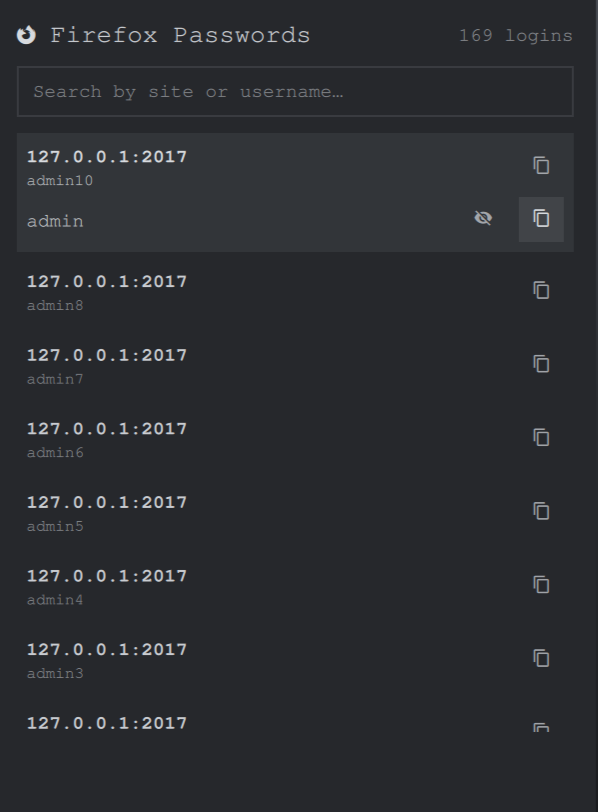
An Omarchy bar widget to search, view, and copy your Firefox saved logins — right from the bar.
Uses firefox_decrypt to decrypt logins.json / key4.db locally. Nothing is written to disk; decrypted entries live in memory only and are wiped when the popup closes.
Requirements
- Omarchy
- Firefox (native package, profiles at
~/.mozilla/firefoxor~/.config/mozilla/firefox) nss≥ 3.113 (omarchy pkg add nss— needed for Firefox 144+)wl-clipboard(wl-copy)python3
Getting Started
Install the plugin:
omarchy plugin add https://github.com/chupre/omarchy-firefox-passwords.git --enable
# or for local development:
./install.sh
The icon appears in the right section of the bar. Click it, pick a profile (the Firefox default is pre-selected and sorted first), leave the Primary password empty unless you set one in Firefox → Settings → Privacy & Security → Primary Password, then click Unlock.
Remove it:
omarchy plugin remove chupre.firefox-passwords
Usage
- Unlock — explicit button; shows profile picker when you have more than one profile, plus a Primary Password field (leave empty if none set). Wrong password shows “Primary password is not correct.” and lets you retry. Exit code 12 means the profile’s key database couldn’t be opened — try the other profile.
- Search — type to filter by site or username (all terms must match).
- Copy —
↵copies password,ctrl+↵copies username; or use the buttons. Usernames are copied from the row header; passwords are copied from the expanded row. Copies usewl-copyand are not auto-cleared. - Reveal — expand a row (
tabor click), then eye button / to show the password (auto-hides after 15s, configurable viarevealTimeoutSecinBarWidget.qml). - Profiles — default profile is first and marked
(default). ChangeprofilesDirinBarWidget.qmlif yourprofiles.inilives elsewhere.
Decrypted data is never written to disk and is cleared on close (Esc → collapse → clear filter → close).
Configuration
Edit BarWidget.qml at the top:
property string profilesDir: ""      // "" = auto-detect
property int revealTimeoutSec: 15    // 0 = stay revealed
property int clipboardClearSec: 30   // 0 = never clear clipboard
Security notes
- Secrets never touch
argvor a shell: the Primary Password is piped tofirefox_decryptover stdin, and copied secrets are piped towl-copy --sensitiveover stdin (EOF-terminated, forked daemon). - Copied passwords carry the
--sensitiveclipboard hint and are wiped afterclipboardClearSec(default 30s) — but only if the clipboard still holds exactly what the plugin copied, so your own later copies are never clobbered. Set0to disable. The ownership probe is bounded at the producer (wl-paste | head -c len+1— the pipe is cut at exactly the secret's length, so an oversized owner SIGPIPEs and the shell sees at mostlen+1bytes), time-limited (3s), and fails closed: timeout, overflow, or mismatch all skip the clear and drop every buffer. - Producer-side output cap: the vendored
firefox_decrypt.py(see theomarchy-firefox-passwords patchmarkers) serializes the JSON payload in the short-lived python process and refuses (exit 40) to write anything to stdout beyond 20 MiB — the long-lived shell can never receive an unbounded stream. Consumer-side layers stay as backstops: 20 MiB stdout check, 5000-entry cap (newest kept), 30s decrypt deadline. - stderr is parsed as a stream (
SplitParser), never accumulated: only the first diagnostic line is kept and a flood past 256 KiB kills the process. - Decrypted entries live in memory only, wiped on close.
- Nothing is ever written to disk.
Vendored-script maintenance: when updating
firefox_decrypt.pyupstream, re-apply the marked patch (search foromarchy-firefox-passwords patch).
Development
./install.sh --no-restart   # symlink for live QML edits
make validate               # qmllint + omarchy plugin validate
omarchy-shell chupre.firefox-passwords toggle  # via bar, or click the icon
journalctl --user -f | grep firefox-passwords
How it works
- Profiles are listed with
firefox_decrypt.py -l <profilesDir> - The default is read from
profiles.ini([Install*] Default=or[Profile] Default=1) - Decryption runs as
python3 firefox_decrypt.py -n -f json --non-fatal-decryption -c N <dir>with the Primary Password fed over stdin only (never argv/env)
License
GPL-3.0-or-later. firefox_decrypt.py is © its authors under the same license (see LICENSE). Other plugin code is © Denis.
firefox_decrypt is based on work from unode/firefox_decrypt.