
Batteries
Every battery on the bar, for laptops that carry more than one pack.

Omarchy's built-in power widget reads UPower.displayDevice — the aggregate
of every pack — and its manifest sets allowMultiple: false, so a second
instance cannot be added and no instance can be pointed at a specific battery.
On a ThinkPad with Power Bridge that means a single number covering two cells
that are frequently nowhere near each other: the internal one can sit at 5%
while the bay battery is at 67%, and the bar just says 44%.
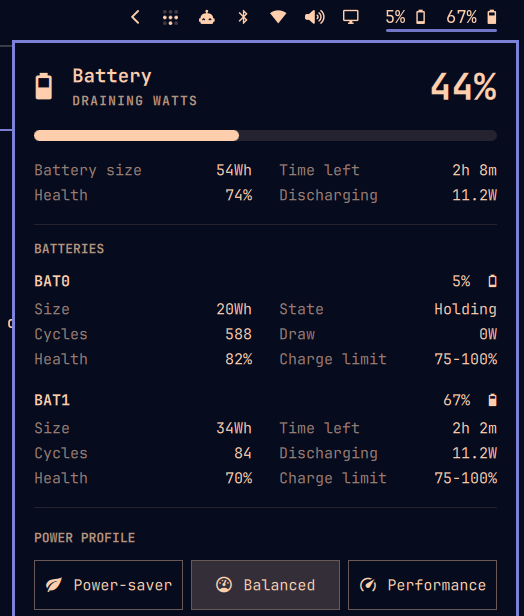
This plugin replaces that widget. It keeps everything the original does — the aggregate hero, the progress bar, the power profile picker, the keybinding — and adds a readout and a stat block for each physical pack.
What it shows
On the bar, one entry per pack, in sysfs order:
5% 67%
In the panel, the aggregate summary on top, then per pack:
| Field | Source |
|---|---|
| Level and icon | UPower, per device |
| Size | energyCapacity (energy-full) |
| Cycles | sysfs cycle_count |
| Health | energy-full ÷ energy-full-design |
| Time left / Time to full | UPower timeToEmpty / timeToFull |
| Draw | changeRate |
| Charge limit | sysfs charge_control_*_threshold |
Live values come from UPower and update reactively. Cycle count, design
capacity and charge thresholds are not in Quickshell's UPowerDevice API, so a
small bundled helper (battery-packs) reads them from sysfs, refreshed on the
same 5-second tick the panel already uses while open.
The charge limit column reflects whatever wrote the thresholds — TLP, a vendor
tool, or the firmware — without shelling out to tlp-stat.
Requirements
- Omarchy 4.0+ (the Quickshell shell — this does not apply to the Waybar era)
- One or more batteries. With a single pack it behaves exactly like the built-in widget, so it is safe on any laptop.
Install
omarchy plugin add https://github.com/cinco/omarchy-batteries.git --enable
omarchy restart shell
That is the whole install. The manifest declares
omarchy.clonedFrom: "omarchy.power", so enabling this plugin takes the
built-in widget's slot in the bar and disables it — no manual swap, and any
showPercentage you had set carries over. The two are mutually exclusive by
design; you cannot end up with both on the bar by following this.
To place it somewhere else:
omarchy bar move cinco.batteries --section right
Configuration
The bar entry in ~/.config/omarchy/shell.json:
{ "id": "cinco.batteries", "showPercentage": true }
showPercentage—trueshows5% 67% ,falseshows icons only. Right-click the widget to toggle it; the choice is written back toshell.json.
Compatibility with the built-in widget
The same clonedFrom declaration makes Omarchy's resolveEnabledId route
calls aimed at the built-in widget here. Everything that addressed the power
panel keeps working:
SUPER + CTRL + P—omarchy-shell shell toggle omarchy.power- The menu's Battery Percentage item —
omarchy-shell omarchy.power togglePercentage
The plugin also answers on its own target:
omarchy-shell cinco.batteries toggle
omarchy-shell cinco.batteries togglePercentage
Uninstall
omarchy plugin remove cinco.batteries
omarchy restart shell
Removal restores omarchy.power to its slot on its own, for the same reason
installing displaced it.
Notes
Vertical bars fall back to the aggregate icon — two readouts do not fit a 28px column.
A pack moving no current is reported as idle regardless of the state it
advertises. On a Power Bridge machine only one pack charges or drains at a
time, and the idle one sits in pending-charge; without that handling the
panel would promise a "time to full" for a battery doing nothing.
Credits
Panel.qml and Model.js are derived from the omarchy.power plugin in
Omarchy by Basecamp, MIT licensed.
Because they are a fork, upstream improvements to the power panel do not arrive
automatically — open an issue if you spot the drift.
MIT. See LICENSE.