
CI Status
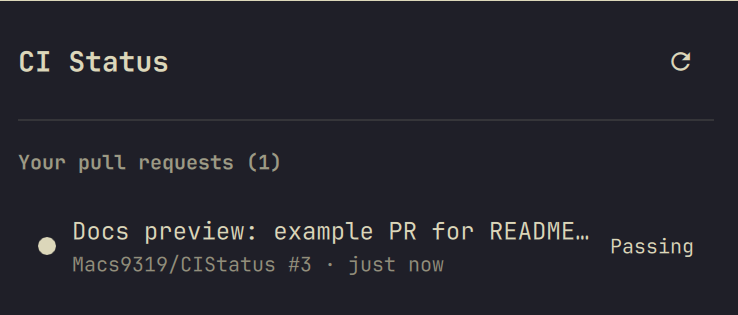
A CI/build-status plugin for the Omarchy shell bar. Shows a single gear icon with a small count badge for your own open pull requests whose latest commit has failing checks; click it to open a popup listing every open PR you authored along with its check-suite state, each linking straight out to the PR's checks tab on GitHub.
It's the build-side companion to ReviewQueue: that plugin tracks PRs waiting on your review, this one tracks PRs waiting on a green build.
Requirements
The gh CLI must be installed and authenticated
(gh auth status). All queries run as the logged-in user — no config needed.
Install
Option 1 — omarchy plugin add (recommended):
omarchy plugin add https://github.com/Macs9319/CIStatus.git --enable
You'll be prompted to pick a bar section (left/center/right) for the icon.
Option 2 — manual clone:
git clone https://github.com/Macs9319/CIStatus.git ~/.config/omarchy/plugins/cistatus
omarchy plugin enable cistatus right
Either way, the shell picks up the plugin without a restart — edits under
~/.config/omarchy/plugins/ hot-reload automatically.
Usage
Click the bar icon to open the popup. It lists every open PR you've authored, sorted so the ones needing attention rise to the top: failing builds first, then running builds, then PRs with no checks configured, then passing builds. Each row shows a colored status dot and a state label (Failing / Running / Passing / No checks).
Click any row to open that PR's checks tab on github.com. Click the refresh icon in the popup header to poll immediately.
If GitHub can't be reached (auth expired, no network, rate limited), the popup shows an error instead of silently reporting zero PRs.
Configuration
Settings live on the plugin's bar entry in ~/.config/omarchy/shell.json
(hot-reloads on save). Defaults:
| Setting | Default | Meaning |
|---|---|---|
refreshMinutes |
5 |
How often to poll GitHub (minimum 2) |
Example entry:
{ "id": "cistatus", "refreshMinutes": 10 }
Uninstall
omarchy plugin remove cistatus
License
MIT — see LICENSE.