
Wallarchy
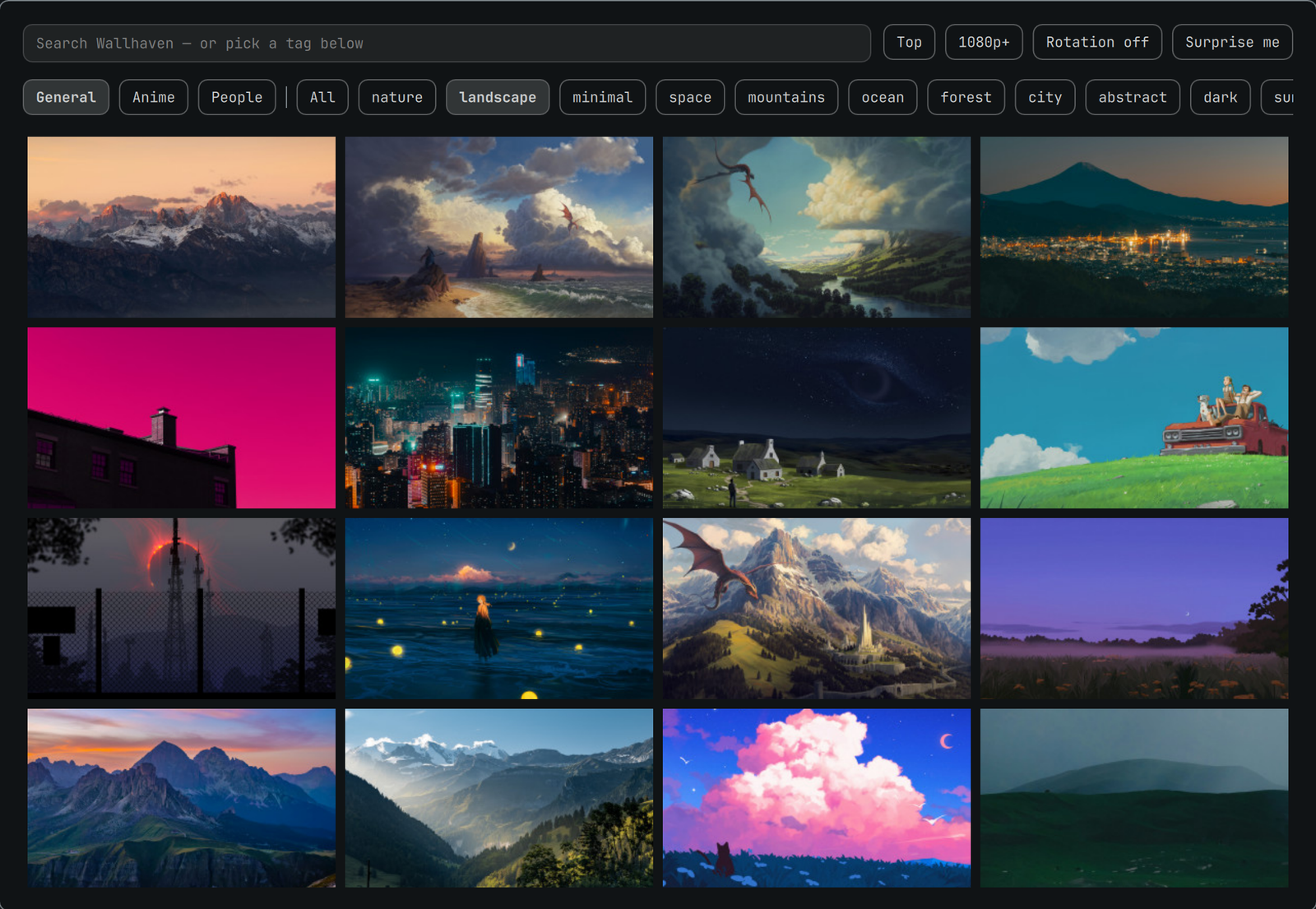
Wallhaven wallpapers for Omarchy. Browse by category or tag, click a wallpaper to set it as your background, and let it rotate on a timer.
No account, no API key, no signup — Wallhaven's search API serves SFW results to anonymous callers.
Install
omarchy plugin add https://github.com/perminder-klair/wallarchy.git --enable --yes
Removal
omarchy plugin remove co.klair.wallarchy --yes
That takes the widget out of the bar and deletes the plugin directory. Removal leaves your files alone by design, so delete anything you no longer want:
rm -f ~/.config/omarchy/wallarchy.json ~/.config/omarchy/wallarchy.key
rm -rf ~/.local/state/wallarchy
rm -f ~/.config/omarchy/backgrounds/*/wallhaven-*        # downloaded wallpapers
If a downloaded wallpaper is the one currently applied, pick another with
omarchy theme bg next before deleting it.
Using it
| Action | Where |
|---|---|
| Browse, search, filter | Left click the bar icon |
| Apply a random wallpaper matching the filters | Middle click, or "Surprise me" |
| Toggle rotation on/off | Right click |
| Narrow by category | General / Anime / People toggles |
| Narrow by subject | Tag chips, or type anything into the search box |
| Sort, minimum size, rotation interval | The buttons beside the search box |
Bind the overlay to a key in ~/.config/hypr/bindings.lua:
o.bind("SUPER SHIFT", "W", "omarchy-shell shell toggle co.klair.wallarchy '{}'")
How it fits Omarchy
Wallpapers are not rendered by this plugin. Images are downloaded into the
current theme's user background folder —
~/.config/omarchy/backgrounds/<theme>/ — and applied with
omarchy theme bg set. That means they join the native per-theme pool, so
omarchy theme bg next and the stock background switcher cycle them too.
Only the newest keepLast downloads are kept. Pruning only ever touches files
named wallhaven-*, so theme wallpapers and anything you added by hand are
left alone. Each download gets a <file>.source.json sidecar pointing back at
its Wallhaven page.
Configuration
One file, ~/.config/omarchy/wallarchy.json, shared by the bar widget, the
overlay, and the rotation service:
| Key | Meaning |
|---|---|
query |
Tag or free-text search. Empty means "everything" |
categories |
Three-character bitfield: general, anime, people. 100 is general only |
purity |
Three-character bitfield: sfw, sketchy, nsfw. 100 is SFW only |
sorting |
toplist, date_added, views, or favorites |
topRange |
Window for toplist: 1d, 3d, 1w, 1M, 3M, 6M, 1y |
atleast |
Minimum resolution, e.g. 1920x1080. Empty means any |
ratios |
Aspect ratio filter, e.g. 16x9. Empty means any |
rotateMinutes |
0 disables rotation; otherwise minutes between changes |
downloadDir |
Override the download folder. Empty means the current theme's |
keepLast |
How many downloads to keep |
Edit it in the overlay, or from the CLI:
wallarchy config show
wallarchy config set query mountains
wallarchy config set rotateMinutes 60
wallarchy config set categories 110   # general + anime
Everything else the plugin does is available from the same CLI —
wallarchy help lists it.
Sketchy and NSFW results
purity is config-only, deliberately — it is not a button you can hit by
accident. 110 adds Wallhaven's "sketchy" tier. The nsfw bit additionally
requires an API key from your Wallhaven account settings:
wallarchy key set <api-key>
The key is written to ~/.config/omarchy/wallarchy.key with mode 0600 and is
handed to curl over stdin, so it never appears in shell.json or in ps.
Development
The plugin is three QML surfaces over one bash CLI. All network and JSON work
lives in wallarchy; the QML only ever sees the normalized
{id, thumb, preview, full, color, label, link, ext} shape it prints, which is
why swapping the image source is a single-file change.
The overlay sets keepLoaded: true, so its window survives between summons —
omarchy-shell shell rescanPlugins will not pick up edits to Browser.qml.
Use omarchy restart shell after changing it.
What it touches
Wallarchy never edits Omarchy's own configuration. It writes only:
| Path | When |
|---|---|
~/.config/omarchy/wallarchy.json |
Its own settings, on any filter change |
~/.config/omarchy/wallarchy.key |
Only if you set an API key (mode 0600) |
~/.local/state/wallarchy/ |
Which wallpaper is applied, and rotation timing |
~/.config/omarchy/backgrounds/<theme>/wallhaven-* |
Downloaded wallpapers |
Setting a background calls omarchy theme bg set, the stock command. Pruning
is limited to files matching wallhaven-* in the download folder, and skips
the wallpaper currently in use.
The bar-widget entry in shell.json is added and removed by Omarchy's own
omarchy plugin enable / disable, not by this plugin.
Requirements
curl, jq, and file — all present on a stock Omarchy install.
External services
Images and metadata come from Wallhaven via its public
API at wallhaven.cc/api/v1. Requests are anonymous unless you set an API key.
Thumbnails are loaded directly from Wallhaven's CDN; full images are downloaded
only when you apply one. No other network calls are made, and nothing is sent
anywhere about you.
License
MIT — see LICENSE.