
NightMan
Fighter of the Day Man
NightMan manages light and dark appearance on Omarchy. It can follow your Omarchy theme, switch with sunrise and sunset, or stay pinned to day or night. Apps that use the standard system preference update automatically.
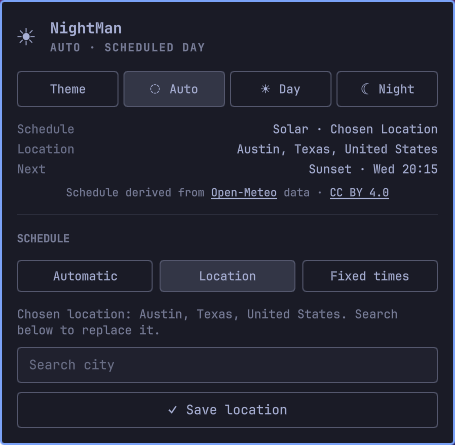
NightMan changes the standard system color preference:
org.gnome.desktop.interface color-scheme
To match Omarchy's native behavior, it also switches gtk-theme between Adwaita and Adwaita-dark. If you use any other GTK theme, NightMan leaves it unchanged. It does not change your Omarchy theme, wallpaper, icons, or Night Light. Everything runs inside the Omarchy shell as a Quattro plugin—there is no systemd service.
Install
omarchy plugin add https://github.com/codefriendly/omarchy-nightman.git --enable
Click the sun/moon icon in the bar to open NightMan.
Requirements
NightMan requires Omarchy with Quattro plugin support, plus curl, gsettings, and omarchy-theme-color. These are normally included with Omarchy.
Remove
omarchy plugin remove codefriendly.nightman
Removing the plugin leaves its settings in ~/.local/state/nightman/ so they are available if you reinstall it. Delete that directory manually if you also want to remove the saved state.
Appearance modes
Your selected mode is saved across shell restarts and theme changes.
- Theme matches the light or dark mode of your current Omarchy theme.
- Auto follows your saved schedule.
- Day uses light mode.
- Night uses dark mode.
Day and Night are permanent by default. You can instead keep either one active only until the next scheduled transition. Temporary choices survive shell restarts.
NightMan watches color-scheme for external changes. Auto, Day, and Night enforce their selected appearance; Theme leaves later changes alone.
Schedule
Automatic
Uses sunrise and sunset for your current location. NightMan first checks Omarchy Weather and saved locations, then falls back to an approximate IP location when needed.
IP location can be inaccurate when using a VPN. Choose a city in Omarchy Weather or NightMan for more predictable results.
Location
Search for a city and save it. NightMan remembers the location if you switch to another schedule.
Fixed times
Set day and night start times in 24-hour HH:MM format. These times are also used when solar data is unavailable. The defaults are 07:00 and 19:00.
Privacy and stored data
Automatic IP location contacts IPWhois.io only when Omarchy Weather and saved locations have no usable location. Solar times and city search use Open-Meteo. Searches are sent after you enter at least two characters, and approximate coordinates are sent to Open-Meteo when IP location is used.
Settings, cached locations and schedules, and temporary overrides are stored in:
~/.local/state/nightman/
NightMan is MIT-licensed, but third-party data and hosted services have their own terms. See Third-party notices. Open-Meteo's free hosted API is limited to non-commercial use; commercial users should review its current terms and plans, or modify NightMan to use a compatible self-hosted service.
Command line
omarchy-shell codefriendly.nightman status
omarchy-shell codefriendly.nightman modeFollowTheme
omarchy-shell codefriendly.nightman modeAuto
omarchy-shell codefriendly.nightman modeDay
omarchy-shell codefriendly.nightman modeNight
The four mode commands select persistent modes. status returns the current mode, preference, schedule, next transition, location source, and most recent error as JSON.
Temporary Auto-mode controls are also available:
omarchy-shell codefriendly.nightman toggle
omarchy-shell codefriendly.nightman light
omarchy-shell codefriendly.nightman dark
omarchy-shell codefriendly.nightman auto
light, dark, and toggle last until the next scheduled transition. auto clears the temporary choice and returns to the schedule. These commands work only while Auto is active.
Development
omarchy plugin validate .
node tests/nightman.test.js
qmllint BarWidget.qml Panel.qml Service.qml