
BW Vault
A Bitwarden vault in the Omarchy bar, powered by the official bw CLI. Click the padlock, type a few letters, press enter — the password is on your clipboard and you never left the window you're pasting into.
Rewritten in Quickshell/QML from the bw-tui Bubble Tea TUI.
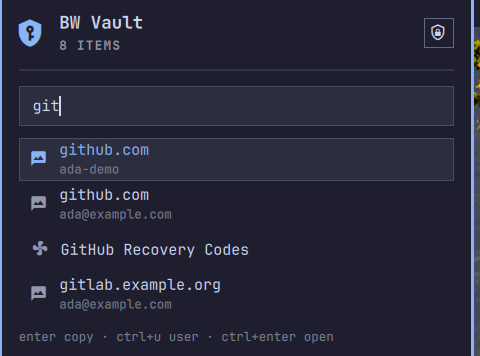
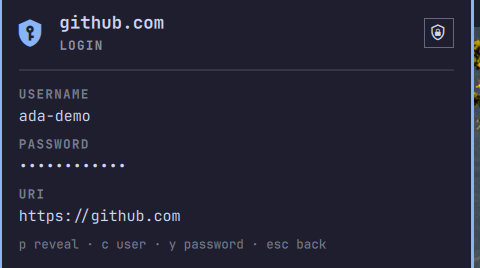
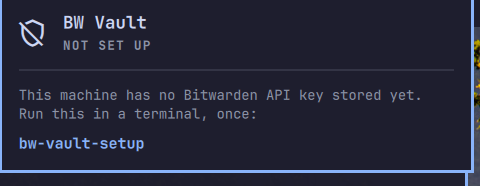
Screenshots are of the fixture vault in test/, not a real one — see Development.
How it's put together
bw is a Node program and a cold start costs about four seconds. That number shapes everything here.
The session, the item list and every bw child live in a service the shell mounts once and keeps. The dropdown is a view onto it. Opening the dropdown against a warm list costs nothing measurable — filtering 215 items lands well under a tenth of a second, because no bw runs at all. Only the password itself is fetched on demand, because only the password is worth never caching.
What that caching does and does not cover is spelled out in Security notes. The short version: item metadata now outlives the panel, and passwords never do.
Features
- Bar dropdown — lock state at a glance; click for a search box over your vault. Enter copies the password.
ctrl+ucopies the username with nobwcall at all, because the username is already in the cached list. - Item detail —
ctrl+enteropens the selected item: username, password (hidden until you pressp), URI, notes. The only screen that ever draws a secret. - Master-password unlock — in the dropdown. The password travels through the child process environment (
bw --passwordenv), never argv, and its environment is cleared when the child exits. - API key authentication — authenticates with your personal API key (
bw login --apikey), which needs no interactive 2FA and skips new-device verification. Stored once per machine bybw-vault-setup; see Setup. - Session persistence — the session key is mirrored to the OS keyring (Secret Service via
secret-tool), so the master password is asked for once per machine and survives a shell restart. - Idle cache expiry — the cached list is forgotten after
cacheTtlMinutesof no vault activity (15 by default). The session is untouched, so recovering costs onebw listand no master password. - Clipboard auto-wipe — a copied value is wiped about 20 seconds later, but only if the clipboard still holds it.
- Native Omarchy theming — built on
Panel,KeyboardPanel,TextFieldandColor.*tokens, so it matches your theme.
Scope
Read and copy only. It does not create, edit or delete items, and it does not cover attachments, organizations/collections, or multiple accounts. Use the official apps for those.
Install
omarchy plugin add https://github.com/alkevintan/bw-vault.git --enable
--enable puts the padlock in your bar and asks which section. Without it, run omarchy plugin enable com.aktivesolutions.bw-vault --section right afterwards.
If the plugin already has a
plugins[]entry inshell.jsonfrom an earlier version,omarchy plugin enable --section rightwill report "Enabled and moved" and change nothing. Remove that entry first; thebar.layoutentry keeps the service enabled on its own.
Setup
Once per machine, store your Bitwarden personal API key:
~/.config/omarchy/plugins/com.aktivesolutions.bw-vault/bin/bw-vault-setup
It prompts for client_id and client_secret (get them from the web vault: Account Settings → Security → Keys → View API Key) and writes them to your OS keyring. The secret is read with terminal echo off and piped to secret-tool on stdin, so it never appears on screen, in scrollback, or in the process list.
--show reports whether a key is stored without printing the secret; --clear removes it.
Why a terminal command and not a screen in the plugin. You copy the two values out of a browser one at a time, and an Omarchy bar dropdown dismisses on any click outside it — the trip back to the browser for the second value would close the form and lose the first. Version 1.x solved this with a floating overlay card that deliberately did not grab the keyboard. Dropping the overlay meant dropping that trick, so the key entry moved somewhere that has never had the problem.
If bw is already logged in by some other means, you can skip this entirely: the dropdown will ask for your master password and unlock against the existing login.
Usage
Bind the dropdown in ~/.config/hypr/bindings.lua:
o.bind("SUPER + B", "Bitwarden vault", "omarchy-shell bw-vault-bar toggle")
Or click the shield in the bar. Right-clicking it locks the vault.
Locking is worth its own binding too — ctrl+l inside the dropdown only reaches you while the dropdown is open:
o.bind("SUPER + ALT + B", "Lock vault", "omarchy-shell com.aktivesolutions.bw-vault lock")
It can also be opened with the search line already filled in — useful from a script, or a per-site keybinding:
omarchy-shell bw-vault-bar search github
search only filters metadata that is already in the shell process. Nothing in the IPC surface reads, fetches or copies a secret: a password always costs a keystroke on a panel someone is looking at.
Keys
Search list
| Key | Action |
|---|---|
type |
Filter items |
↑ ↓ |
Move through results |
enter |
Copy the password (one bw get, about four seconds — the panel says it's fetching) |
ctrl+u |
Copy the username (instant; already in the cached list) |
ctrl+enter |
Open item detail |
ctrl+l |
Lock the vault |
esc |
Close |
Clicking a row copies its password; right-clicking a row opens its detail.
Item detail
| Key | Action |
|---|---|
p |
Reveal / hide the password |
c |
Copy the username |
y |
Copy the password |
ctrl+l |
Lock the vault |
esc / ← |
Back to the list |
Unlock
Type your master password and press enter.
Settings
Set these through Omarchy's bar widget settings, or directly on the widget's shell.json entry.
| Setting | Default | What |
|---|---|---|
maxResults |
8 |
Rows shown in the dropdown |
cacheTtlMinutes |
15 |
Forget the cached item list after this many idle minutes. 0 keeps it until you lock |
lockOnRightClick |
true |
Right-clicking the bar icon locks the vault |
showCount |
false |
Show the item count next to the bar icon |
Upgrading from 1.x
Version 2.0 removes the fullscreen overlay. Two things change for you:
- Your keybinding.
omarchy-shell shell toggle com.aktivesolutions.bw-vaultno longer resolves to anything. Useomarchy-shell bw-vault-bar toggle. - First-run API key entry moved from the overlay's floating card to
bw-vault-setup. A key already in your keyring is picked up as-is; nothing to redo.
Item metadata is now cached between opens where 1.x dropped it on every close — see Security notes if that matters to you.
Requirements
- Omarchy 4 (Quattro)
bw— the Bitwarden CLIlibsecret(secret-tool) — OS keyring accesswl-clipboard(wl-copy,wl-paste) — clipboard
All three are usually already present on Omarchy. If one is missing, add it with your usual package tooling — the plugin never installs anything itself, and never invokes a package manager.
Troubleshooting
bw: command not found→ install the Bitwarden CLI.secret-tool: command not found→ installlibsecret.- The padlock isn't in the bar →
omarchy plugin list, and see the note under Install. - The dropdown says "Not set up" → run
bw-vault-setup. - Everything feels slow → that's
bw. CheckcacheTtlMinuteshasn't been set to something tiny; each expiry costs one four-secondbw list.
Remove
omarchy plugin disable com.aktivesolutions.bw-vault
omarchy plugin remove com.aktivesolutions.bw-vault
~/.config/omarchy/plugins/com.aktivesolutions.bw-vault/bin/bw-vault-setup --clear   # before removing, if you want the keyring entries gone
Security notes
- The client_id and client_secret are stored in your OS keyring via
secret-tool, never in a plaintext file, and are passed tobw login --apikeythrough the child process environment rather than argv. The master password only ever lives in a child's environment (BW_VAULT_MASTER_PASSWORD). - Credentials handed to
bw login/bw unlockhave that environment cleared when the child exits, on both the success and failure paths. Before 2.0 the master password stayed set on the Process until the next unlock overwrote it. - Item metadata is cached between opens, and that is a real change from 1.x.
parseList()strips passwords out ofbw listoutput before anything reaches a property, so what the service holds is names, usernames, ids and URIs — a map of your vault, not its contents. It lives in the always-loaded shell process until you lock, or untilcacheTtlMinutesof idleness passes. If you would rather have the old behaviour at the cost of a four-second wait per open, setcacheTtlMinutesto 1; the session is unaffected either way. - Item passwords are fetched on demand (
bw get item <id>). The password is handed to the widget through a signal and is never assigned to a property on the shared service. The widget holds it only while the detail screen is showing it, and drops it on the way back to the list. - The detail screen is the only place a secret is drawn, and it is masked until you press
p. A bar dropdown sits in the open — that is worth remembering before revealing one in a meeting. - A
bw liststarted before a lock cannot repopulate the cache after it: in-flight children carry the generation they started in and drop their results if it has moved. - The session key is stored in the OS keyring. If that fails, it is held in memory only and lost on shell restart.
- This plugin runs unsandboxed in your shell process, like all Omarchy plugins. It has access to your session and can run arbitrary commands. Review the source before trusting it.
Development
omarchy plugin validate .
omarchy restart shell
manifest.json        # plugin manifest (id: com.aktivesolutions.bw-vault)
Service.qml          # session, item metadata, every bw child. Mounted once by the shell
BarWidget.qml        # bar icon + dropdown: unlock, search, copy, detail
VaultModel.js        # bw CLI command building + JSON parsing (pure JS)
bin/bw-vault-setup   # one-time API key storage, from a terminal
test/demo            # run the dropdown against a fixture vault, in its own shell
test/demo-vault.json # the fixture vault
test/fixtures/       # stub `bw` and `secret-tool`
Running it without a real vault
test/demo              # starts locked, on the first-run screen
test/demo --unlocked   # starts with the fixture vault open
This launches a second Quickshell instance with its own minimal bar, so the running Omarchy shell is untouched. PATH is prefixed with test/fixtures, whose bw and secret-tool stubs answer from test/demo-vault.json and a temp directory — secret-tool is stubbed as well as bw, because otherwise a fixture unlock would write its fake session over your real one in the keyring. No real vault, keyring or network is involved.
Drive it over its own IPC socket rather than by typing into it:
qs ipc -p <config-dir-printed-at-startup> call bw-vault-bar search git
BW_DEMO_SCRIPT=detail:github test/demo --unlocked   # open straight onto an item
The screenshots in this README were taken that way.
Live state, with no secrets in it:
omarchy-shell com.aktivesolutions.bw-vault state   # the service
omarchy-shell bw-vault-bar status                  # the dropdown
Three Omarchy quirks that will cost you an hour if you meet them cold:
- A new
.qmlfile in a plugin directory fails to load withFile name case mismatchuntil the shell restarts — the QML engine caches the directory listing at startup. Hot-reload only covers files that already existed. - A new
ipcTargetalso needs a shell restart to register, and after a hot-reload the stale instance keeps the old target: you getHandler was registered but will not be used, and IPC calls land on a widget that is no longer on screen. omarchy plugin enable --section rightsilently does nothing if the plugin already has aplugins[]entry inshell.json.
After editing, omarchy restart shell rather than trusting hot-reload.
License
MIT — see LICENSE.