
Omacom — Intercom over LAN / Tailscale for Omarchy
Push-to-talk intercom for Omarchy Quattro. A bar widget + local daemon that streams audio across your LAN, or across the internet over Tailscale — hold to talk, release to listen. No cloud, no accounts.
Like all Omarchy plugins, it runs unsandboxed — review the source before trusting it.
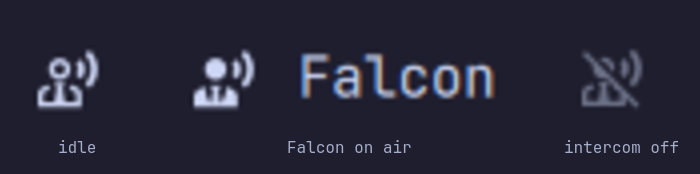
The bar icon carries the state, and shows the call-sign of whoever is talking:
What it is
- Bar widget — status: peer count on
:53318, talking, availability, plus the on-air call-sign (a×Ncounter when several talk at once). Clicking opens the panel (roster + call-sign editor); push-to-talk itself is keybind-only, because Omarchy's bar can't distinguish a click from a hold. - Service — owns the
omacom-enginedaemon lifecycle. The daemon does the audio/UDP work; QML only reflects state and forwards PTT so no secrets sit in the shell process. - Local daemon (
cmd/omacom-engine) — Go binary you build from the checkout's source, stdlib only. Discovery and audio over UDP53318; a unix socket at$XDG_RUNTIME_DIR/omacom.sockbetween daemon and shell. No TCP listener at all. Audio is raw s16le@48k mono, one 20ms frame per packet — not Opus, despite the port neighbourhood; compression is a follow-up.
Scope (0.2.0): PTT intercom for machines you already trust each other. Hold-to-talk over raw s16le@48k, one 20ms frame per UDP packet (PipeWire pw-cat/parec/arecord capture → UDP → pw-cat/paplay playback). LAN discovery is UDP broadcast; over the internet it runs on Tailscale, which supplies the encryption, the peer identity and the NAT traversal — see Over the internet. No global relay, no history, and no application-layer encryption of its own.
Requirements
- Omarchy Quattro (Quickshell)
pipewire/wireplumber(already on Omarchy) —pw-catdoes capture and playbacksocatornetcatfor the shell↔daemon socket (Omarchy shipssocat)tailscale, only if you want to use it over the internet- Go 1.22+ only if you want to build the daemon locally (recommended — see below)
Install dependencies manually so you can audit what's installed:
# Arch / Omarchy — audio + build tool
pacman -S pipewire wireplumber socat go
# over the internet, additionally:
pacman -S tailscale
The plugin never runs
sudoor installs packages itself. It only invokesomacom-engineif it is already present.
Install
omarchy plugin add https://github.com/alkevintan/omacom.git --enable
# bar widget appears on the right — move if you like
omarchy bar move com.aktivesolutions.omacom --section right
Build the daemon (recommended — auditable from the reviewed commit)
git clone https://github.com/alkevintan/omacom.git
cd omacom
./bin/omacom-setup
bin/omacom-setup builds ./cmd/omacom-engine from the source in this checkout (go build ./cmd/omacom-engine) and downloads nothing, so the running binary is the reviewed commit's code. It needs Go; without it the script stops and explains rather than installing a prebuilt binary. OMACOM_ALLOW_PREBUILT=1 opts in to a pinned, checksum-gated release asset if you prefer not to install Go — off by default because a prebuilt cannot be audited from the tree.
Without building
The bar widget and service load without the daemon — they show "daemon not running" and PTT is a no-op. This is intentional for omarchy plugin validate and for judges to see the UI without audio hardware.
Usage
- Hold ALT + SPACE to talk — release to listen. Or SUPER + SHIFT + I to toggle with a single press.
- SUPER + ALT + I toggles availability — turns the intercom off (dimmed, no broadcast, no audio) and back on. The switch in the panel does the same, mouse or keyboard (
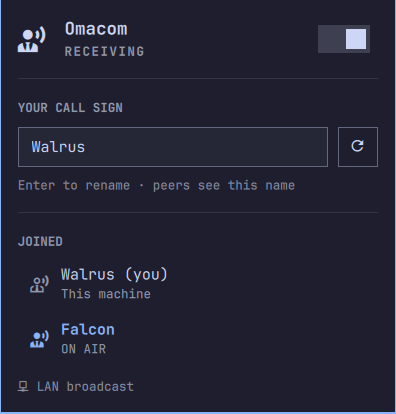
awhile the panel is open). - SUPER + CTRL + M opens the Omacom panel — your call-sign, and everyone joined on the intercom with on-air stations highlighted.
Escapeor a click outside dismisses it; clicking the bar icon toggles it too. Inside the panel,cjumps to the call-sign field andrrolls a new one. - The bar icon is a status indicator (peers / talking / availability). While someone is on air the widget shows their call-sign next to the icon — when several people talk at once it shows a
×Ncounter instead. - From the shell:
omarchy-shell com.aktivesolutions.omacom state
omarchy-shell com.aktivesolutions.omacom startTalking
omarchy-shell com.aktivesolutions.omacom stopTalking
omarchy-shell com.aktivesolutions.omacom toggleTalking      # push-to-talk toggle
omarchy-shell com.aktivesolutions.omacom toggleAvailable     # intercom on/off
omarchy-shell com.aktivesolutions.omacom setCallSign Falcon  # rename this station
omarchy-shell com.aktivesolutions.omacom rerollCallSign      # roll a fresh random word
omarchy-shell shell toggle com.aktivesolutions.omacom        # panel (Omarchy panel convention)
Call-signs
Each machine announces a call-sign so humans, not IP addresses, show up in the bar and roster.
You get one automatically. On first run the daemon rolls a random word — Falcon, Quartz, Zephyr — and remembers it in $XDG_STATE_HOME/omacom/callsign (~/.local/state/omacom/callsign), so the same machine keeps the same handle across restarts. Your hostname never goes on the wire unless you type it in yourself. If another station on the net is already using your rolled word, whoever rolled it re-rolls; a name you chose is never taken away from you.
Change it any time — no restart:
- Open the panel (SUPER + CTRL + M), type into the call-sign field, press Enter. The dice button (or
r) rolls a fresh word. - Or from the shell:
omarchy-shell com.aktivesolutions.omacom setCallSign Falcon.
The new name goes out on the next hello immediately, so peers' rosters update within a second. Names are trimmed to 32 characters, and |, quotes, and control characters are stripped — they'd otherwise forge the packet framing.
Settings → Plugins → Omacom → Call sign override pins a name for this machine regardless of what is persisted. Leave it blank (the default) to let the panel and the auto-assigned word do their thing.
Keybindings
Add to ~/.config/hypr/bindings.lua (Omarchy's Hyprland config):
-- Hold ALT+SPACE to talk (press → start, release → stop) — uses Omarchy's release flag like voxtype's F9 PTT
 o.bind("ALT + SPACE", "Omacom PTT start", "omarchy-shell com.aktivesolutions.omacom startTalking")
 o.bind("ALT + SPACE", "Omacom PTT stop", "omarchy-shell com.aktivesolutions.omacom stopTalking", { release = true })
-- Simple toggle if you prefer press-once (no hold) — works even without release:
 o.bind("SUPER + SHIFT + I", "Omacom toggle talk", "omarchy-shell com.aktivesolutions.omacom toggleTalking")
-- Toggle intercom availability (do-not-disturb, like turning off the intercom)
 o.bind("SUPER + ALT + I", "Omacom availability", "omarchy-shell com.aktivesolutions.omacom toggleAvailable")
-- Panel — your call-sign, and who else is on the intercom
 o.bind("SUPER + CTRL + M", "Omacom panel", "omarchy-shell shell toggle com.aktivesolutions.omacom")
Checked against Omarchy quattro defaults (default/hypr/bindings/*.lua):
| Key | Status |
|---|---|
ALT + SPACE |
Free. SUPER + ALT + SPACE (Apps menu) is a different chord and still works. |
SUPER + SHIFT + I, SUPER + ALT + I |
Free. |
SUPER + CTRL + M |
Free. SUPER + CTRL + <letter> is Omarchy's panel convention (A audio, B bluetooth, D display, W network, P power) — M for "mic" is the slot that fits. |
Raw Hyprland fallback (if you bypass o.bind):
# ~/.config/hypr/hyprland.conf
bind = ALT, SPACE, exec, omarchy-shell com.aktivesolutions.omacom startTalking
bindr = ALT, SPACE, exec, omarchy-shell com.aktivesolutions.omacom stopTalking
bind = SUPER_SHIFT, I, exec, omarchy-shell com.aktivesolutions.omacom toggleTalking
Discovery
Default UDP 53318. A hello goes out every 2s to the LAN broadcast address and to every peer Omacom can address directly; peers expire after 10s of silence. Change the port in Settings → Plugins → Omacom → Discovery / audio UDP port if it collides.
Broadcast finds peers on a LAN and nowhere else — it cannot cross a tunnel. tailscale0 is a point-to-point interface with no broadcast flag, and 255.255.255.255 goes out your default route rather than the tunnel. Reaching a tailnet therefore means unicasting to each peer, which is what the next section is about.
Over the internet
Omacom does not encrypt or authenticate its own packets. Running it across the internet means running it inside something that does, and the supported answer is Tailscale — it already provides exactly the three things this needs: WireGuard encryption end to end, cryptographic node identity, and NAT traversal with a relay fallback when hole punching fails.
Install Tailscale on each machine, join them to the same tailnet, then:
Settings → Plugins → Omacom → Tailscale only.
With that on, Omacom:
- asks the local
tailscalefor its online peers every 30s and sends hellos straight to their100.xaddresses — no configuration, no peer list to maintain; - stops broadcasting on the LAN entirely;
- drops every packet from outside Tailscale's ranges (
100.64.0.0/10,fd7a:115c:a1e0::/48), so a machine on the café wifi cannot reach you at all.
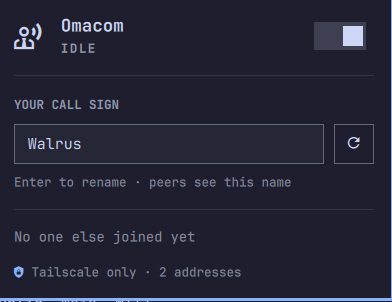
The panel's footer shows which mode is live — LAN broadcast, LAN broadcast + N direct, or Tailscale only · N addresses.
Extra peers takes a comma-separated list of addresses to contact directly (100.71.4.9, mac.tail1234.ts.net, 10.0.0.5:53318). Use it for a host Tailscale cannot see for you — a port-forwarded machine, or a WireGuard mesh that is not Tailscale. Bare addresses get the discovery port.
Tailscale ACLs are worth setting: without them, everyone on your tailnet can hear you. Scope UDP 53318 to the devices that should be on the intercom.
What this does and does not protect
| Someone on the path reading your audio | Protected by Tailscale (WireGuard) |
| Someone on the path injecting audio | Protected by Tailscale |
| A stranger on your LAN, with Tailscale only | Protected — non-tailnet sources are dropped |
| A stranger on your LAN, without Tailscale only | Not protected. Two forged packets — a hello, then audio — reach your speakers |
| Someone already on your tailnet | Not protected. Use ACLs |
| Another member of the intercom spoofing a call-sign | Not protected. Call-signs are self-asserted |
The last two are what per-channel keys and signed identities would fix, and Omacom does not have them yet. Until it does: on a network you do not control, turn Tailscale only on.
What it installs and writes
| Path | Contents |
|---|---|
~/.config/omarchy/plugins/com.aktivesolutions.omacom/ |
QML plugin (via omarchy plugin add) |
$XDG_RUNTIME_DIR/omacom.sock |
Unix socket between service and daemon (0600) |
~/.local/bin/omacom-engine |
Daemon binary (only after you run bin/omacom-setup) |
~/.local/state/omacom/callsign |
This machine's call-sign, so it survives restarts (0600) |
The daemon logs to the shell's own log — journalctl --user -t omarchy-shell | grep omacom-engine shows what it found, dropped, or re-rolled.
Nothing else. No ~/.config/omarchy/shell.json edits beyond the plugin entry, no sudo, no background service unit. Audio never leaves your LAN/Tailscale.
Remove
omarchy plugin disable com.aktivesolutions.omacom
omarchy plugin remove com.aktivesolutions.omacom
# daemon if you built it
rm -f ~/.local/bin/omacom-engine
rm -f "$XDG_RUNTIME_DIR/omacom.sock"
rm -rf ~/.local/state/omacom
Security notes
- Audio is captured from PipeWire while PTT is held and sent as raw PCM UDP to discovered peers on
53318, in the clear. Call-signs ride the same cleartext hellos — pick one you are comfortable putting on that network. - Anyone who can send you a packet can announce themselves as a peer. Omacom will not play audio from an address that has not joined the roster first, and every source is rate-limited (120 packets/sec) with the roster capped at 64 — but that is abuse resistance, not authentication. Turn on Tailscale only for anything beyond a network you control.
- The daemon is a normal user process, not privileged. It never runs
sudo, installs nothing, and downloads nothing. The only file it writes is your call-sign. - No application-layer encryption yet. Per-channel keys and signed identities are the intended next step; today the tunnel is the security boundary.
- Like all Omarchy plugins, this runs unsandboxed with your user permissions. Review
Service.qml,BarWidget.qml, andcmd/omacom-engine/before trusting it.
Development
omarchy plugin validate .                     # check manifest
(cd cmd/omacom-engine && go test ./... && go vet ./...)
omarchy-shell com.aktivesolutions.omacom state
journalctl --user -t omarchy-shell -f | grep omacom-engine   # daemon log
qmllint needs the shell's modules under a directory named qs, since they declare module qs.Commons / qs.Ui:
mkdir -p /tmp/omacom-imports && ln -sfn "$OMARCHY_PATH/shell" /tmp/omacom-imports/qs
qmllint -I /tmp/omacom-imports BarWidget.qml Service.qml
Two daemons on one machine make a usable test net — they find each other through --peers exactly as tailnet peers do:
omacom-engine --socket /tmp/a.sock --port 53401 --peers 127.0.0.1:53402 &
omacom-engine --socket /tmp/b.sock --port 53402 --peers 127.0.0.1:53401 &
printf '{"op":"getPeers"}\n' | socat -t1 - UNIX-CONNECT:/tmp/a.sock
Structure:
manifest.json          # id: com.aktivesolutions.omacom, 0.2.0, bar-widget + service
preview.png            # marketplace card image
docs/                  # README screenshots
BarWidget.qml          # bar icon, call-sign / ×N talker label, peer count, panel
Service.qml            # daemon lifecycle, unix-socket IPC, peer polling
cmd/omacom-engine/     # Go daemon — build from the checkout, no deps beyond stdlib
  main.go              #   discovery, PTT, unix-socket ops
  callsign.go          #   random-word assignment, persistence, clash re-roll
  audio.go             #   capture and per-talker playback sinks
  discovery.go         #   broadcast targets, tailnet peers, address classification
  limits.go            #   per-source rate limiting and roster caps
  *_test.go            #   go test ./cmd/omacom-engine/...
bin/omacom-setup       # build script — go build from source, no download by default
License
MIT — see LICENSE.