
Omarchy Audio Visualizer
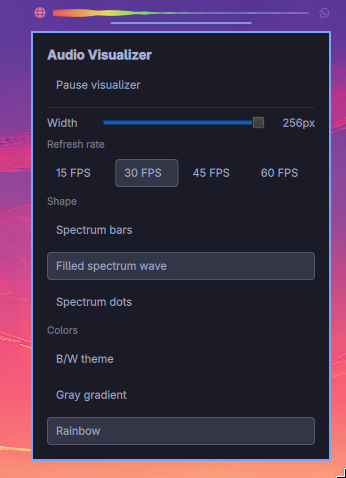
A live, Winamp-style spectrum visualizer for the Omarchy bar.
It captures the current PipeWire/PulseAudio default monitor and renders frequency bands directly with a QML Canvas. Right-click the widget to open an Omarchy-style settings popup.
Features
- Frequency spectrum analyzer, low → high from left to right
- Bar, filled-wave, and dot render styles
- B/W, gray-gradient, and rainbow color modes
- Runtime controls for pause/start, width, refresh rate, style, and colors
- Configurable FPS, gain, source, width, and band count
Requirements
- Omarchy Quattro shell
No manual setup or root privileges are required. The plugin uses the python3, parec, and PipeWire/PulseAudio components already included with Omarchy. It runs inside the normal long-running Omarchy shell process and starts one user-owned parec capture process plus the local audio-visualizer Python helper.
Install
After this repository is public, install with:
omarchy plugin add https://git.cyfrowynomada.com/CyfrowyNomada/audio-visualizer.git --enable
Then place it on the bar if needed:
omarchy bar move com.cyfrowynomada.audio-visualizer --section center
Usage
- Left click: open audio controls (
pavucontrolif available, otherwisewpctl status) - Right click: open visualizer options
The right-click popup lets you change:
- Start/pause
- Width: 64px–256px in 8px steps
- Refresh rate: 15/30/45/60 FPS
- Shape: spectrum bars, filled spectrum wave, spectrum dots
- Colors: B/W theme, gray gradient, rainbow
Configuration
You can also configure it inline in ~/.config/omarchy/shell.json:
{
  "id": "com.cyfrowynomada.audio-visualizer",
  "width": 152,
  "samples": 48,
  "fps": 30,
  "drawMode": "bars",
  "colorStyle": "bw",
  "gain": 12.0,
  "source": "@DEFAULT_MONITOR@",
  "showWhenSilent": true
}
Settings:
| Setting | Default | Description |
|---|---|---|
width |
152 |
Widget width in pixels, clamped to 64–256 |
samples |
72 |
Number of frequency bands/lanes |
fps |
45 |
Analyzer refresh rate; menu offers 15/30/45/60 |
drawMode |
bars |
bars, wave, or dots |
colorStyle |
bw |
bw, gray, or rainbow |
gain |
12.0 |
Spectrum sensitivity |
source |
@DEFAULT_MONITOR@ |
Pulse/PipeWire recording source |
showWhenSilent |
true |
Keep the widget visible during silence |
Remove
omarchy plugin remove com.cyfrowynomada.audio-visualizer
If you manually added a layout entry, remove it from ~/.config/omarchy/shell.json or move another widget into its place.
Development
Validate the manifest and QML from the repository root:
omarchy plugin validate .
qmllint -I "$OMARCHY_PATH/shell" BarWidget.qml
For local testing without publishing:
mkdir -p ~/.config/omarchy/plugins/com.cyfrowynomada.audio-visualizer
cp -a manifest.json BarWidget.qml audio-visualizer README.md LICENSE ~/.config/omarchy/plugins/com.cyfrowynomada.audio-visualizer/
chmod +x ~/.config/omarchy/plugins/com.cyfrowynomada.audio-visualizer/audio-visualizer
omarchy-shell shell rescanPlugins
License
MIT — see LICENSE.