
Chinese Input for Omarchy
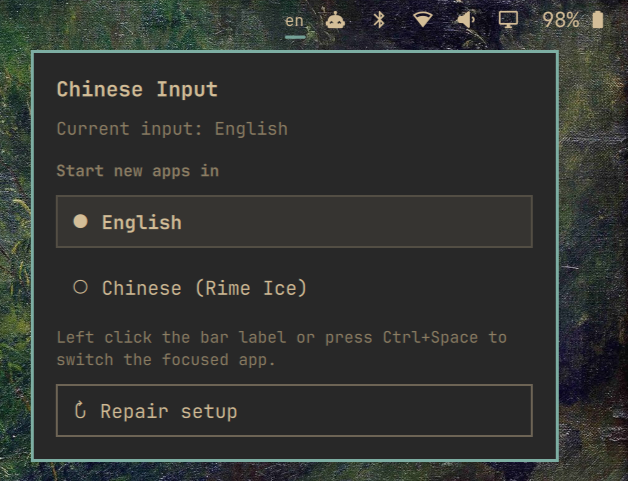
An Omarchy 4 Quattro bar plugin for English and Simplified Chinese input with Fcitx5 and Rime Ice.
The bar shows en or cn. Left click the label—or press Ctrl+Space—to switch the focused app. Right click opens a small panel where you can choose whether new apps start in English or Chinese.
Install
One line install in your terminal:
omarchy plugin add https://github.com/gohlihan/omarchy-cn-input-plugin.git --enable
The widget initially shows --. Right click it and choose Install Chinese input. A terminal opens for the guided setup because installing packages requires confirmation and may request your password.
The setup installs:
fcitx5-rimefrom the Arch repositories, throughomarchy pkg addrime-ice-pinyin-gitfrom the AUR, throughyay
An existing rime-ice-git installation is also supported. Setup then enables only the Rime Ice full-pinyin schema and adds Rime to the current Fcitx5 input-method group.
Fresh installations start new apps in English. Right click the widget to change that preference.
What it changes
The plugin relies on the Fcitx5 service and input-method environment already provided by Omarchy 4. It does not modify /etc/security/pam_env.conf or replace Omarchy's system files.
User configuration changes are deliberately narrow:
~/.config/fcitx5/config: setsBehavior/ActiveByDefault; addsCtrl+Spaceonly when a custom trigger-key section exists and lacks it.~/.local/share/fcitx5/rime/default.custom.yaml: adds therime_iceschema while preserving existing customizations.- The current Fcitx5 group: appends
rimewhile preserving its keyboard/layout entries.
Before editing an existing file, the controller copies it to:
~/.local/state/community.cn-input/backups/
If an existing Rime YAML file uses a form that cannot be amended safely, setup stops and explains what needs manual attention; it does not overwrite the file.
Commands
The panel normally runs these for you. They are also available from the installed plugin directory:
scripts/cn-inputctl status
scripts/cn-inputctl toggle
scripts/cn-inputctl set-mode en
scripts/cn-inputctl set-mode cn
scripts/cn-inputctl set-startup en
scripts/cn-inputctl set-startup cn
scripts/setup
status emits JSON for the widget. The startup choice controls the default state of new input contexts; it does not forcibly change text fields that are already open.
Update and repair
Update through Omarchy:
omarchy plugin update community.cn-input
To repair the Fcitx/Rime setup, right click the widget and choose Repair setup. The operation is idempotent: it does not intentionally duplicate schemas, hotkeys, or group entries.
If the shell ever fails to hot-reload the plugin, run:
omarchy restart shell
Remove
Remove the widget and its plugin files with:
omarchy plugin remove community.cn-input
Removal leaves Fcitx5, Rime Ice, your user configuration, and backups intact. This avoids breaking another input-method setup that uses them. Remove those separately only if you know they are no longer needed.
Development
Validate and test from the repository root:
omarchy plugin validate .
qmllint -I /usr/share/omarchy/shell BarWidget.qml Panel.qml
./tests/cn-inputctl-test.sh
The implementation follows the Omarchy plugin guide, updates the older manual Chinese-input approach for Omarchy 4, and uses the Rime Ice full-pinyin schema.
Reference
雾凇拼音 | 长期维护的简体词库 https://github.com/iDvel/rime-ice
License
MIT