
FN sync for Omarchy
FN sync is a theme-native Omarchy bar widget and management panel for syncing Linux folders with an fnOS NAS. It displays as FN sync, or 飞牛 when the system interface language is Chinese.
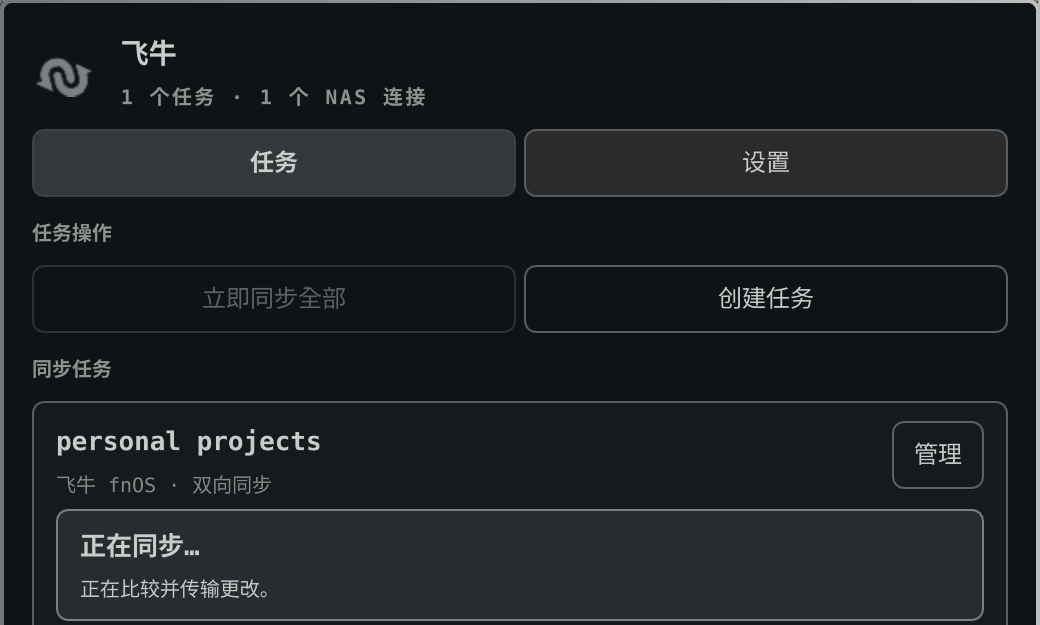
The panel separates reusable NAS authorization from sync-task setup, matching the official client's connection-first model. Use the NAS tab once, then reuse that connection from any number of tasks.
Test and save is one atomic action: login and root-folder access must succeed before a new or edited authorization is written. Sync tasks use native local-folder selection and a browsable NAS folder picker instead of typed paths. Opening a new NAS form also starts a bounded scan of the directly connected private LAN. A responding WebDAV endpoint fills the address automatically; an fnOS host without WebDAV is labeled clearly and can open the management UI. The form still requires a successful login and folder test.
The Omarchy panel contains the complete graphical workflow. The plugin bundles its FN Sync controller, LAN discovery helper, and background service. The two helpers are standalone executables for AMD64 and ARM64, so neither Python nor the separate GTK/GJS client is required. Transfers run out of process through rclone; no WebDAV password is stored in QML or plugin settings.
Installation
Install it like a regular Omarchy plugin:
omarchy plugin add https://github.com/ripple0328/omarchy-fn-sync.git --enable --yes
This is the only FN Sync installation command required on Omarchy. If no supported system rclone exists, the one-time setup card prepares a private copy from the pinned official release under the user's data directory. Its archive is checked against a SHA-256 value shipped with the reviewed plugin source, and no administrator access is needed. The controller and discovery helper include their own Python runtime. The plugin needs no host Python, AUR package, GTK/GJS runtime, administrator prompt, or second terminal command.
Requirements
- Omarchy on x86-64 or ARM64 with a working per-user systemd session.
- An fnOS NAS with WebDAV enabled and an account that can read and write the selected folders. A standards-compliant non-fnOS WebDAV server may work, but fnOS is the supported and tested target.
- Network access from this computer to that WebDAV endpoint. Internet access is needed once only when the plugin must download its pinned private rclone copy.
Secret Service and desktop notifications are optional. Without Secret Service, FN Sync uses rclone's obscured credential format.
Update the Git-managed installation with:
omarchy plugin update community.fnos-sync --yes
The optional fn-sync Arch/AUR package is for non-Omarchy and system-wide
installations. It is not a dependency of this plugin.
Removal
Stop the plugin-owned background service, then remove the plugin:
unit="$HOME/.config/systemd/user/community.fnos-sync.service"
if [ -f "$unit" ] && grep -Fqx '# Managed by community.fnos-sync' "$unit"; then
  systemctl --user disable --now community.fnos-sync.service
  rm -f -- "$unit"
  systemctl --user daemon-reload
fi
omarchy plugin remove community.fnos-sync --yes
Removing the plugin does not delete either synchronized folder. The user's task configuration and logs remain under the normal XDG directories unless the user removes them separately. The private rclone runtime also remains available for a reinstall; a system-installed rclone is never changed or removed.
The plugin uses Omarchy's Color, Style, BorderSurface, KeyboardPanel,
Button, TextField, Dropdown, and Toggle components so it follows the
active theme automatically. Controller-, NAS-, and user-derived strings are
rendered through explicit Text.PlainText surfaces; they are never interpreted
as HTML, Markdown, or remote image resources.
Guided first sync
The official desktop client starts syncing as soon as a task is created. This Linux client adds one read-only safety check because WebDAV cannot reliably identify the newer copy during rclone's first two-way merge. The panel presents that difference as a short guided flow instead of exposing rclone's preview and initialization terminology.
Choose whether the computer or NAS copy should be kept only when the same file differs, run Check first sync, then use the single Start first sync button. Files found on only one side are merged regardless of that choice. The check records its conflict rule, so changing the choice requires a new check. It streams progress and can be stopped without changing files. A successful first sync enables automatic background sync; only then is the real pause/on toggle shown. Raw rclone output remains available as View technical log for troubleshooting, but is not a required review step.
Safety pause and repair
Every initialized two-way task has a small FN_SYNC_ACCESS_TEST marker on both
sides. fn-sync verifies the exact marker before the expensive file scan. If it
is missing or changed, the task pauses immediately and no files are modified.
After confirming that the displayed local and NAS folders are correct, use
Repair safety check and resume. That action recreates only fn-sync's marker,
verifies both copies, and then resumes automatic sync. The client never repairs
the marker silently because doing so could hide an accidentally changed remote
folder. Task logs rotate at 5 MiB and retain one previous file.
Automatic status refresh
Status is refreshed when the widget loads, whenever the panel opens, after an
action finishes, and periodically in the background. The default interval is
30 seconds and can be changed with the plugin's refreshIntervalSec setting.
There is no manual refresh button in the panel.
Security and Linux scope
Passwords are requested only while connecting or reauthorizing a NAS. The client prefers the desktop Secret Service and falls back to rclone's reversible obscured credential format when Secret Service is unavailable. The plugin does not retain a password. Secret Service and desktop notifications are optional integrations rather than installation prerequisites.
fn-sync uses fnOS's documented WebDAV service. It supports multiple tasks, three sync modes, scheduling, filters, previews, conflict copies, deletion guards, and bounded same-subnet discovery on documented/default fnOS ports. FN ID relay, cross-subnet discovery, official token/2FA authorization, and on-demand placeholders depend on private official-client APIs and are not emulated.
Auditing the bundled controller
The exact controller source and build entry point are published under
controller/. Each AMD64 and ARM64 executable is built from
that directory on a native Ubuntu 24.04 GitHub Actions runner using Python 3.13
and PyInstaller 6.22.0. BUILD-PROVENANCE.json binds
the published binary hashes to the main source commit and workflow run, while
GitHub stores a signed SLSA build-provenance attestation for each executable.
Verify the downloaded bytes and attestation with:
sha256sum -c runtime/SHA256SUMS
gh attestation verify runtime/bin/fn-sync-runtime-amd64 --repo ripple0328/fn-sync
Use the ARM64 filename on AArch64 systems. See
controller/README.md for the local build command and
the precise reproducibility boundary.
Development
python3 -m unittest discover -s tests -v
omarchy plugin validate .
The standalone repository runs these checks, ShellCheck and QML parsing on every push. Releases of the main FN sync repository automatically publish this plugin subtree to the standalone repository.
License
MIT. The 飞牛/FN logo remains a trademark of its owner and is used only to identify compatibility with the fnOS service.