
Omarchy Snippets
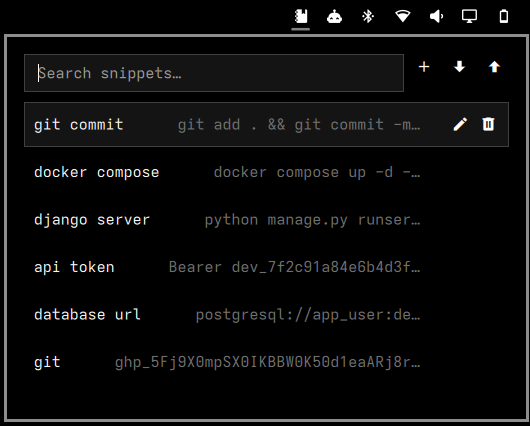
A native Omarchy plugin: save frequently used text and commands locally, and copy them back with one click.
Open → find → one click → copied.
Screenshots
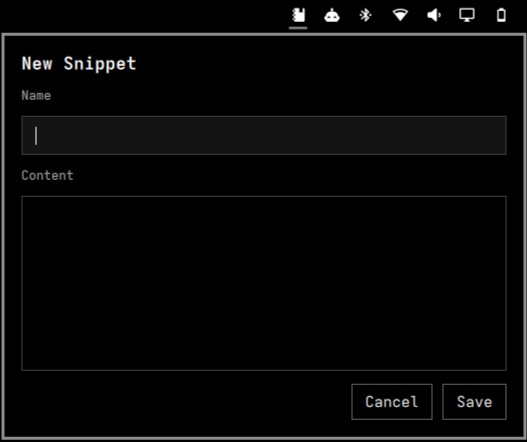
| Search & copy | New snippet |
|---|---|
 |
 |
Features
- Bar icon + anchored popup panel (no separate window)
- Create, edit, delete, search
- One-click copy to the clipboard, exact byte-for-byte content
- Export / import via a versioned local JSON file
- Import conflict resolution: skip, replace, or keep both (deterministic unique naming)
- Local-only storage, no network access anywhere in the plugin
- Snippet store kept at
0600permissions, written atomically
See docs/snippet-manager.md for the full
behavioral spec (data model, storage, import/export format, conflict
semantics, security requirements).
Install
One command, adds the plugin and turns on the bar icon in one step:
omarchy plugin add https://github.com/shoxjaxon-atabayev/omarchy-snippets --enable
That's it — the Snippets icon appears in the bar (right section) immediately, no restart needed.
If you'd rather review the plugin before enabling it, split it into two steps:
omarchy plugin add https://github.com/shoxjaxon-atabayev/omarchy-snippets
omarchy plugin enable community.shoxjaxon.snippets --section right
omarchy plugin addclones the repo into~/.config/omarchy/plugins/community.shoxjaxon.snippets/and validates its manifest. It does not enable it or put anything on the bar.omarchy plugin enable ... --section rightis what actually adds the icon to your bar. Drop--section rightto use whatever section you prefer (left,center, orright).
Plugin id: community.shoxjaxon.snippets — use this id for any later
omarchy plugin disable|remove|update community.shoxjaxon.snippets.
Uninstall
omarchy plugin remove community.shoxjaxon.snippets
This disables the widget and removes the cloned plugin folder. It does not
touch your saved snippets (~/.local/state/omarchy/snippets.json) — delete
that file yourself if you want the data gone too.
Usage
Click the Snippets icon in the bar, or trigger it directly:
omarchy-shell shell toggle community.shoxjaxon.snippets
There is no fuzzy-search launcher entry for this plugin (no public plugin API extends Omarchy's core launcher) -- the bar icon and the IPC command above are the two ways to open it.
Keyboard, once open:
↑/↓to move the selection,Enterto copy the selected snippetF2to edit the selected snippetDeleteto delete the selected snippet (with confirmation)Escto clear the search field, or close the panel if it's already empty
Requirements
- A running Omarchy install with the plugin system (
omarchy plugin ...commands available) jqandwl-clipboard(wl-copy), used by the bundled CLI scriptspython3withPyGObject(thegimodule), used by the bundled file picker (bin/omarchy-snippets-file-select) for Import/Export -- this is already a standard Omarchy desktop dependency, not something to install separately
The Import/Export file picker is bundled with this plugin rather than
relying on Omarchy core's omarchy-file-select, because core's SaveFile
support (needed for Export's "choose a filename" dialog) isn't present on
every Omarchy install. This plugin never depends on that core command.
Storage
Snippets are stored at ~/.local/state/omarchy/snippets.json, matching
Omarchy's existing local-state convention. This plugin never sends snippet
data anywhere over the network.
Development
To work on the plugin itself instead of installing a released copy:
git clone https://github.com/shoxjaxon-atabayev/omarchy-snippets \
  ~/.config/omarchy/plugins/community.shoxjaxon.snippets
omarchy-shell shell rescanPlugins
omarchy plugin enable community.shoxjaxon.snippets --section right
Editing files under ~/.config/omarchy/plugins/community.shoxjaxon.snippets/
is meant to hot-reload automatically. In practice, for a bar-widget kind
plugin like this one, that reload can be unreliable -- the shell log
(~/.cache / $XDG_RUNTIME_DIR/quickshell/by-id/*/log.log) may show
repeated "Local plugin changed, reloading" entries alongside "Handler was
registered but will not be used" warnings, meaning a stale duplicate
instance is still around instead of a clean reload. omarchy-shell shell rescanPlugins does not fix this either (it only re-scans manifests, not
already-mounted bar-widget instances). If you see stale behavior after
editing code, run a full:
omarchy restart shell
This is disruptive (the bar disappears and reappears for a moment) but guarantees the widget is rebuilt from the current source. When in doubt after any code change, do this rather than trusting the hot reload.
Tests:
bash test/shell/snippets-test.sh        # unit + CLI integration tests
bash test/acceptance/snippets-test.sh   # requires a running Omarchy session
                                         # with the plugin installed+enabled