
Workspace Stage
Workspace Stage is a third-party Omarchy Shell plugin that turns real Hyprland workspaces into a quiet, macOS-inspired rail. Each card reconstructs a workspace from all mapped toplevel windows at their monitor-relative positions; it is not an application switcher and never substitutes one arbitrary window for the desktop.
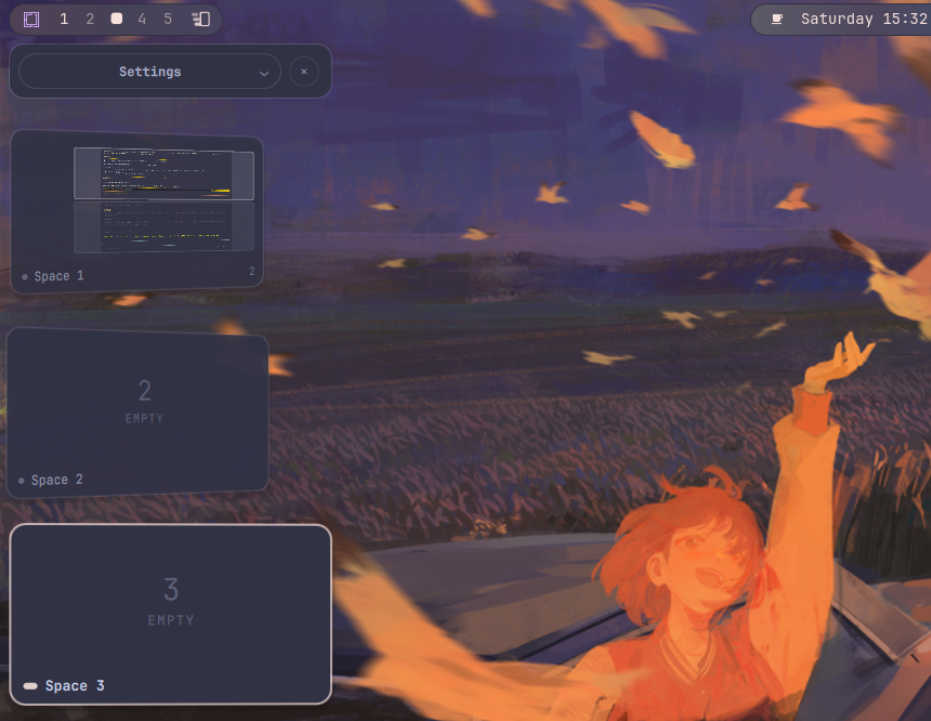
The visual language is deliberately restrained: the full-height rail canvas stays transparent, while the header, settings, and workspace cards use solid theme-aware surfaces that remain readable on any wallpaper. A thin current-space accent, shallow depth, and adjustable right-facing Y-axis perspective provide structure without a dark slab across the desktop. The rail clears the active Omarchy bar instead of painting underneath it, and its settings surface shares the bar's exact outer inset. Cards keep a real vertical gap at every supported size, window captures stay inside a protected desktop gutter, and hover brings one slightly forward and almost straightens it without colliding with its neighbors.
Clicking a populated card activates that workspace's lastwindow when Hyprland exposes it, falling back to the lowest focusHistoryID; an empty card activates the workspace itself. The rail remains open after selection and focus changes until it is explicitly closed from the bar icon, close button, hotkey, or Escape.
Install
Install and enable the plugin through Omarchy's built-in plugin manager:
omarchy plugin add https://github.com/howdeploy/omarchy-workspace-stage.git --enable
Omarchy shows its third-party code warning and asks for confirmation before cloning. The plugin is then validated and installed as community.workspace-stage; when enabling it, Omarchy offers the manifest's left bar section as the default placement.
Update an installed checkout with:
omarchy plugin update community.workspace-stage
Remove it safely with:
omarchy plugin remove community.workspace-stage
Removal disables the plugin first and then removes its Git-managed checkout. The optional user settings file at ~/.config/omarchy/workspace-stage.json is intentionally left in place so reinstalling preserves the user's choices; delete that file separately only when those settings are no longer wanted.
What it includes
bar-widget: a compact Stage/Spaces icon for the Omarchy bar.panel: a rail on the selected left or right edge of the currently focused monitor.- Live per-window previews through Quickshell
ScreencopyViewandhyprland-toplevel-export-v1. - Geometry-correct workspace compositions for tiled, floating, and fullscreen windows.
- Normal numeric and named workspaces. Special workspaces are rejected by their
special:*selector name rather than by ID, because Hyprland also gives ordinary named workspaces negative IDs. - Five quiet empty slots by default, plus every existing normal workspace on the focused monitor. At 100% workspace size the first five cards auto-fit the available height without overlap; larger cards and additional workspaces remain scrollable. A numeric slot already assigned to another monitor is not duplicated.
- A compact settings card above the workspace rail with side, desktop-space, palette, size, and right-tilt controls.
- Keyboard navigation:
Up/DownorShift+Tab/Tab,Enterto activate,Escapeto close. - Compositor shortcuts remain available while the rail has keyboard focus. When Hyprland closes a window, Workspace Stage immediately detaches only that window's live capture and removes its stale preview before the Wayland toplevel handle is destroyed, avoiding a shared-shell crash without inhibiting unrelated shortcuts.
- No daemon, privilege elevation, external effect module, GTK, or Electron process.
Layer surfaces never enter the toplevel model; known shell-owned toplevels are filtered as a second guard. The card canvas is theme-derived rather than a fake wallpaper screenshot, while individual window previews stay live.
Requirements
- Omarchy Shell plugin API with manifest schema 1.
- Quickshell 0.3 or newer with Hyprland and Wayland modules.
- Qt 6.11 or newer. Workspace Stage uses
Rotation.distanceToPlanefor adjustable perspective rather than a flat affine skew. - Python 3, which Workspace Stage uses for its small settings-boundary helper.
- Hyprland support for
hyprland-toplevel-export-v1for live window content. A window without an export handle keeps its geometry-correct quiet placeholder.
Development
Clone and validate the checkout before loading it into the shell:
git clone https://github.com/howdeploy/omarchy-workspace-stage.git
cd omarchy-workspace-stage
omarchy plugin validate "$PWD"
npm test
qmllint -I "$OMARCHY_PATH/shell" \
  WorkspaceStage.qml WorkspaceCard.qml SettingsCard.qml Widget.qml
For live development, link the checkout into the third-party plugin directory, rescan, and enable it:
mkdir -p "$HOME/.config/omarchy/plugins"
ln -s "$PWD" "$HOME/.config/omarchy/plugins/community.workspace-stage"
omarchy-shell shell rescanPlugins
omarchy plugin enable community.workspace-stage --section left
Do not run the ln -s command over an existing destination.
Hotkey
The bar icon toggles the rail. For a keyboard toggle, add a free binding to ~/.config/hypr/bindings.lua; for example:
o.bind("SUPER + ALT + W", "Workspace Stage", "omarchy-shell shell toggle community.workspace-stage")
Settings and configuration
Open Settings above the first workspace card. Changes are applied immediately and saved to ~/.config/omarchy/workspace-stage.json:
LeftandRightmove the complete rail, including the header, settings, and every workspace card. Stack alignment, depth/hover motion, 3D tilt, and its pivot mirror with the rail edge, while preview contents remain unmirrored.Overlaydraws above windows;Reserveasks layer-shell to reserve the rail width so tiled windows cannot enter it. Overlay clears the bar explicitly, while Reserve reuses the compositor's exclusive zone so the bar is never counted twice.Systemfollows the active Omarchy theme,Pasteluses the bundled quiet template, andCustomexposes surface, text, accent, and preview-canvas colors.Workspace sizescales only workspace cards from 70% to 180%. The settings chrome keeps its width; cards larger than the five-slot baseline become scrollable instead of being forced back down.Right tilton the left rail andLeft tilton the right rail control the mirrored resting Y rotation from 0° to 32°. Cards rotate around the outer rail edge so stronger perspective cannot project inactive workspaces beyond the screen boundary.
The rail canvas does not inherit the Omarchy bar transparency setting. It remains clear, while every functional surface supplies its own opaque background for predictable contrast.
Workspace geometry is normalized in Wayland logical coordinates, including fractional output scale and rotated monitors.
For hand editing, copy the complete example first:
install -Dm600 config/workspace-stage.json.example \
  "$HOME/.config/omarchy/workspace-stage.json"
Additional JSON controls include:
perspective.distanceToPlane: lower positive values strengthen perspective; higher values flatten it;0disables perspective projection.perspective.scaleStep,opacityStep,depthOffset, andarcStrength: depth falloff away from the current workspace.rail.cardSpacing: minimum vertical gap between cards in logical pixels. A hard eight-pixel safety gap remains even if this is lower.previews.maxLiveWindows: global live-stream budget. Every captured non-live window still takes one fresh frame when the rail opens.previews.captureRadius: how many workspace positions around the active card receive continuous live streams. More distant cards keep a fresh still frame instead of clearing their previews.previews.scale: workspace-card size relative to the responsive five-card baseline; defaults to100.rail.width: fixed width of the settings chrome. The Workspace size control does not change it.placement.side: whole-rail screen edge, eitherleftorright.workspaces.emptySlots: seed numeric empty spaces from1through this value.workspaces.visibleSlots: number of cards the collapsed rail fits into the available monitor height; defaults to five.behavior.persistent: open the rail when the plugin loads. This is separate from its normal stay-open-after-selection behavior.
The default live budget is six, keeping current and neighboring workspaces alive without asking a software-rendered VM to stream every window at once. User configuration is deep-merged over defaults, so small JSON fragments are sufficient.
For a permanent rail that reserves desktop space:
{
  "placement": { "side": "left", "mode": "reserve" },
  "behavior": { "persistent": true }
}
Security and privacy
Like every third-party Omarchy Shell plugin, Workspace Stage runs unsandboxed inside the long-lived omarchy-shell process with the user's permissions. Review the source before enabling it.
- It makes no network requests and does not upload, save, or cache captured window frames.
- Live previews stay inside Quickshell and use Hyprland's toplevel export protocol.
- It reads and writes only
~/.config/omarchy/workspace-stage.json, through a short-lived bundled Python helper. The helper resolves the account home from the effective UID, opens each parent directory without following links, and rejects unsafe ownership or permissions. - The helper refuses symlinks, non-regular files, multiply linked files, and settings larger than 64 KiB. It publishes writes atomically relative to the already verified parent-directory descriptor and fixes the resulting mode at
0600; an existing user-owned0644file from version 1.0.0 is tightened automatically. - Its external commands are that helper through
/usr/bin/python3, Omarchy'somarchy-shellIPC wrapper, and Hyprland's bundledhyprctl dispatchfallback for workspace/window activation. - It has no install hook, daemon, service, compiled binary, package-manager action, or privilege-elevation path.
Checks
The automated tests use only Node.js and Python standard libraries:
npm test
omarchy plugin validate .
qmllint -I "$OMARCHY_PATH/shell" \
  WorkspaceStage.qml WorkspaceCard.qml SettingsCard.qml Widget.qml
The plugin deliberately contains no generated artifacts under its root; Omarchy watches installed plugin trees and reloads changed code.
Design references
- Apple Stage Manager for the sense of nearby spaces, not its application-group data model.
- Omarchy Shell plugins for packaging and host lifecycle.
- Quickshell ScreencopyView and Hyprland integration for live sources and compositor state.
- debba/omarchy-stage-manager as an API source map, not a visual template.
- itsDigvijaysing/gnome-stage-manager for perspective and distance-falloff ideas.