
Omahub
← All plugins
C

Esports

by contra

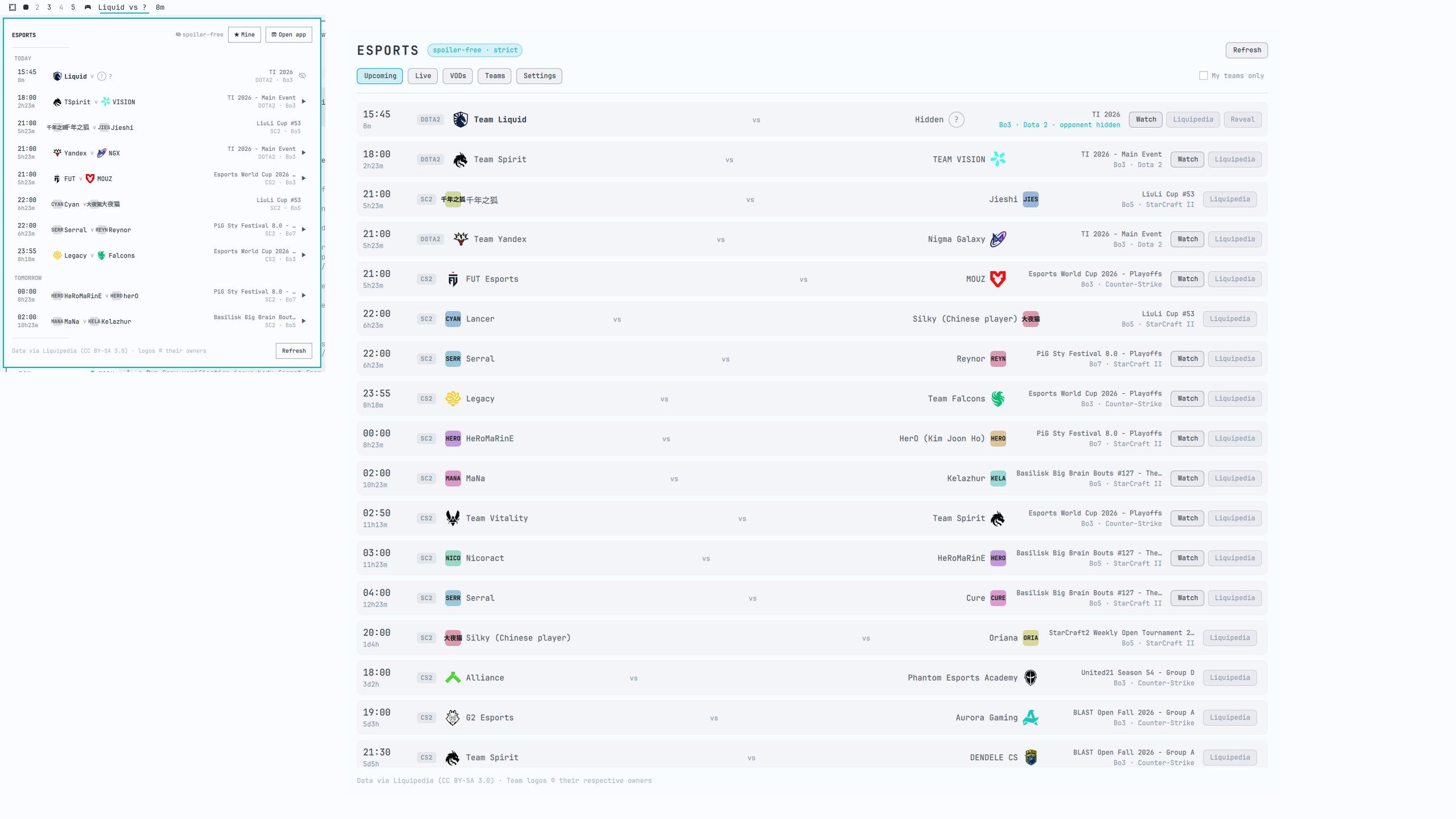
Spoiler-free match schedule for the Omarchy bar. The next match for a team you follow sits on the chip with a countdown; click for what is live, coming, and still to watch. Scores are withheld by a daemon rather than merely undrawn. Dota 2, Counter-Strike and StarCraft II out of the box; 37 games one toggle away. Requires the omarchy-esports daemon.

Security review

Review recommended · 1 finding

Deterministic scan — not a security guarantee

Low
Risk level
Low
Analyzed commit
9a9f3d2
Scanned
1 month ago

Flagged patterns appear only in documentation files (README / docs) — descriptive examples, not executable code.

  • Docs sudo README.md:27

    Command runs with sudo, elevating the process beyond the plugin environment.

    sudo or pkexec is required.

Automated analysis only — not a security guarantee.

AI advisory review

No obvious issues detected

Language-model assessment · ~deepseek/deepseek-v4-flash-latest — advisory only

Low
AI risk level
Low
Recommendation
install
Model
~deepseek/deepseek-v4-flash-latest
Analyzed commit
9a9f3d2
Reviewed
1 month ago

The plugin is a well-coded QML widget that reads a local state file and performs sanitization on all external data. It does not talk to the network directly and only executes local daemon commands after validation. The deterministic scan flagged a sudo command in the README, but that line actually says 'No sudo or pkexec is required,' so it is a false positive.

  • The deterministic scan flagged a sudo command in README.md, but the actual text is 'No sudo or pkexec is required,' so this is a false positive.
  • The plugin relies on an external daemon (omarchy-esports) for data fetching, but the plugin itself does not introduce additional risk beyond what the daemon already handles.
How this check works

This review combines the deterministic scan (the rule-based results above) with an independent look at the plugin's code by a language model. The model reads a trimmed sample of the repository's files, the manifest, and the README, then gives a plain-language risk level and a recommendation: install (no notable danger), review (look closer first), or avoid (clearly dangerous).

It runs on the same analyzed commit as the deterministic scan and is strictly advisory — it is not a security guarantee and never blocks a plugin by itself. A human moderator still reviews plugins before they are listed.

AI advisory only — automated analysis, not a security guarantee.

Install
$ omarchy plugin add https://github.com/matt-shearing/omarchy-esports-plugin --enable
Widgets #bar #quickshell #media

Esports

Esports panel on the Omarchy bar

A spoiler-free match schedule on the Omarchy bar. The next match for a team you follow sits on the chip with a countdown; click it for what is live, what is coming, and what you still have to watch.

  • Next match on the bar with a live countdown.
  • Click a match for streams, the VOD, and Liquipedia pages.
  • Spoiler-free by construction. A result you have not revealed is absent from the file this widget reads, not merely undrawn.
  • Catch-up masking. If you are behind on a team, later opponents are withheld too — knowing who they play next tells you they won.
  • ★ Mine filters the list to your teams.
  • Dota 2, Counter-Strike and StarCraft II out of the box; 37 games verified and one toggle away.

This plugin is the front end. It never talks to the network. The omarchy-esports daemon fetches, redacts, and notifies.

Requires the daemon

Until the daemon is running the widget shows a panel that names the repo. Install it from omarchy-esports (Go is required to build it). If this plugin is already a git checkout, that repo's installer leaves it alone. No sudo or pkexec is required.

Install

omarchy plugin add https://github.com/matt-shearing/omarchy-esports-plugin.git --enable

That clones the plugin and can place the widget on the left side of the bar. Nothing in ~/.config is rewritten except the bar layout entry Omarchy adds when you enable the plugin.

Remove

omarchy plugin remove contra.esports

That leaves the daemon and its state. To uninstall those too, see omarchy-esports.

Requirements

  • Omarchy Quattro with third-party shell plugins
  • The omarchy-esports daemon from the companion repo above
  • go to build the daemon

Settings

Widget options live on the bar entry in ~/.config/omarchy/shell.json:

omarchy bar set contra.esports showLabel false   # icon only
omarchy bar set contra.esports maxRows 14        # rows in the dropdown
omarchy bar set contra.esports showFinished false
omarchy bar set contra.esports hideWhenEmpty true

Keybinding

-- ~/.config/hypr/bindings.lua
o.bind("SUPER + ALT + E", "Esports panel", "omarchy-shell shell toggle contra.esports")

Bind through shell toggle rather than a plugin IPC target: a bar widget is instantiated once per monitor and an IPC target reaches only one of them, so an IPC binding opens the panel on the wrong screen. shell toggle routes through the bar, which picks the focused one.

Development

omarchy plugin validate .

Edits under ~/.config/omarchy/plugins/contra.esports/ reload in the running shell. Force a rescan with omarchy-shell shell rescanPlugins if a change does not appear.

Licence

MIT. Match data from Liquipedia, CC BY-SA 3.0. See LICENSE.