
Persistent Layouts
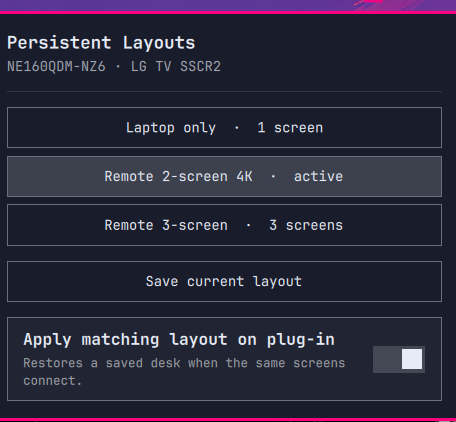
Save a Hyprland desk. Get it back when the same screens plug in.
Persistent Layouts is an Omarchy bar widget for people who move between setups: laptop only, a dock at home, a TV on the road. It remembers each named layout and restores the matching one automatically.
Screens are matched by the set that is plugged in, not by DP-3 / HDMI-A-1. Connector names renumber; the set of panels on your desk does not. A two-screen layout will not win while three screens are connected, and a spare panel is never quietly conscripted to stand in for a saved one.
It is a profile switcher, not a spatial editor. Arrange the screens with HyprMon or hyprctl, then save. The widget applies what you saved.
Stock Display stays where it is (brightness, text size, scale). This chip uses a different icon on purpose.
No sudo or pkexec is required.
How this is different
Other listed tools cover adjacent jobs:
- Stock Display — backlight, font size, scale, enable/disable
- hyprmoncfg — named profiles and a hotplug daemon, via an external TUI the bar launches
- Screens / Display Manager — in-bar visual editors that also save a desk
Persistent Layouts only switches named profiles. Geometry stays with whatever you already use to place monitors.
When two panels claim the same identity
Some displays lie. Cheap portables sit behind a generic scaler chip that reports
a placeholder EDID — a stock vendor string and a serial like 0x01010101 — so
two physically different panels can be indistinguishable, and the mode list one
of them advertises may not be a mode it can actually show. Driving such a panel
at its "preferred" resolution can leave it dark with the backlight off.
Persistent Layouts handles that by never trusting a single display's identity on its own:
- The connected set picks the layout, so the same panel can mean different things in different desks.
- The saved mode is applied verbatim. A profile records what actually worked on that panel, not what its EDID claims it can do.
- Panels with a placeholder serial are flagged unverified EDID in the widget, and every display row carries its own resolution so two panels reporting the same make and model are still tellable apart.
- If more than one saved layout fits the connected set, clicking one pins it for that set. Auto-apply will not overrule it on the next hotplug.
- Dummy amdgpu EDIDs (
The Linux Foundation/Linux FHD) that appear as connected 0×0 sinks after sleep are ignored and disabled. They are not a panel; leaving them enabled steals a CRTC from the laptop display. If I2C still reads a real portable (GWD ARZOPA, the fakeLG TV SSCR2blob, or the espresso) on that connector, the dummy is treated as that panel and driven at the saved 1080p mode instead of being disabled.
Install
omarchy plugin add https://github.com/matt-shearing/omarchy-persistent-layouts.git --enable
That clones the plugin and can place the widget on the right side of the bar, next to Display.
Use
- Click the chip — open the profile list
- Right-click — apply the profile that matches the connected screens
- Save current layout — snapshot mode, scale, and position for this set of panels
- Apply matching layout on plug-in — restore that snapshot when the same set of screens returns
Applying a layout is remembered for that set of screens, so an explicit click always beats auto-detection. If an output does not end up where the profile asked, the widget says the apply failed instead of claiming success.
The matching service retries after a display is added or removed, after a Hyprland config reload, and after resume from sleep, because some HDMI sinks (Framework expansion cards after a long s2idle) take up to two minutes to become ready, and monitors.lua disables dummy Linux FHD sinks on reload. If I2C still reads the portable behind that dummy, auto-apply drives the saved 1080p mode instead of leaving the panel dark. Every hyprctl call is bounded so a wedged modeset cannot stall auto-apply.
Profiles and config
User data lives outside the plugin folder and is not deleted on remove:
- Profiles:
~/.config/omarchy/persistent-layouts/profiles/ - Auto-apply:
~/.config/omarchy/persistent-layouts/config.json - Active profile:
~/.local/state/omarchy/persistent-layouts/
An older ~/.config/omarchy/display-profiles/ directory is copied on first run.
Applying a profile changes the live Hyprland layout. If ~/.config/hypr/hyprmon.lua already exists, that file is refreshed so a HyprMon restart matches. monitors.lua is not edited.
Old TVs that crop HDMI (overscan) can set per-output underscan in a profile — { "hborder": 48, "vborder": 27 } is ~5% on 1080p. Hyprland has no overscan control; this sets the amdgpu connector properties after the modeset.
Command line
The bundled helper is invoked by the widget. From a checkout or an installed plugin folder:
bin/persistent-layouts status
bin/persistent-layouts list
bin/persistent-layouts save desk --name "Home desk"
bin/persistent-layouts apply desk
bin/persistent-layouts detect --apply
bin/persistent-layouts auto off
Requirements
- Omarchy Quattro with third-party shell plugins
- Hyprland with
hyprctl - Python 3 (already on Omarchy)
Remove
omarchy plugin remove contra.layouts
Saved profiles stay on disk. Delete ~/.config/omarchy/persistent-layouts/ only if you want those gone too.
Development
python3 tests/test_cli.py
omarchy plugin validate .
License
MIT. See LICENSE.