
Sunset Night Light
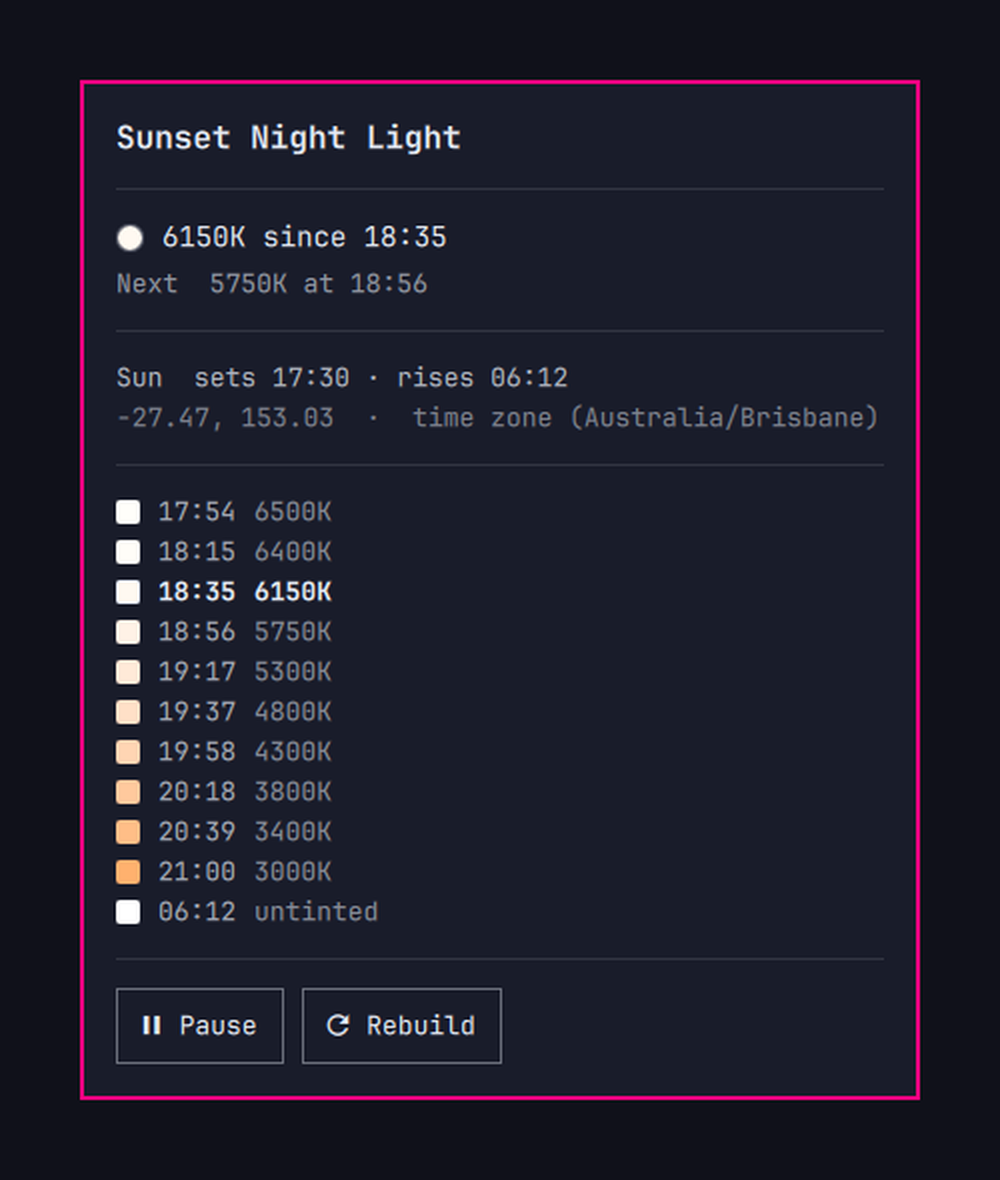
Warm the screen on a ramp anchored to real local dusk, deepening through the evening, back to untinted at sunrise.
Omarchy's built-in night light is a switch: Super + Ctrl + N flips between 4000 K and
6500 K. hyprsunset can also follow the clock, but only the clock — its profiles key on a
fixed HH:MM and there is no interpolation between them. So an evening that gets
gradually warmer means a ladder of profiles, and a ladder anchored to sunset has to be
rebuilt as sunset moves. That is what this does.
17:30            sunset — still light out, so nothing happens
17:54  6500K     civil dusk: the ramp starts at the daytime value
18:22  6400K     nautical dusk, properly dark now — still imperceptible
18:56  5750K     the first real warmth
19:58  4300K
21:00  3000K     fully warm, at the hour you asked for
06:12  untinted  sunrise
It starts at dusk rather than sunset, from the daytime temperature rather than a warmer one, and on a curve that holds near neutral early. Sunset is still daylight; a filter that becomes visible then reads as firing too early. Nothing here steps — the first rung is the value already on screen.
It finishes at a clock time you choose, not after a fixed number of hours. Dusk moves
by well over an hour across the year, so a fixed duration drifts full tint towards
midnight in summer. Pinning the end instead means the ramp stretches through winter and
compresses in summer, and is always fully warm when you want to be winding down. In
Brisbane, full_tint_by: "21:00" gives a 212-minute ramp in midwinter and 111 in
midsummer.
Location comes from your time zone
tzdata ships a representative latitude and longitude for every zone in
zone1970.tab, so Australia/Brisbane is enough to place you within a few kilometres —
far inside the minute or two of precision sunset timing needs. Change the system time
zone and the schedule follows, with no second thing to update.
Set latitude / longitude in the config if you want your actual coordinates.
Install
Installing places files. It does not change your desktop, start anything, or schedule anything — that happens only after you have seen exactly what it would change and agreed to it.
git clone https://github.com/matt-shearing/omarchy-nightlight-auto
cd omarchy-nightlight-auto
./install.sh
install.sh symlinks the nightlight-auto CLI into ~/.local/bin, links the plugin
into ~/.config/omarchy/plugins/, adds the bar widget, and then hands over to
nightlight-auto setup, which prints the list below and waits for you to type yes:
~/.config/hypr/hyprsunset.conf— replaced with a generated schedule. Whatever is there now is copied tohyprsunset.conf.pre-nightlight-autofirst.systemctl --user enable --now hyprsunset.service— see below. Warns ifautostart.luaalready launches hyprsunset, since two launch paths race for its socket.~/.config/systemd/user/nightlight-auto.{service,timer}— the daily rebuild.~/.config/omarchy/hooks/post-boot.d/nightlight-auto.sh— rebuild at login.~/.config/nightlight-auto/config.json— created only if you do not have one.
Say no and nothing is written. Nothing under /usr/share/omarchy is touched at any
point, and nothing reaches the network.
Useful flags: --place-only stops after placing files, --no-bar skips the widget,
--yes accepts the changes without prompting.
Installing from the marketplace
omarchy plugin add https://github.com/matt-shearing/omarchy-nightlight-auto clones and
enables the plugin without running install.sh, so it is inert: the widget appears and
its panel shows what setup would change, with a button to agree. Nothing is written until
you press it. To get the nightlight-auto command on your PATH as well, run
./install.sh --place-only from the cloned directory.
Remove
nightlight-auto teardown
That undoes everything setup did: puts your original hyprsunset.conf back (or restores
Omarchy's default if you did not have one), disables and removes the timer and the
post-boot hook, and hands hyprsunset's launch back the way it found it. Your
~/.config/nightlight-auto/config.json is left alone.
Then remove the files:
rm -rf ~/.config/nightlight-auto ~/.local/state/nightlight-auto
rm -f ~/.local/bin/nightlight-auto
omarchy plugin remove contra.nightlight
If you added the indicator mark below, restore the original NightLight.qml.
Use
nightlight-auto status         # what is on screen now, and what is next
nightlight-auto show           # tonight's whole ladder
nightlight-auto show --date 2026-12-21
nightlight-auto pause          # untinted until you resume
nightlight-auto resume
nightlight-auto generate       # rebuild now (the timer does this daily)
nightlight-auto setup --print  # what setup would change, without changing it
nightlight-auto teardown       # undo everything setup did
The bar widget shows the stage of the evening — a sun before the ramp starts, then a setting sun, a crescent moon, and a new moon once it reaches the floor. Click it for tonight's ladder with the current step marked, right-click to pause. It turns the urgent colour only when hyprsunset is not running, because that is the one state where nothing is being applied at all.
From a script or a keybinding:
omarchy-shell contra.nightlight status
omarchy-shell contra.nightlight pause | resume | toggle | rebuild
omarchy-shell shell toggle contra.nightlight    # open the panel
Using the indicator instead of a bar widget
If you would rather not have a second night light icon, indicators/NightLight.qml
replaces the stock mark in the centre-bar indicator cluster with one that follows the
ramp. Clone the indicators widget, drop the file in, and leave this plugin out of the bar:
omarchy plugin clone omarchy.indicators
cp indicators/NightLight.qml ~/.config/omarchy/plugins/<you>.indicators/indicators/
omarchy restart shell
Then in ~/.config/omarchy/shell.json, remove the contra.nightlight entry from
bar.layout and add { "id": "contra.nightlight" } to the top-level plugins array —
that keeps the plugin enabled so its service still loads, without placing a widget.
Clicking pauses, clicking again resumes. The mark stays on screen while paused — an
inactive indicator is given opacity: 0 and interactive: false, so a mark that hid
itself on pause would take the only control for undoing that with it. Paused is worth
seeing in daylight too: it says tonight's ramp will not run.
The mark falls back to the stock omarchy.nightlight toggle if this plugin is ever
disabled, so it keeps working either way.
How this is different
Set your Nightlight is the closest listed plugin and covers adjacent ground: it switches between a day and a night temperature at manual times or at sunrise/sunset, with an optional transition of up to 120 minutes, all driven from buttons in the bar.
This one is shaped differently:
- A ladder, not two states. The evening keeps deepening in steps across a configurable window (five hours by default) rather than moving between a day value and a night value.
- A CLI and a systemd timer, not only bar buttons — so it is scriptable, bindable to a key, and works over SSH. The bar widget is optional; the schedule runs without it.
- Location with nothing to configure. Coordinates come from the system time zone via tzdata, so travelling and changing time zone moves the ramp with no second step.
- Steps are interpolated in mireds, and the solar math is covered by tests against published almanac times.
If you want to pick your own on and off times from the bar, theirs is the better fit.
Configuration
~/.config/nightlight-auto/config.json:
| Key | Default | Meaning |
|---|---|---|
latitude, longitude |
null |
null derives both from the system time zone |
evening_temp |
6500 |
Kelvin at the start of the ramp. The daytime value, so it begins from no tint |
night_temp |
3000 |
Kelvin at the deepest point |
day_temp |
null |
null means untinted; a number tints the day too |
ramp_anchor |
civil_dusk |
sunset, civil_dusk, nautical_dusk or astronomical_dusk |
full_tint_by |
"21:00" |
Clock time to reach night_temp. null uses ramp_minutes instead |
ramp_start_offset_min |
0 |
Minutes relative to the anchor; negative starts earlier |
ramp_minutes |
300 |
Fixed ramp length, used only when full_tint_by is null |
min_ramp_minutes |
45 |
Floor, for when dusk falls close to the target |
step_minutes |
20 |
Ladder granularity |
ramp_curve_power |
2.0 |
1.0 is a straight line; higher holds near daylight longer |
morning_offset_min |
0 |
Minutes relative to sunrise for the return to day |
fallback_sunset, fallback_sunrise |
18:00, 06:00 |
Used only where the sun does not rise or set |
round_to_kelvin |
50 |
Rounds emitted temperatures, to keep the file readable |
Run nightlight-auto generate after editing, and nightlight-auto show to see the result
before committing to it.
Two things shape how the ramp feels. Temperatures are interpolated in mireds
(reciprocal megakelvin) rather than Kelvin, because even steps there are what read as an
even ramp to the eye — linear Kelvin steps crowd all the visible change into the warm end.
On top of that, ramp_curve_power biases the movement towards later in the evening, so
the first hour does very little. Set it to 1.0 for a straight line.
An early-hours full_tint_by such as "01:00" is taken as the following morning. A time
that has already passed by the time it gets dark keeps a short ramp rather than inverting
it.
Anchors. Sunset is when the sun's disc goes down and it is still light. Civil dusk (sun 6° below) is about when you would reach for a lamp; by nautical dusk (12°) it is properly dark. In Brisbane those fall roughly 24 and 52 minutes after sunset, and the gap widens the further you are from the equator. Where the sun never reaches the chosen altitude — a high-latitude summer — it falls back to sunset.
How it fits into Omarchy
Consent
Every write to your configuration goes through generate, and generate refuses to run
until a consent record exists at ~/.local/state/nightlight-auto/consent.json. Only
setup creates that record, and only after printing the full list of changes and getting
a yes. The bar panel shows that same list — it renders setup --print verbatim, so the
text you agree to is the text that governs what happens.
The record also stores what was true beforehand — whether hyprsunset.service was already
enabled, where the old config was saved — so teardown can put things back rather than
guess. tests/test_schedule.py covers this directly: unconsented generate refuses,
setup without a terminal refuses, --print changes nothing, and setup followed by
teardown restores the original file byte for byte.
It writes ~/.config/hypr/hyprsunset.conf, which is Omarchy's documented place for a
night light schedule. omarchy toggle nightlight still works and still wins — until the
next step in the ladder fires, at most step_minutes later. For a hold that lasts, use
nightlight-auto pause.
All state lives in a single service plugin. Bar widgets are instantiated once per
monitor and an indicator mark is instantiated twice over — active strip and hover
fold-out — so anything holding its own copy of the state would drift, and clicking one
copy would leave the others stale. The QML here is read-only; every side effect goes
through the one singleton.
hyprsunset runs from systemd, not autostart.lua
The Omarchy manual suggests o.launch_on_start("hyprsunset"). This uses
systemctl --user enable hyprsunset.service instead — the unit the hyprsunset package
already ships — for a specific reason.
hyprsunset reads its config only at startup, so applying a rebuilt schedule means
restarting it. omarchy-restart-app relaunches through uwsm, which asks the user manager
for a transient scope. A scope created from inside a systemd service does not outlive
that service. Run from the timer, hyprsunset comes up, answers on its socket, and is
then killed the instant the oneshot exits — reproducibly, even after waiting for it to
confirm it is up. Restarting the unit has no such problem.
Running both launch paths would race for hyprsunset's socket, so there is only the one.
install.sh leaves the systemd unit enabled; if you also have the autostart.lua line,
remove it.
Tests
python3 tests/test_schedule.py
Covers the solar math against published almanac times for Brisbane, London (across a DST boundary), New York and Nairobi; polar day and polar night; the ladder's shape, ordering, clamping and mired spacing; and the rendered config's structure.
Requirements
Omarchy 4 (Quattro), hyprsunset, Python 3.9 or newer. No external Python packages and
no other dependencies — the solar calculation is stdlib arithmetic. jq and systemd
come with Omarchy.
Licence
MIT — see LICENSE.