
Omaxkcd
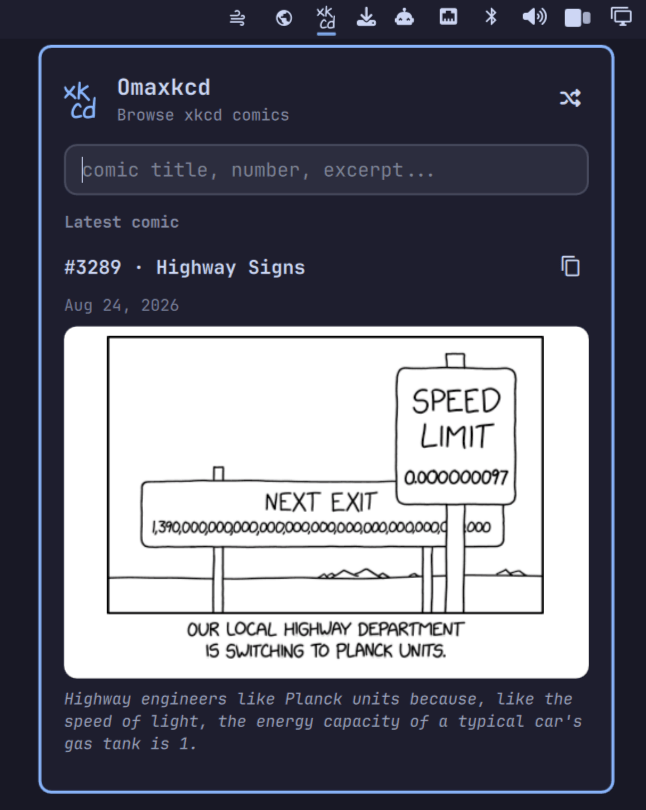
Browse and search every xkcd comic from the Omarchy bar - latest, by number, random, or full-text search over title, alt text, and transcript.
Features
- Shows the latest comic when opened
- Jump to any comic by number
- Full-text search over titles, alt text, and transcripts
- Shuffle button for a random comic
- Copy the comic image to the clipboard
- Click through to the comic on xkcd.com
- Follows your Omarchy theme (colors, fonts, spacing)
Install
omarchy plugin add https://github.com/cossssmin/omarchy-xkcd.git --enable
The widget lands in the bar's right section by default.
Usage
Click the xk/cd icon in the bar:
- Empty query shows the latest comic
- Type a number to jump to that comic
- Type anything else to full-text search titles, alt text, and transcripts
↑/↓move through results,Enteropens the comic on xkcd.com- Click the comic title or image to open it on xkcd.com
- The shuffle button (top right) picks a random comic
- The copy button next to the comic title copies the image to the clipboard
Escapecloses the panel
Configuration
Nothing to configure :) Colors, fonts, and spacing follow your Omarchy theme automatically.
Dependencies
Everything below ships with a stock Omarchy install:
curl- fetches comic imageswl-clipboard(wl-copy) - copies images to the clipboardxdg-open- opens comics in your browser
Comic data comes from the public xkcd search API (mirrors xkcd's own JSON and adds full-text search). Images are only ever loaded from imgs.xkcd.com over HTTPS.
Remove
omarchy plugin remove cossssmin.xkcd
Credits
- Comics by xkcd (Randall Munroe), CC BY-NC 2.5
- Icon uses the xkcd Script font, CC BY-NC 3.0
License
MIT (plugin code). The bundled xkcd-script.ttf font is CC BY-NC 3.0.