
osu! Typing Sounds
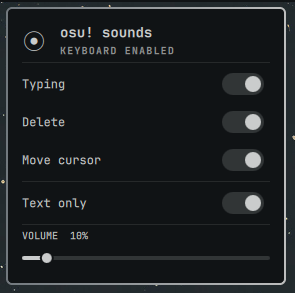
An Omarchy service and minimal bar widget that plays the official osu!
key-press-1 through key-press-4 samples for global keyboard key-down
events, with dedicated osu! samples for cursor movement, Enter, Backspace,
and Delete. The widget controls Typing, Delete, Confirm, Move cursor, Text only, and
master volume. Text only is enabled by default; disabling it plays sounds
for all keyboard keys while still ignoring mouse events.
The listener opens /dev/input/event* read-only and never grabs the devices.
All runtime dependencies—Python 3, Quickshell, Qt Multimedia, and PipeWire—are
already included in Omarchy Quattro. Python detects events, while Quickshell's
SoundEffect handles playback without spawning an audio process per key press.
The service also needs read access to the input devices.
Mutable settings are stored at ~/.config/osu-typing-sounds/config.json
so changing the volume or action toggles does not trigger a plugin rescan.
Samples: https://github.com/ppy/osu-resources/tree/master/osu.Game.Resources/Samples/Keyboard
The samples are third-party assets and are documented in
sounds/LICENSE.md. The plugin code is MIT licensed;
see LICENSE.
The bar icon uses the embedded Unicode circled-bullet symbol (⦿) as a small,
font-independent approximation of the osu! circle mark.
Installation
Install the plugin from its GitHub repository with Omarchy:
omarchy plugin add https://github.com/countluss/omarchy-osu-typing-sounds.git --enable
The plugin adds its service and bar widget automatically.
Removal
omarchy plugin remove countless.osu-typing-sounds --yes
To also remove the saved preferences:
rm -rf ~/.config/osu-typing-sounds