
crmne Active Window for Omarchy
A native Quattro/Quickshell active-window widget with the focused application's actual desktop icon and its window title.
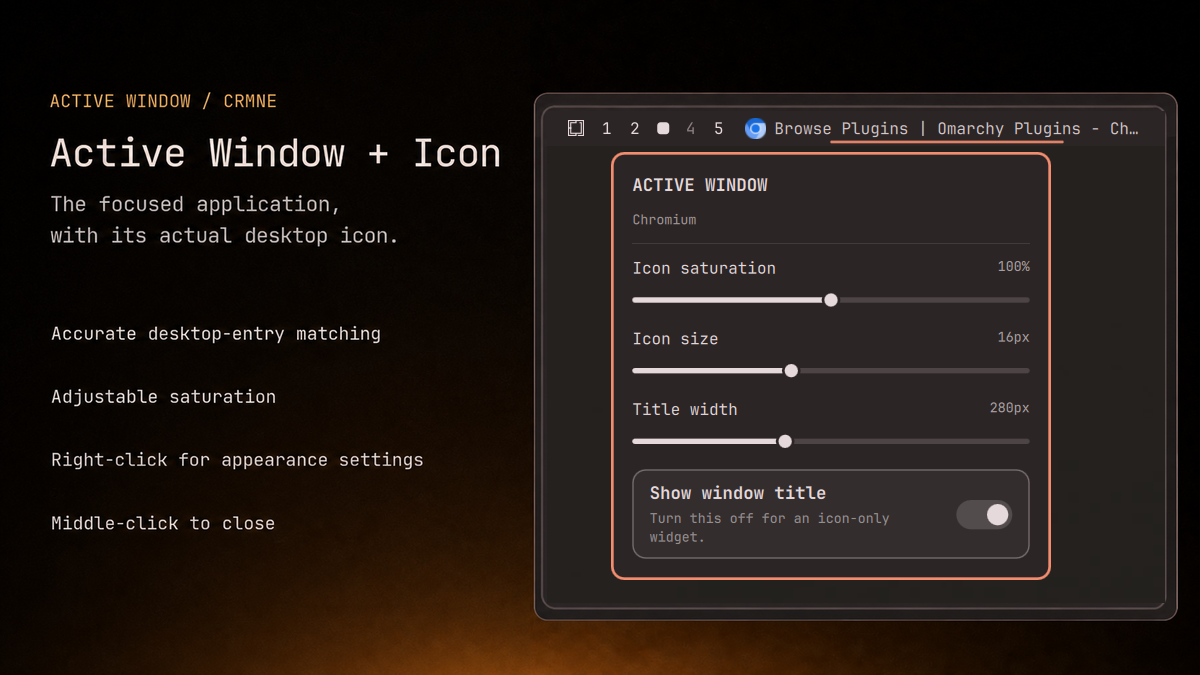
Icon lookup uses three pieces of runtime information, in order to handle both normal applications and Chromium web apps:
- the active Wayland/Hyprland application class;
- Hyprland's initial class and process ID;
- the running process executable from
/proc/<pid>/exe.
Those values are matched against Freedesktop desktop entries, including
StartupWMClass, and the matched entry's themed icon is rendered. Linux
Wayland windows do not carry a portable embedded icon themselves, so this is
the standard reliable route to the icon belonging to the running app.
Install
omarchy plugin add https://github.com/crmne/omarchy-active-window.git --enable --yes
omarchy bar move crmne.active-window --section left --after omarchy.workspaces
Requirements
- Omarchy Quattro with its Quickshell-based shell.
- Hyprland and standard Freedesktop desktop entries for application matching.
There are no additional packages, services, or helper scripts.
Remove
omarchy plugin remove crmne.active-window --yes
For local development, put or link this repository at
~/.config/omarchy/plugins/crmne.active-window and run:
omarchy-shell shell rescanPlugins
omarchy plugin enable crmne.active-window --section left --after omarchy.workspaces
The Omarchy bar settings UI exposes icon saturation from 0% (grayscale) through 100% (the original icon) to 200% (boosted), plus icon size, title width, and an icon-only toggle.
Left click activates the window, middle click closes it, and right click opens
an appearance panel. The panel previews and persists saturation, icon size,
title width, and the icon-only toggle directly in shell.json.