
Lyrics Synced with Music
The words to whatever is already playing, in time with the song.
The widget picks up whatever you are playing and looks it up on LRCLIB — so there is nothing to search for, and no account to make. When the track has synced lyrics, the line being sung is highlighted and the panel follows along; click any line to jump the player there.
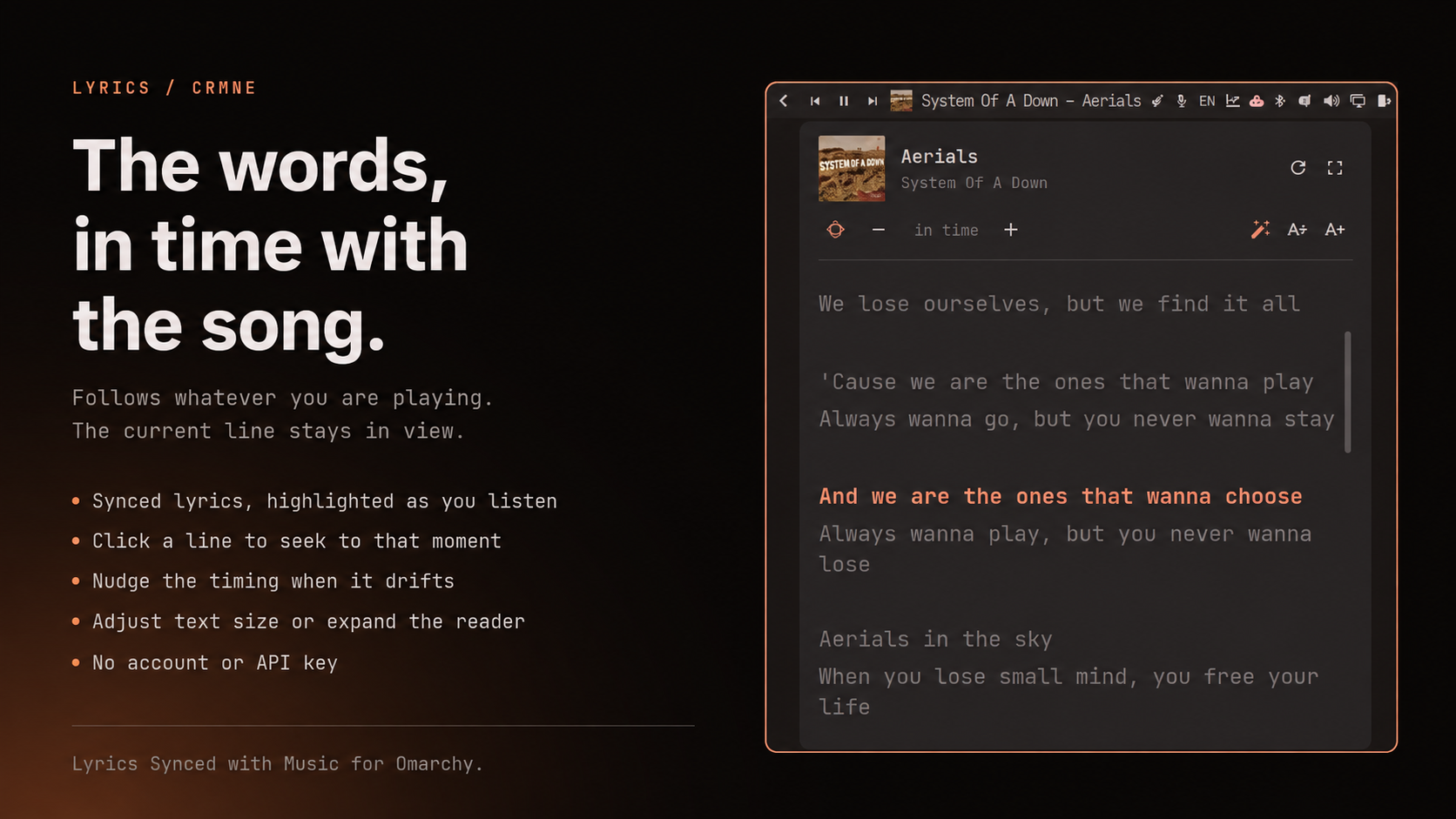
microphone icon · follows the song · click a line to seek · timing nudge · text size
Install
omarchy plugin add https://github.com/crmne/omarchy-lyrics.git --enable --yes
omarchy bar move crmne.lyrics --section right --before omarchy.tray
Requirements
- Omarchy Quattro with its Quickshell-based shell.
- Any media player that tells the desktop what it is playing (the standard MPRIS interface, which nearly all of them speak).
/usr/bin/python3for the fetch helper. No extra packages, no account.
Using it
| Action | What it does |
|---|---|
| left click | open the lyrics |
| middle click | look them up again, ignoring the cache |
Inside the panel: click a line to seek there, nudge the timing when an upload
runs early or late, step the text size, or expand the panel. Scrolling by hand
stops it following; the crosshair button picks the song back up. Text size,
expanded state, and the timing nudge are remembered in
~/.local/state/omarchy/settings/lyrics.json.
Expanding is a step up in size rather than a takeover of the screen, and it leaves the text alone: lyrics are already large, and the size is yours to set.
While a track is playing before its first line -- an intro, or a song started again after it finished -- there is no line to highlight, so the panel returns to the top instead of sitting wherever it was left. Lyrics that came without timestamps get scrolled to roughly where the track is, which is the best guess available without them.
When a track has no lyrics the panel says so. LRCLIB also marks tracks it knows are instrumental, and those say that instead.
The panel opens under the widget and slides to stay on screen, so a bar icon on the right opens a panel on the right.
How the track is matched
What a player reports rarely matches a database exactly, so the plugin asks LRCLIB for an exact match on artist, title, album and duration first, and only widens to a search if that misses.
Track length decides between candidates, because a search for a well-known title returns the same words attached to several different recordings — studio, live, and other people's songs of the same name. A candidate more than 30 seconds away from what is playing is refused rather than shown, and synced lyrics win a tie against plain ones.
IPC
omarchy-shell crmne.lyrics status     # what is playing, and what was found
omarchy-shell crmne.lyrics toggle     # open or close the panel
omarchy-shell crmne.lyrics show       # open the panel
omarchy-shell crmne.lyrics hide       # close the panel
omarchy-shell crmne.lyrics refresh    # look the lyrics up again
Bind toggle to a key in ~/.config/hypr/bindings.conf to summon the panel
without reaching for the bar.
Remove
omarchy plugin remove crmne.lyrics --yes
Development
Put or link this repository at ~/.config/omarchy/plugins/crmne.lyrics and run:
omarchy-shell shell rescanPlugins
omarchy plugin enable crmne.lyrics --section right --before omarchy.tray
Saving any file under ~/.config/omarchy/plugins/ reloads the plugin.
The fetch helper is usable on its own:
bin/lrclib get --artist "Artist" --title "Song" --duration 240
bin/lrclib search --artist "Artist" --title "Song"
Matching, LRC parsing, and the current-line lookup live in Model.js as pure
functions:
node --test tests/model.test.js
python3 -m unittest discover -s tests
Lyrics arrive from a remote API, so they are rendered as plain text rather than
letting QML sniff them for markup, and the fetch helper only follows https on
lrclib.net, re-checking every redirect hop. Responses are size-limited before
and after decompression, lyrics and search results are capped, and the shell
collects at most 2 MiB of the helper's output.
Responses are cached under ~/.cache/omarchy/lyrics for a month, since lyrics
do not change. Pass --no-cache to bypass it.
License
MIT for the plugin. Lyrics belong to their writers and publishers; LRCLIB is the source and this is only a reader for it.