
OmaCoin
An Omarchy shell plugin that tracks crypto prices via the CoinGecko public API.
What you get
- Bar widget: the primary coin's symbol and USD price, plus a direction
glyph (
▲/▼/·). The price is tinted green when up, red when down, and plain white when the 24h move is inside the flat band. Left click opens the detail popup, middle click cycles the primary through your tracked coins, right click forces a refresh. - Detail popup, split across two tabs:
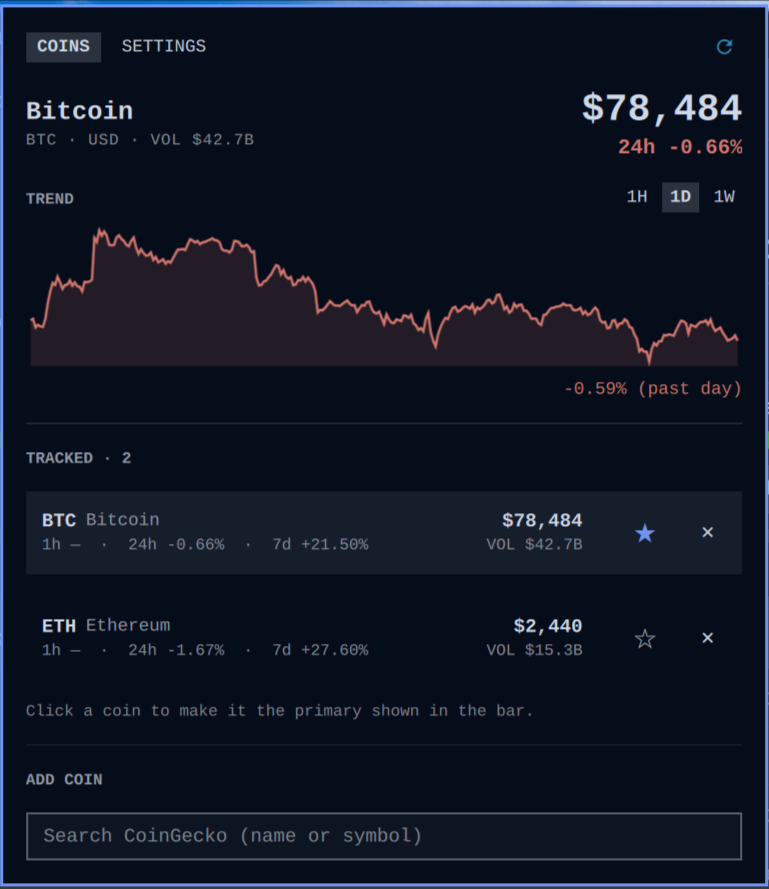
- Coins — primary-coin hero with USD price and 24h volume, a trend line with 1 hour / 1 day / 1 week ranges, the tracked-coin list (USD price, volume, and 1h/24h/7d change for each coin), and CoinGecko search to add any coin by name or symbol. Click a coin (or its ★) to make it the primary shown in the bar; ✕ removes a coin.
- Settings — the check-frequency slider and the flat-band slider.
Check frequency
CoinGecko's public API accepts roughly one call per minute from an IP (and
refreshes its cache every 30–60s), so the slider walks a ladder from that
minimum up to once per day: 1, 2, 5, 10, 15, 30, 60, 120, 240, 360, 720
minutes, 1 day. Default: once per hour. Each check is a single
/coins/markets call that covers every tracked coin, so tracking more coins
costs no extra calls — and exactly one poll loop runs no matter how many
monitors show the widget.
Flat band
24h moves smaller than the flat band count as "no direction": the bar shows
the price in plain white with a · glyph instead of a tint. The slider runs
from 0% (no flat band — every move tints) up to 5% in 0.1% steps.
Default: ±0.5%.
Limits
The plugin treats its two untrusted inputs accordingly:
- Tracked coins: ids from IPC, the popup, or a hand-edited
shell.jsonare normalized and validated against CoinGecko's id format (lowercase, ≤64 chars) and the list is capped at 16 coins — so config growth is bounded no matter who writes to it. - Responses: every API response is piped through a producer-side byte cap (1 MiB) before it reaches the shell's memory, parsed result arrays and sparkline data are bounded, and remote strings are sanitized and rendered as plain text.
State
Everything lives inline on the widget's entry in ~/.config/omarchy/shell.json:
coins— tracked CoinGecko ids (default:["bitcoin", "ethereum"]; capped at 16, ids restricted to CoinGecko's lowercase id format)primary— coin shown in the bar (default:"bitcoin")intervalMin— check frequency in minutes, snapped to the ladder (default:60)flatThresholdPct— flat band in percent (default:0.5)popupPosition—icon(opens under the bar icon, default) orcenter
All of it is editable from the popup, so you never have to touch the file.
Install
omarchy plugin add https://github.com/crueber/omarchy-plugin-omacoin.git --enable --yes
or by hand:
git clone https://github.com/crueber/omarchy-plugin-omacoin.git \
  ~/.config/omarchy/plugins/crueber.omacoin
omarchy-shell shell rescanPlugins
omarchy plugin enable crueber.omacoin
Requires curl (used for all CoinGecko requests). No API key: everything
runs on CoinGecko's public endpoints, rate-limited to one call per minute
(enforced by the plugin itself).
Uninstall
omarchy plugin disable crueber.omacoin
omarchy plugin remove crueber.omacoin
or by hand: remove the widget from your bar layout in
~/.config/omarchy/shell.json, delete
~/.config/omarchy/plugins/crueber.omacoin, and restart the shell
(omarchy restart shell). All plugin state lives inline on the widget's
entry in ~/.config/omarchy/shell.json — removing the entry removes every
trace; no other files are written.
Dependencies
curl— every CoinGecko request (markets, search, market chart). Standard on Omarchy installs.- Network access to
api.coingecko.com(public API, no key).
Mirrored on Forgejo.
License
MIT