
RPG Dice
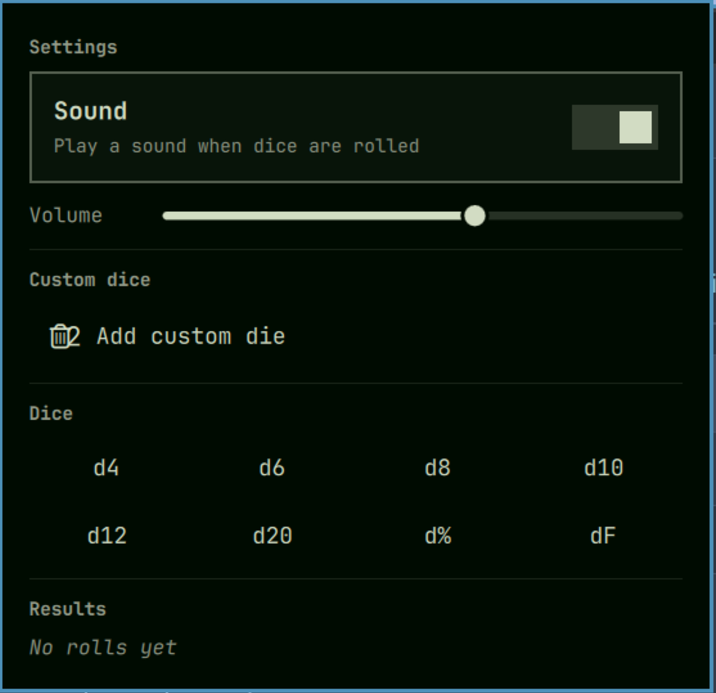
An Omarchy shell plugin that rolls tabletop RPG dice from the status bar — standard polyhedral dice, Fate dice, and your own custom dice, with an optional roll sound.
Features
- Standard dice — d4, d6, d8, d10, d12, d20, d% (d100).
- Fate dice (dF) — six faces: two
-, two blank, two+. - Custom dice — numeric (1–1,000,000 sides) or explicit sides (any labels,
e.g.
heads, tailsor1, 2, sword, shield). - Three-section panel — Settings, Dice, Results.
- Debounced rolling — click any number of dice, then 1.5s after your last
click everything rolls together and groups by type (
d6: 2, 5, 3 d8: 8). - Sound — toggleable roll sound with adjustable volume.
- Persistent state — sound, volume, and custom dice survive restarts.
Installation
omarchy plugin add ssh://git@git.packden.us:2288/crueber/omarchy-plugin-rpgdice.git --enable
Or clone manually:
git clone ssh://git@git.packden.us:2288/crueber/omarchy-plugin-rpgdice.git \
  ~/.config/omarchy/plugins/crueber.rpgdice
omarchy-shell shell rescanPlugins
omarchy plugin enable crueber.rpgdice center
Removal
omarchy plugin remove crueber.rpgdice --yes
This disables the widget, deletes the plugin, and rescans the shell. Because the
plugin is a git checkout, the directory is removed outright (the source stays
upstream). Omit --yes to be prompted for confirmation.
To keep it installed but hide it from the bar instead:
omarchy plugin disable crueber.rpgdice
Settings are kept under ~/.local/state/omarchy/rpgdice/state.json, so
reinstalling preserves your custom dice.
Usage
Click the d20 icon in the bar to open the panel.
- Roll — click one or more dice buttons. The panel waits 1.5s after your
last click, then rolls everything together. Results group identical dice:
d6: 3, 4, 5, joined per type for mixed rolls. - Custom dice — expand Add custom die in Settings. Pick Numeric and enter a side count (1–1,000,000), or Explicit sides and enter comma-separated labels, then Add die. Custom dice appear as roll buttons in the Dice section.
- Sound — toggle it and adjust volume in Settings.
Configuration
The bar icon is overridable via the widget's entry in
~/.config/omarchy/shell.json (the default is the d20 glyph, U+F1155):
{ "id": "crueber.rpgdice", "icon": "d20" }
Development
The shell hot-reloads on save, so changes under
~/.config/omarchy/plugins/crueber.rpgdice/ apply automatically. If a change
fails to land, force a reload:
omarchy-shell shell rescanPlugins
omarchy restart shell
Layout:
| File | Purpose |
|---|---|
manifest.json |
Plugin manifest (id, kinds, entry points, widget metadata) |
BarWidget.qml |
Bar pill (d20 icon), panel lifecycle, and IPC |
Panel.qml |
Popup panel: Settings/Dice/Results sections, roll debounce, sound, persistence |
Model.js |
Pure dice logic and state (de)serialization — no QML imports |
assets/dice-roll.wav |
Bundled roll sound |
Where the logic lives:
- Dice model —
STANDARD_DICEandFATE_DIEinModel.js. Add a new built-in die by appending toSTANDARD_DICE; the Dice grid picks it up automatically. - Rolling —
Model.rollDie(die)returns{ label, display, value }. Fate and explicit-sides dice are non-additive (value: null); only numeric dice contribute to the group total inPanel.qml:rollAll(). - Debounce —
Panel.qml'sdebounceTimer(1.5s) restarts on eachqueueDie()and rolls the accumulatedpendinglist on timeout. - Persistence — state is JSON under
~/.local/state/omarchy/rpgdice/state.json, read with a size-boundedProcess(symlink- and FIFO-safe) and written atomically viaUtil.execDetached.
Validate before publishing:
omarchy plugin validate ~/.config/omarchy/plugins/crueber.rpgdice