
Asked Dashboard
An Omarchy Shell bar widget that extends the centered clock with a three-view dashboard. The bar displays the day and time; clicking it opens the Overview, Media, and Weather views.
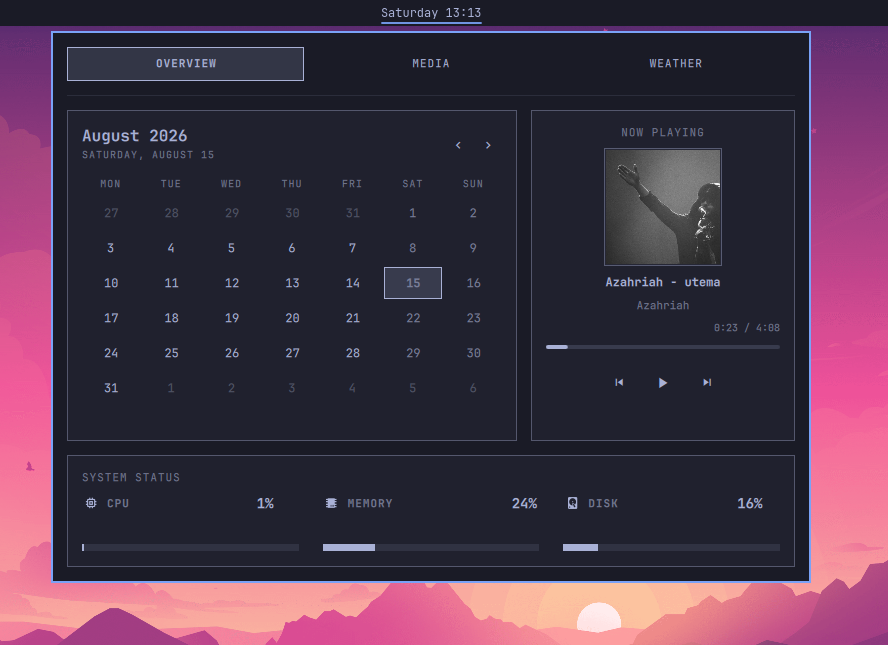
Features
Top Bar
- Configurable day and time format.
- Stacked clock rendering for left and right vertical bars.
- Open or close the dashboard with a left click.
- Uses the active Omarchy theme colors, font, spacing, and borders.
- Only one widget instance can be placed on the bar.
Overview
- Monthly calendar with Monday as the first day of the week.
- Previous and next month controls.
- Highlight for the current day.
- Cover art, title, and artist from the active MPRIS source.
- Previous, play/pause, and next controls.
- Continuously updated, seekable playback progress bar.
- CPU, memory, and root disk usage.
Media
- Large cover art and detailed media metadata.
- Previous, play/pause, and next controls.
- MPRIS playback position updated every 500 ms.
- Current and total playback time.
- Seekable playback progress bar.
- Per-player MPRIS volume control for the selected media source.
- Source selector when multiple MPRIS players are available.
- Filters the
playerctldproxy to avoid duplicate sources.
Weather
- Current temperature and weather icon.
- Apparent temperature, wind speed, and humidity.
- Five-day forecast with minimum and maximum temperatures.
- Uses the existing Omarchy weather location setting.
- Fetches data from the Open-Meteo API.
Requirements
- Omarchy 4 or newer with the current Omarchy Shell plugin API.
- Quickshell with MPRIS support.
bash,curl,awk,df, and the Linux/procfilesystem.- An internet connection for weather data.
- An Omarchy Nerd Font-compatible font for icons.
This plugin is Linux- and Omarchy-specific. It cannot be used unchanged in an
unrelated Quickshell configuration because it depends on Omarchy's qs.Commons
and qs.Ui components.
Installation
From a Git Repository
omarchy plugin add https://github.com/cucu0628/omarchy-dashboard.git --enable --yes
Omarchy clones the repository into:
~/.config/omarchy/plugins/cucu0628.dashboard/
Manual Installation
Place the complete plugin directory at:
~/.config/omarchy/plugins/cucu0628.dashboard/
Then rescan and enable it:
omarchy-shell shell rescanPlugins
omarchy plugin enable cucu0628.dashboard
Verify the installation with:
omarchy-shell shell listPlugins
The cucu0628.dashboard entry should have enabled set to true.
Top Bar Configuration
The default section is center. To replace the stock clock, replace the
omarchy.clock entry in the center layout of
~/.config/omarchy/shell.json with:
{
  "id": "cucu0628.dashboard",
  "format": "dddd HH:mm"
}
Set centerAnchor to the dashboard as well:
"centerAnchor": "cucu0628.dashboard"
Do not replace your entire shell.json with a short example. That file may
also contain the rest of your bar layout, idle timers, and other plugins.
The Shell normally reloads configuration changes automatically. If it does not, run:
omarchy restart shell
Clock Format
The format setting accepts a Qt date and time format.
| Setting | Example |
|---|---|
dddd HH:mm |
Saturday 12:30 |
ddd HH:mm |
Sat 12:30 |
HH:mm |
12:30 |
yyyy-MM-dd HH:mm |
2026-08-15 12:30 |
For a vertical bar, use verticalFormat. The default value renders the hour,
a separator, and the minutes as three stacked bar slots:
"verticalFormat": "HH\n—\nmm"
Usage
- Click the clock on the top bar to open or close the dashboard.
- Use the
OVERVIEW,MEDIA, andWEATHERtabs to switch views. - Use the calendar arrows to change the displayed month.
- Click or drag a playback progress bar to seek.
- The volume bar controls the selected MPRIS player's own volume.
- When multiple players are active, source buttons appear at the top of the Media view.
- Press
Escapeto close the panel.
The playback progress bar is enabled only when the selected MPRIS player supports seeking and reports the total media length. Some live streams do not provide these capabilities.
IPC
The dashboard can also be controlled directly:
omarchy-shell cucu0628.dashboard open
omarchy-shell cucu0628.dashboard close
omarchy-shell cucu0628.dashboard toggle
These commands can be used from scripts or Hyprland keybindings.
Weather Location
The plugin reads the existing Omarchy weather state file:
~/.local/state/omarchy/settings/weather.json
Expected format:
{
  "name": "Veszprem",
  "latitude": 47.09327,
  "longitude": 17.91149
}
Use the Omarchy weather location tool instead of editing the file manually:
omarchy-weather-location --set "Budapest"
Weather data refreshes every 15 minutes. The plugin uses this Open-Meteo endpoint:
https://api.open-meteo.com/v1/forecast
Data Sources
| Data | Source |
|---|---|
| Date and time | Quickshell SystemClock |
| Media | Quickshell.Services.Mpris |
| Application volume | Selected MPRIS player's volume property |
| CPU | /proc/stat |
| Memory | /proc/meminfo |
| Disk | df -P / |
| Weather | Open-Meteo HTTPS API |
System statistics refresh every three seconds while the panel is open.
File Structure
cucu0628.dashboard/
├── manifest.json   # Omarchy plugin metadata and widget settings
├── BarWidget.qml   # Top-bar clock, click handling, and IPC entry point
├── Panel.qml       # Dashboard UI, services, and data collection
├── Model.js        # Calendar and weather helper functions
├── preview.png     # Marketplace and README preview image
├── LICENSE         # MIT license
└── README.md       # Documentation
Theming
The plugin does not define a fixed color palette. It uses the following shared Omarchy values:
Color.background,Color.foreground, andColor.accentColor.popupsStyle.fontStyle.spacingStyle.cornerRadiusBorder.controlSpec
As a result, Omarchy theme, font, and scaling changes are reflected in the dashboard automatically.
Permissions and Privacy
Omarchy Shell plugins are not sandboxed. Their QML code runs inside the
omarchy-shell process. Always review a plugin before installing it.
This plugin:
- reads local system statistics;
- controls MPRIS players owned by the current user;
- changes the selected MPRIS player's own volume;
- sends the configured weather coordinates to Open-Meteo;
- does not request elevated privileges;
- does not maintain its own database or history file.
Troubleshooting
The Plugin Does Not Appear
omarchy-shell shell rescanPlugins
omarchy plugin enable cucu0628.dashboard
omarchy restart shell
Ensure that both the directory name and the manifest ID are
cucu0628.dashboard.
The Panel Does Not Open
omarchy-shell cucu0628.dashboard open
quickshell log --pid "$(pgrep -n quickshell)" --tail 100 --no-color
No Media Information Is Shown
Check whether the player exports an MPRIS service:
busctl --user list --no-pager
The output should contain a service named org.mpris.MediaPlayer2.*.
Seeking Is Disabled
The selected player or content probably does not support the MPRIS seek operation. This is common for live streams and media with an unknown length.
Volume Control Does Not Work
Confirm that the selected player exports the MPRIS volume property. The
slider is disabled when the application does not support MPRIS volume control.
Weather Is Missing
- Check the
weather.jsonstate file. - Check your internet connection.
- Configure the location again with
omarchy-weather-location. - Previously loaded weather data remains visible if a refresh fails temporarily.
Development
Changes under ~/.config/omarchy/plugins/cucu0628.dashboard/ are normally
detected automatically by Omarchy Shell. To rescan manually:
omarchy-shell shell rescanPlugins
For a clean restart:
omarchy restart shell
Basic JSON and JavaScript validation:
jq empty manifest.json
node --check Model.js
Check runtime QML errors with:
quickshell log --pid "$(pgrep -n quickshell)" --tail 150 --no-color
Updating
To update a Git-managed installation:
omarchy plugin update cucu0628.dashboard --yes
If necessary, restart the Shell afterward:
omarchy restart shell
Removal
For an Omarchy-managed installation:
omarchy plugin remove cucu0628.dashboard
If the dashboard replaced the stock clock, restore the omarchy.clock entry
and set:
"centerAnchor": "omarchy.clock"
License
This project is licensed under the MIT License. See LICENSE for the full license text.