
Deskmate
An animated desktop companion for the Omarchy shell.
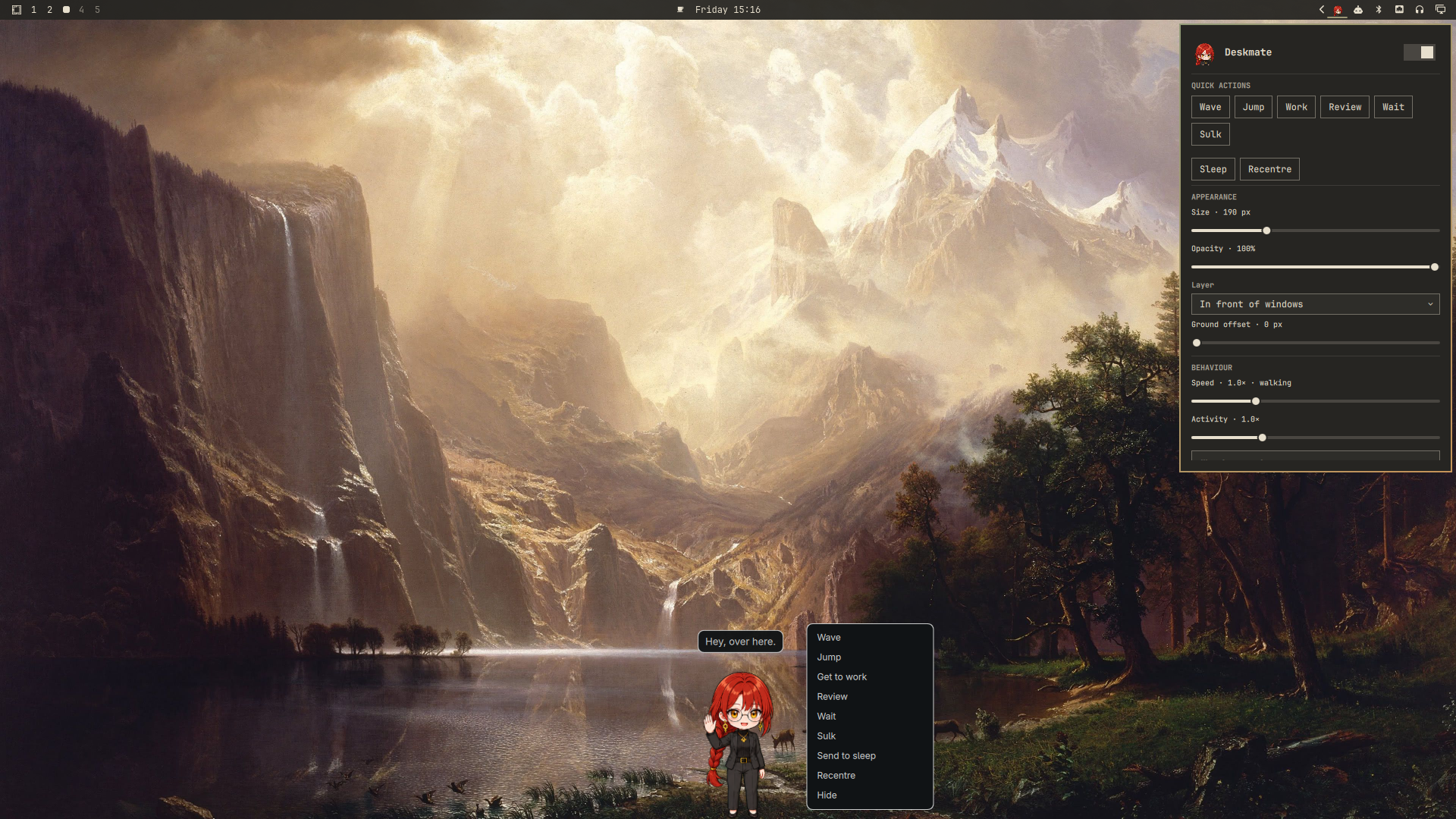
She lives along the bottom edge of your screen: strolls around on her own, waves when you click her, sulks when a command fails, and mirrors what your AI coding agent is doing. Pick her up and drag her to another monitor — she walks off on whichever one you drop her on.
Features
- 11 hand-normalised animations, 74 frames — idle, walk (both ways), run (both ways), wave, jump, sulk, wait, work and review.
- Real multi-monitor support. Every output gets its own transparent layer surface, but she lives in one shared coordinate space, so she renders across a monitor seam continuously while you drag her. She only wanders on her own on the monitor she calls home.
- A bar widget with a settings panel: size, opacity, layer, ground offset, speed, activity, home monitor, click action, and which behaviours she may pick on her own.
- Interactions: left click, right-click menu, middle click to sleep, drag to carry, scroll to resize, hover for a passing remark.
- Optional integrations: she sulks after a failed shell command, and follows your coding agent between working, waiting and reviewing — ready-made configurations for Claude Code, Codex and opencode. All are opt-in and do nothing until you wire them up yourself.
- Swappable character. The art is generated by a documented pipeline; point it at a different reference image and description and you get a different companion out of the same plugin.
Requirements
- Omarchy with the Quickshell-based shell (
omarchy-shell) and Hyprland. - Nothing else at runtime — no daemons, no network access, no extra packages.
Regenerating the sprite sheets (only if you want a different character) also needs the Codex CLI and Python with Pillow and NumPy. See Making it a different character.
Install
omarchy plugin add https://github.com/cucu0628/omarchy-deskmate --enable
omarchy restart shell
That registers the service. To put her face on the bar as well:
omarchy bar put cucu0628.deskmate --section right --index 0
If
omarchy bar putreports that the plugin "is on the bar" without adding anything, it is because the plugin ships both aserviceand abar-widgetkind, and its presence inplugins[]already counts as enabled. Add the widget by hand instead — put{ "id": "cucu0628.deskmate" }intobar.layout.rightin~/.config/omarchy/shell.json, which hot-reloads on save.
Manual install
git clone https://github.com/cucu0628/omarchy-deskmate \
  ~/.config/omarchy/plugins/cucu0628.deskmate
omarchy plugin validate ~/.config/omarchy/plugins/cucu0628.deskmate
omarchy plugin enable cucu0628.deskmate
omarchy restart shell
Uninstall
omarchy plugin disable cucu0628.deskmate
omarchy plugin remove cucu0628.deskmate
rm -f ~/.local/state/omarchy/deskmate.json          # her saved settings
Then remove the cucu0628.deskmate entry from bar.layout in
~/.config/omarchy/shell.json, and — if you enabled them — the two optional
integrations below, from ~/.bashrc and ~/.claude/settings.json.
The plugin writes to exactly two places outside its own directory: the state file above, and whatever you choose to add to those two files yourself.
Using her
| Input | What happens |
|---|---|
| Left click | Her click action — waving by default |
| Right click | Menu: wave, jump, work, review, wait, sulk, sleep, recentre, hide |
| Middle click | Send to sleep / wake up |
| Drag | Picks her up; she follows the pointer across monitors and drops where you let go |
| Scroll | Resize |
| Hover | She sometimes says something |
The bar widget: left click opens the settings panel, right click shows or hides her, middle click puts her to sleep.
She walks by default and only breaks into the run cycle above 1.6× speed; the panel's speed row says which gait is in effect. Her stride is timed off how fast she actually crosses the screen, so her feet never slide at any size or speed.
Command line
omarchy-shell deskmate show | hide | toggle | pause | resume | reset | status
omarchy-shell deskmate play  wave | jump | working | waiting | review | failed
omarchy-shell deskmate say   "text"
omarchy-shell deskmate agent working | waiting | review | failed | idle
omarchy-shell deskmate home  DP-2
bin/deskmate is a shorter wrapper over the same calls: bin/deskmate wave,
bin/deskmate status.
Optional integrations
Both are opt-in. The plugin never edits your shell or editor configuration; you add these yourself, and either can be switched off again from the settings panel without touching the files.
Sulking at failed commands
Source the hook from your ~/.bashrc (a .zsh version is next to it):
source ~/.config/omarchy/plugins/cucu0628.deskmate/hooks/deskmate-shell-hook.bash
Only a non-zero exit status is reported, so an idle prompt costs nothing.
Following your AI agent
She can mirror what your coding agent is doing: working while it runs, waiting
when it needs you, reviewing when it finishes. Ready-made configurations for
three agents live in hooks/. They all end up calling the same thing:
omarchy-shell deskmate agent working | waiting | review | failed | idle
working and waiting hold until the agent says otherwise; review lapses back
to normal behaviour after nine seconds. One-shot reactions — a click, a failed
command — briefly override the agent state and then hand it back.
Claude Code
Merge hooks/claude-code-hooks.json into ~/.claude/settings.json (it is
already shaped as a hooks block, so its contents go under your top-level
"hooks" key). Claude Code picks it up on the next session, or immediately
after you open /hooks once.
Codex
cp hooks/codex-hooks.json ~/.codex/hooks.json
Codex will not run a hooks file it has not been asked to trust. Start Codex once
after copying and accept the prompt to trust the file — until you do,
codex app-server reports the hooks as trustStatus: "untrusted" and nothing
fires. You can check what Codex makes of the file at any time:
printf '%s\n' \
  '{"jsonrpc":"2.0","id":1,"method":"initialize","params":{"clientInfo":{"name":"x","title":"x","version":"0"}}}' \
  '{"jsonrpc":"2.0","method":"initialized","params":{}}' \
  '{"jsonrpc":"2.0","id":2,"method":"hooks/list","params":{}}' | codex app-server
Two quirks worth knowing: Codex does not support async hooks yet — it silently
skips them — so these run synchronously, which is fine at roughly 20 ms per call.
And SessionEnd timeouts are clamped to three seconds.
opencode
mkdir -p ~/.config/opencode/plugin
ln -s ~/.config/omarchy/plugins/cucu0628.deskmate/hooks/opencode-deskmate.js \
      ~/.config/opencode/plugin/deskmate.js
Restart opencode. Some builds read ~/.config/opencode/plugins/ (plural)
instead — if nothing happens, try that path. The plugin collapses repeated
states, so a busy session does not spawn a process per tool call.
Settings
The panel writes to ~/.local/state/omarchy/deskmate.json, and the service
watches that file, so the two stay in sync and you can also edit it by hand.
| Key | Meaning |
|---|---|
shown, paused |
Visible; frozen (no autonomous behaviour) |
size, petOpacity |
Her height in pixels; opacity |
layer |
bottom (behind windows), top, overlay |
groundOffset |
Lift her off the bottom edge, for a bottom bar or a dock |
speed, activity |
Walking speed; how often she picks something to do |
homeScreen, posRatio, followDrag |
Which monitor she wanders on, where, and whether dropping her elsewhere moves home |
wander, bubbles |
Roam on her own; show speech bubbles |
clickAction |
wave, jump, random or none |
reactCommands, reactAgent |
The two integrations above |
doWave, doJump, doWorking, doReview, doWaiting |
What she may pick on her own |
Her layer surface is named cucu0628-deskmate, so you can target her from
Hyprland layer rules if you want to, for example, blur or dim her.
Making it a different character
The plugin is not tied to this character. Everything that makes her her is a reference image you supply plus one description file, and the rest of the pipeline is generic.
-
Point it at your character.
- A reference image. One clear, full-body picture of your character —
this is what the generator matches face, hair and outfit against. The
repository does not ship one; put yours at
~/deskmate-build/char-ref.pngor passDESKMATE_CHAR_REF=/path/to/character.png. tools/character.txt— a plain-language description of the same character: build, hair, eyes, clothing, colours. Be specific and repetitive; the exact wording is pasted into every prompt. Keep thePROPORTIONSsentence at the end — that is what stops the generator drifting between sheets.- A style anchor, which defaults to
assets/animations/idle/00.png— the idle frame this plugin actually ships. Every new sheet is matched against what is already on screen, so the set stays coherent as you rebuild it one animation at a time. Override withDESKMATE_STYLE_REFto change the art style itself; on the very first build of a brand-new character, point it at any image in the style you want.
- A reference image. One clear, full-body picture of your character —
this is what the generator matches face, hair and outfit against. The
repository does not ship one; put yours at
-
Generate the sheets. One call per animation; each writes
~/deskmate-build/raw/<action>.png.cd ~/.config/omarchy/plugins/cucu0628.deskmate tools/gen.sh idle 3 2 1536x1024 tools/prompts/idle.desc tools/gen.sh walkRight 4 2 1536x1024 tools/prompts/walkRight.desc tools/gen.sh wave 2 2 1024x1024 tools/prompts/wave.desc # ...and so on for walkLeft, runRight, runLeft, jump, failed, waiting, # working and review — the grid for each is listed in tools/rebuild-all.shThe
.descfiles describe the motion, not the character, so they carry over unchanged. Adjust the pronouns and any prop mentions (the laptop, the clipboard) if they do not suit your character. -
Cut the sheets into frames.
tools/rebuild-all.sh python3 tools/verify-scale.pyverify-scale.pyexits non-zero if any animation renders the character more than 8% larger or smaller thanidle. If one sheet is flagged, regenerate that sheet rather than fighting the numbers — a flagged sheet usually means the generator drew that pose with different proportions. -
Refresh the bar icon.
python3 tools/make-icon.pyIt finds the head automatically, so it works for any character the face detector can see.
-
Retune the personality. Speech bubbles, frame timings and the vertical arcs all live in
DeskmateBrain.js—LINES,CATALOGUE,LIFT,SQUASH. Nothing there mentions this character by name.
Finally, omarchy restart shell. Editing files under ~/.config/omarchy/plugins/
normally hot-reloads, but Qt caches compiled QML and decoded images per
directory, so a restart is the reliable way to see art or QML changes.
How the frames are built
Sheets are generated on a flat #00FF00 background, keyed out locally, and cut
into frames that all share one 512×384 canvas with the feet on a fixed ground
line at y=370. Motion that would be baked into the art — the jump arc, the
walk and run bob — lives in DeskmateBrain.js instead, so it stays tunable.
Scaling calibrates on the geometric mean of two measurements: the height of her face (hairline to chin) and the height of her whole silhouette. Neither works alone. Normalise on the silhouette and a leaning pose comes out too big, because the same character occupies fewer vertical pixels when she leans. Normalise on the face and a sheet the generator happened to draw with a larger head comes out too short. Splitting the difference keeps both errors small — currently under 5% across all eleven animations.
Two implementation notes worth knowing before you change the rendering:
- Every frame keeps a live
Image. Qt only holds a small budget of unreferenced pixmaps, so a sprite loop that reassigns oneImage'ssourcegets its frames evicted and re-decoded mid-cycle; theImageblanks for a moment each time and the character strobes.DeskmateService.qmlkeeps a hiddenImageper frame so the drawn one is always a cache hit and can load synchronously. - The hit area does not follow the animation's vertical lift. A hit area that moved every frame slid out from under a resting cursor and retriggered hover, which made the speech bubble strobe.
Files
manifest.json           kinds: service + bar-widget
DeskmateService.qml     behaviour, layer surfaces, dragging, IPC
DeskmateConfig.qml      the shared, file-backed settings object
DeskmateBrain.js        animation catalogue, arcs, behaviour picking, lines
DeskmateBarWidget.qml   bar icon
DeskmatePanel.qml       settings panel
assets/animations/      <action>/NN.png — 512x384, ground line at y=370
assets/icon.png         bar icon, cropped from the idle frame
bin/deskmate            CLI wrapper over the shell IPC
hooks/                  optional shell and agent integrations
tools/                  sprite generation, slicing, size verification, icon
Credits and licensing
The plugin code is MIT licensed — see LICENSE.
The character artwork was generated for this plugin from a reference image owned by the author, using OpenAI's image generation via the Codex CLI, and is distributed under the same license as the rest of the repository.