
Omatheme
A Quickshell app for designing an Omarchy Quattro theme in place — live on the desktop it is theming, painted from the very palette it edits.
It is built as a shell plus panels, switched by tabs that keep each panel's unsaved edits alive:
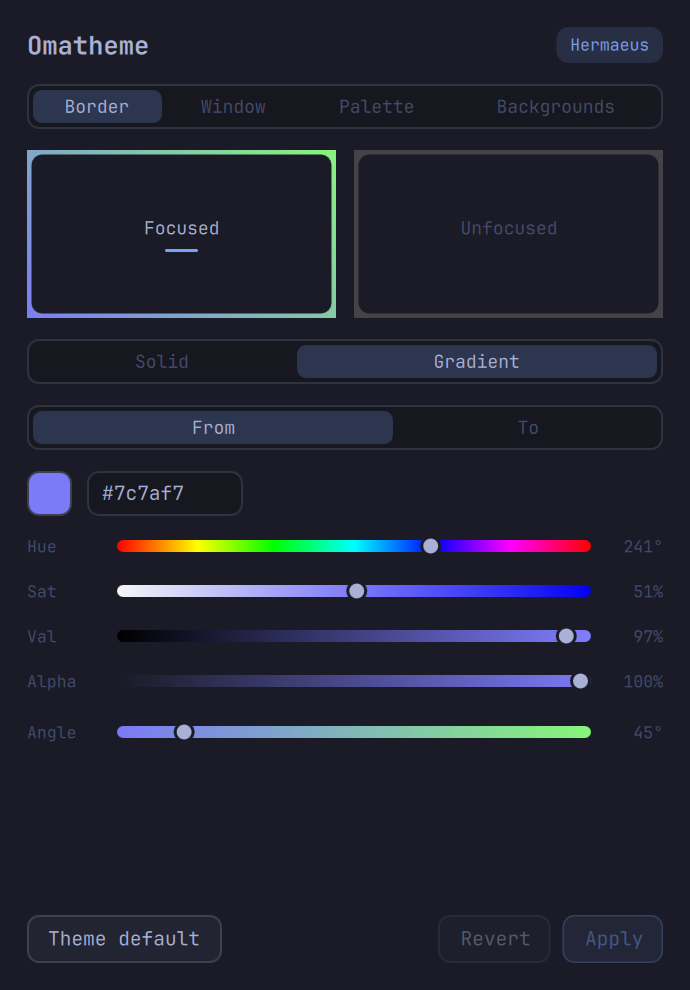
- Border — the window border colors. Quattro derives every border from
the active theme's
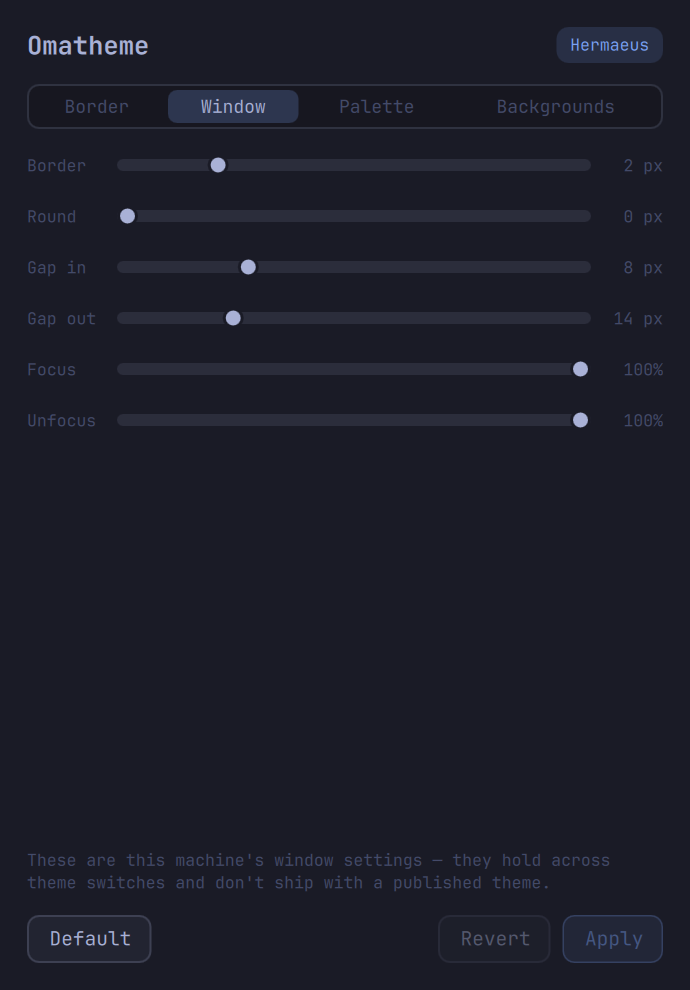
colors.toml(hyprland_active_border/hyprland_inactive_border), and the same key feeds the bar, notifications and the lock screen, so a change lands everywhere at once. Dragging pushes the border straight into the running compositor withhyprctl eval(Quattro's Lua parser rejectshyprctl keyword); nothing is written until Apply. - Window — the chrome Hyprland owns rather than the theme: border width,
corner rounding, gaps and opacity. Live preview via the same eval path;
Apply persists to
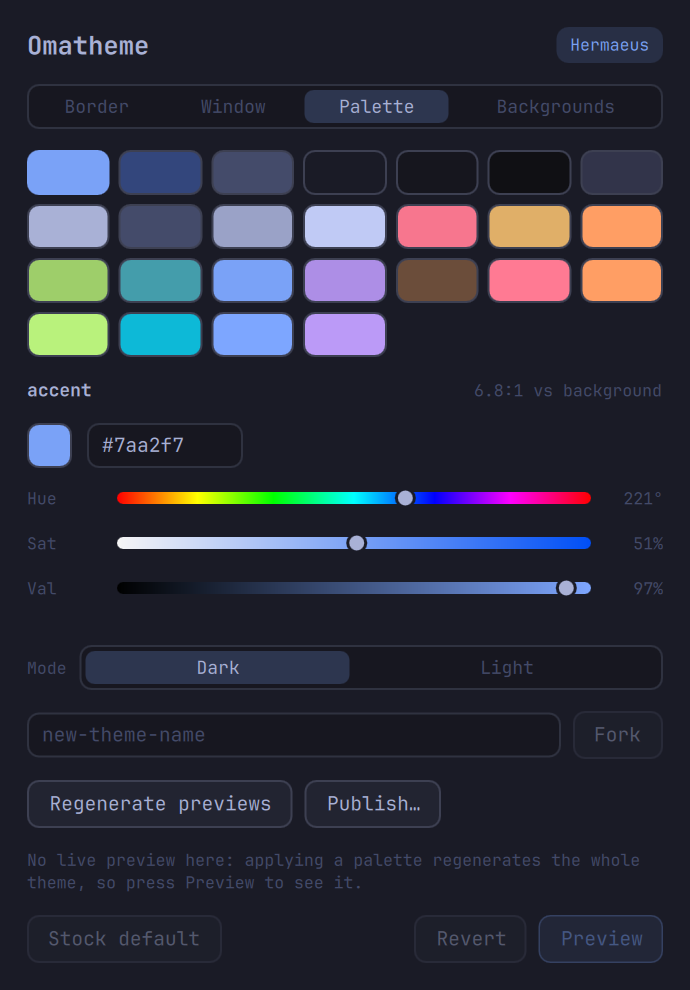
~/.config/hypr/looknfeel.lua, touching only the six keys it owns and leaving the rest of that file byte-identical. - Palette — a swatch grid over the theme's color keys, with a live WCAG
contrast readout for the selected key. Applying a palette regenerates the
whole theme (
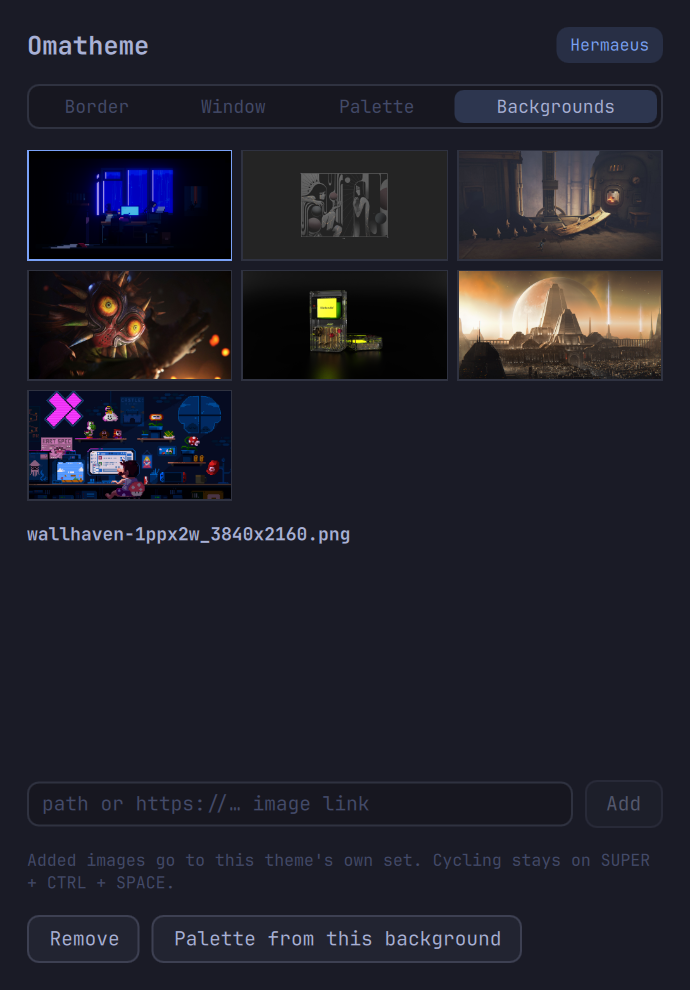
omarchy theme set, too slow for live-on-drag), so edits collect behind an explicit Preview — which also re-skins the app itself, since it paints from the theme it edits. This panel also carries the authoring actions: a Dark/Light mode switch, the fork field, preview regeneration and publishing. - Backgrounds — a thumbnail grid over the theme's background set: click
to apply, add from a local path or an image URL, remove. Curating what a
theme ships lives here; cycling between backgrounds stays with Omarchy
(
SUPER + CTRL + SPACE). "Palette from this background" generates a candidate palette from the selected wallpaper and stages it in the Palette panel as pending edits — nothing touches disk until you judge the swatches and press Preview.
 |
 |
 |
 |
Editing a stock theme never touches /usr/share/omarchy: writes land in a
user overlay under ~/.config/omarchy/themes/<slug>/, which is Omarchy's
documented override mechanism. The window scales with
omarchy display text size, and panel content scrolls when a short screen
or a big text scale leaves it no room.
Authoring a theme
The tool's second job is making a theme that can leave your machine:
- Fork a starting point in the Palette panel — a stock theme, or the one you're running.
- Backgrounds: add the wallpapers the theme should ship (they go into
the fork's own
backgrounds/, so publishing carries them). - Palette: generate from a wallpaper, or edit by hand with the contrast hints; flip mode if you crossed the dark/light line.
- Regenerate previews so the theme switcher shows your fork's real face instead of its parent's (the capture briefly dodges the app's own window off-screen).
- Publish — the theme directory becomes a git repo with copy-pasteable
next steps; anyone installs it with
omarchy theme install <url>.
One inherited edge: forks copy their parent's neovim.lua / vscode.json
/ icons.theme, so a heavily recolored fork should have those edited by
hand — they are editor configs, not palette entries.
Shell-first architecture
QML draws, shell scripts mutate. Every panel has an omatheme-<domain>
helper with show / set / reset subcommands, so anything the GUI can do
is also reachable and testable from a terminal:
omatheme-state                   # current theme, palette, font, text scale
omatheme-border show
omatheme-border set --active "rgba(33ccffee) rgba(00ff99ee) 45deg"
omatheme-window set --rounding 12 --gaps-in 4
omatheme-window reset --all
omatheme-palette set --accent "#ff9e64"
omatheme-palette mode light
omatheme-palette generate wallpaper.png --apply
omatheme-palette fork my-new-theme
omatheme-bg add https://example.com/wallpaper.jpg
omatheme-bg set wallpaper.jpg
omatheme-preview regen
omatheme-publish --push git@github.com:you/omarchy-my-new-theme-theme.git
Install
Omatheme is an Omarchy shell plugin
— it runs as a panel inside the omarchy-shell process. It's listed on
omarchyplugins.com,
the community plugin directory.
omarchy plugin add https://github.com/Davies-Sam/omatheme.git --enable
External dependencies: Omarchy 4.0+ (Quattro), plus imagemagick
(palette generation, previews, the boot logo) and inotify-tools
(following external theme switches). jq and git are already Omarchy
core dependencies.
Remove it the same way any shell plugin goes:
omarchy plugin remove davies-sam.omatheme
Removal disables the panel first and never touches your themes — the
forks you made live in ~/.config/omarchy/themes/ and stay yours.
Then summon it:
omarchy-shell shell toggle davies-sam.omatheme '{}'
or bind that — in Quattro's ~/.config/hypr/bindings.lua:
hl.bind({ "SUPER", "SHIFT", "CTRL" }, "T", "exec",
  "omarchy-shell shell toggle davies-sam.omatheme '{}'")
and float it in ~/.config/hypr/hyprland.lua:
hl.window_rule({ float = true, match = { title = "^Omatheme$" } })
(Quickshell hardcodes the app-id org.quickshell for every surface, so
rules must match on the title.)
Optional extras, for a launcher entry and terminal-friendly helpers — from the installed plugin directory:
PLUGIN=~/.config/omarchy/plugins/davies-sam.omatheme
ln -s "$PLUGIN/bin/omatheme" ~/.local/bin/omatheme
ln -s "$PLUGIN/share/applications/omatheme.desktop" ~/.local/share/applications/
mkdir -p ~/.local/share/icons/hicolor/scalable/apps ~/.local/share/icons/hicolor/256x256/apps
ln -s "$PLUGIN/share/icons/hicolor/scalable/apps/omatheme.svg" ~/.local/share/icons/hicolor/scalable/apps/
ln -s "$PLUGIN/share/icons/hicolor/256x256/apps/omatheme.png" ~/.local/share/icons/hicolor/256x256/apps/
Developing
Work in a clone, deploy by copy (the plugin folder may not contain symlinks, and the shell only hot-reloads real file changes — a restart picks up changes reliably):
rsync -a --delete --exclude .git ./ ~/.config/omarchy/plugins/davies-sam.omatheme/
omarchy-restart-shell
omarchy-shell shell summon davies-sam.omatheme '{}'
tests/run exercises every bundled helper end to end on a throwaway
fork and restores the desktop it started on.
Adding a panel
- Write
Panels/<Name>Panel.qml— a ColumnLayout owning its own state, processes and action buttons, likePanels/BorderPanel.qml. - Add a small
omatheme-<domain>helper next to the others for the reads and writes it needs (omatheme-libhas the shared theme plumbing). - Add one entry to
panelsinOmatheme.qml. The switcher appears automatically at two panels.
Development notes and the original build plan live in omatheme-goal.md.