
Stock Ticker
Real-time stock price ticker with an interactive line chart for the Omarchy Quattro bar.
Screenshots
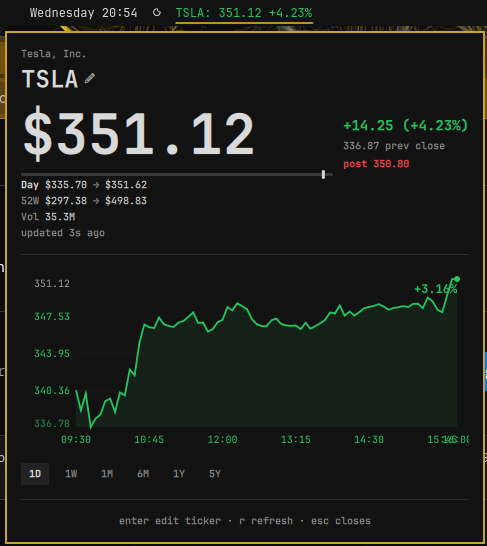
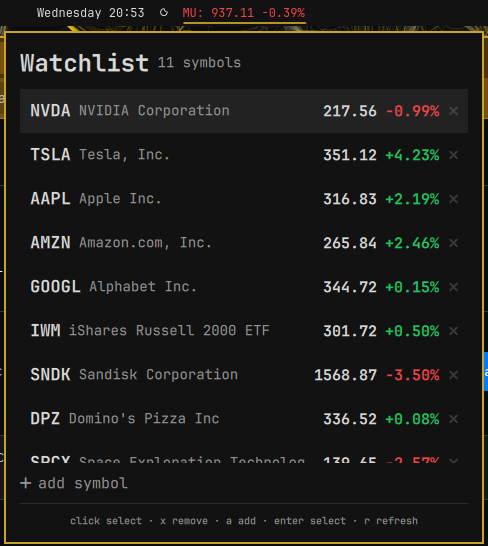
| Details panel | Watchlist |
|---|---|
 |
 |
Install
omarchy plugin add https://github.com/dchristensen8/omarchy-stock-ticker.git --enable
Usage
Bar label
Shows the ticker (uppercase), the latest price, and the day's percent change, e.g. MU: 937.85 -7.3%. The label color follows the day's move: green when up, red when down, dimmed when the data is stale (no successful fetch within three refresh cycles).
Click the label to open the details panel; right-click opens the watchlist; middle-click refreshes immediately.
Watchlist
Right-click the bar label to open the shared watchlist pane. It shows every symbol you're tracking with a live mini-quote (price + day's change, color-coded the same as the bar label).
- Click a row to switch the widget to that ticker (closes the watchlist pane)
- Hover a row to pre-highlight it, then
Enterto select ↑/↓(ork/j) to move the selectionxor the red ✕ to remove a symbolaor the "+ add symbol" row to add one; additions are validated against Yahoo before they are saved (typos are rejected with "Ticker not found")
The watchlist is stored in ~/.local/share/stock-ticker/watchlist.json
(symbols plus a cache of the last-known mini-quotes, so the pane isn't blank on
first open). The file is shared by all instances of the widget, and writes are
merged against the latest on-disk state. Mini-quotes refresh sequentially —
one request at a time, every 45 seconds — only while the watchlist pane is
open, so a large list can't hammer the API or interfere with the primary
ticker's own retry/backoff behavior.
Details panel
- Company name, ticker (editable — see below), price with currency
- Day's change ($ and %), previous close, currency
- Day range bar with a marker at the current price, plus day low → high
- Click Day or 52W to switch the range bar between the daily range and the 52-week range (resets to Day when the panel closes); 52-week low → high shown alongside
- After-hours / pre-market price in the stats column (e.g.
post 310.22), colored by the change vs the regular close (today's close after hours, the prior close pre-market); the bar's main price stays on the regular close - Volume (abbreviated:
12.4M,340K) - "Updated Xs ago" freshness line (amber when stale)
- Interactive line chart with a hover crosshair showing
price · time - Timeframe selector: 1D, 1W, 1M, 6M, 1Y, 5Y
- "Ticker not found" feedback when a symbol does not exist
Keyboard
| Key | Action |
|---|---|
Enter |
Edit ticker symbol (quote pane) / select highlighted row (watchlist pane) |
← / → (or h / l) |
Step through timeframes |
↑ / ↓ (or k / j) |
Move watchlist selection |
x |
Remove the selected watchlist row |
a |
Add a symbol (watchlist pane) |
r |
Refresh now |
Esc |
Close the panel |
Tab / Shift+Tab |
Switch to the neighboring panel |
Refresh behavior
- The plugin refreshes automatically once per minute while the NYSE is open (9:30–16:00 ET, Mon–Fri) and once every 3 minutes while it's closed, so the after-hours/pre-market price keeps tracking without hammering the API.
- A manual refresh overrides the schedule and fetches immediately:
middle-click the bar label, or press
rin the panel. - On consecutive fetch failures the interval backs off exponentially (up to 8×), and resets after a successful fetch.
- An invalid ticker stops automatic retries until you edit the symbol.
Multiple tickers
The plugin supports multiple instances (allowMultiple: true). Add more than one entry to the bar layout, each with its own ticker. All instances share one watchlist (see above), so "stocks I'm tracking" lives in one place regardless of how many widgets are on the bar:
{
  "id": "dchristensen8.stock-ticker",
  "ticker": "MSFT"
},
{
  "id": "dchristensen8.stock-ticker",
  "ticker": "AAPL"
}
Configure
Change the tracked stock in ~/.config/omarchy/shell.json:
{"id": "dchristensen8.stock-ticker", "ticker": "MSFT"}
Or click the ticker name in the panel and press Enter to edit it interactively.
Settings
| Key | Type | Default | Description |
|---|---|---|---|
ticker |
string | AAPL |
Stock symbol, e.g. AAPL, MSFT, GOOGL |
Tests
Pure helpers in Model.js are covered by Node's test runner:
node --test tests/model.test.js
Notes
- This plugin uses an unofficial/undocumented Yahoo endpoint — not a
supported API — and may break at any time. It may also be rate-limited. The
plugin is intentionally conservative (1 min during market hours, 3 min
otherwise); with multiple instances the default
allowMultiplemeans several widgets can still be polling at once. - Ticker input is validated against an allowlist (
A–Z,0–9, and./-/^/=, up to 10 chars) before any request is made, and the watchlist is capped at 50 symbols so a hand-edited file can't balloon the UI or the fetch queue.
Remove
omarchy plugin remove dchristensen8.stock-ticker
Dependencies
curl(for Yahoo Finance API requests)- Internet connection (for live price data)
License
MIT