
Network Throughput for Omarchy
A compact Omarchy Quattro bar widget that stacks upload above download and opens a native per-process activity panel.
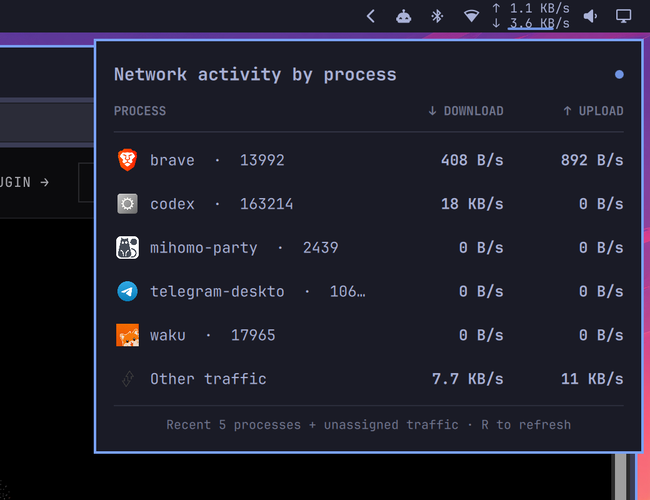
Features
- Interface-wide upload and download rates in a narrow two-line bar slot
- Stable recent-process roster that keeps idle apps visible at
0 B/s - Per-process TCP throughput without root privileges
- An Other traffic row for UDP/HTTP3, proxy/TUN, system-owned, short-lived, and protocol-overhead traffic
- Optimistic background refreshes that keep the last snapshot visible
- Theme-aware native Quattro panel and application icons
Install
omarchy plugin add https://github.com/egoist/omarchy-network-throughput.git --enable
The widget lands in the right section of the bar. Move it if needed:
omarchy bar move dev.egoist.network-throughput --section right
Configure
Set the fixed horizontal widget width (default 68):
omarchy bar set dev.egoist.network-throughput width 68
Set the number of recent process rows (default 5, range 1–10):
omarchy bar set dev.egoist.network-throughput processCount 5
How attribution works
The bar reads the active interface counters in /sys/class/net. The panel uses ss TCP counters to attribute traffic to user-visible processes, then reconciles the remaining interface bytes as Other traffic. This avoids claiming there is no activity when traffic cannot be safely assigned to a process.
Local loopback sockets may seed idle entries in the recent-process roster, but their traffic is never counted against interface throughput.
Dependencies and security
The plugin runs unsandboxed with your user permissions, like every Omarchy shell plugin. It does not use sudo, install packages, start services, or access the network itself.
It uses commands included with a standard Omarchy installation: Bash, ip, ss, awk, jq, sort, head, and date.
Update
omarchy plugin update dev.egoist.network-throughput
Remove
omarchy plugin remove dev.egoist.network-throughput
License
MIT