
dev.git — Git dashboard bar widget for Omarchy
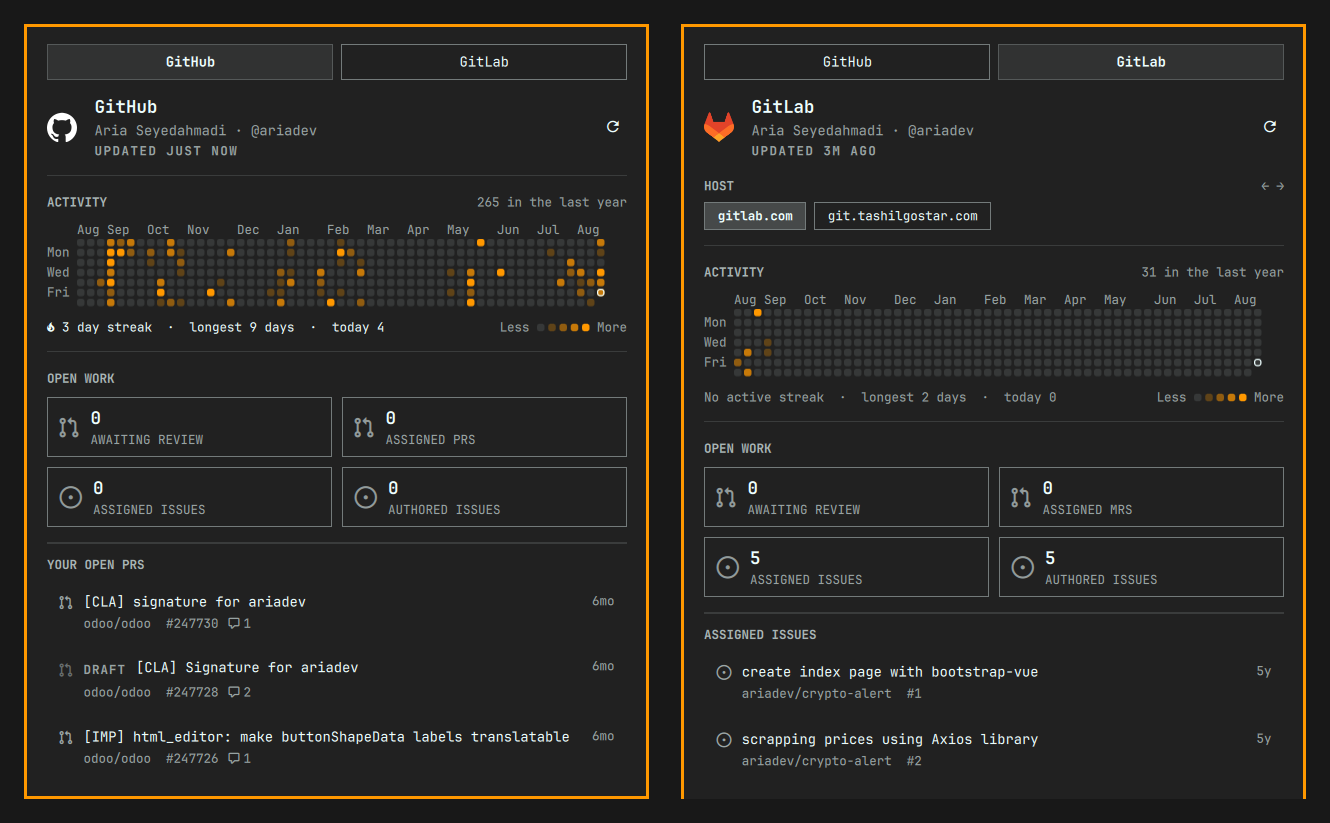
A native Omarchy shell bar widget that watches GitHub, GitLab and Gitea for open work: a full-year contribution graph, review queues, and your own pull and merge requests, all in one panel.
Features
- Full-year activity graph — trailing 53 weeks, quartile-shaded, with per-day tooltips, streaks and today's count
- Multiple hosts per provider — GitHub Enterprise and self-managed GitLab
and Gitea are discovered from
gh/glab/teaconfig, each with its own identity, graph and queues, behind a host switch inside the tab - Open-work grid — awaiting review, assigned PRs/MRs, assigned and authored issues; each click opens the pre-filtered queue page
- Queue rows carrying draft tag, approval check, comment count, repository, number and age
- A dot on the bar icon when something is waiting on your review
- Keyboard driven throughout
Install
omarchy plugin add https://github.com/ariadev/omarchy-dev-git.git --enable --yes
Needs curl and jq, plus any of gh,
glab and tea
signed in — the collector reads the credentials those CLIs already hold and
never stores a token of its own. All three are optional: each provider is
collected independently, so a missing or unauthenticated one never hides the
others.
Nothing is compiled or installed. Clone it and it runs.
Keyboard
| Key | Action |
|---|---|
j / k |
Move down / up the queue rows |
h / l |
Previous / next provider tab |
[ / ] |
Previous / next host |
g / G |
First / last row |
Enter |
Open the selected row |
p |
Pin the provider tab first |
r |
Refresh now |
Tab |
Neighbouring panel |
Esc |
Close |
Left click toggles the panel, middle click cycles providers, right click refreshes.
Open it from a keybinding
The panel exposes an IPC target, so it can be bound to a key. Add to
~/.config/hypr/bindings.lua:
o.bind("SUPER + CTRL + G", "Git dashboard", "omarchy-shell dev.git toggle")
toggle, open, close, refresh and next (cycle provider) are all
available — omarchy-shell dev.git refresh refreshes without opening.
How it works
bin/gitwork runs on a timer (default 300 s) and writes one JSON overview to
~/.local/state/omarchy/git/overview.json, which the panel watches. It is a
bash script with its JSON transforms in bin/gitwork.jq.
GitHub needs one GraphQL request per host for identity, calendar and all five queues. GitLab takes one GraphQL request for identity and merge requests, REST for issues, and the events feed for the calendar — it has no calendar API — with page one reporting the page count so the rest are fetched together. Gitea has no GraphQL at all, but its issue search takes each queue as query parameters and answers pulls and issues from one row shape, so identity comes first and then the five queues and the heatmap fly together.
Every host is collected in its own subshell, so a run costs the slowest single host rather than the sum of them. A host that cannot be reached carries its last good record forward for up to six hours, marked stale, so a dropped VPN does not blank a working dashboard. An authentication failure is not carried: that data is genuinely gone.
Settings
| Key | Type | Default | Description |
|---|---|---|---|
refreshIntervalSec |
integer | 300 | Collector run interval (s) |
providers.github.enabled |
boolean | true | Show the GitHub tab |
providers.gitlab.enabled |
boolean | true | Show the GitLab tab |
Tests
./tests/run.sh
No network or credentials required — every host the suite touches is deliberately unreachable.
License
MIT