
XCompose Picker for Omarchy
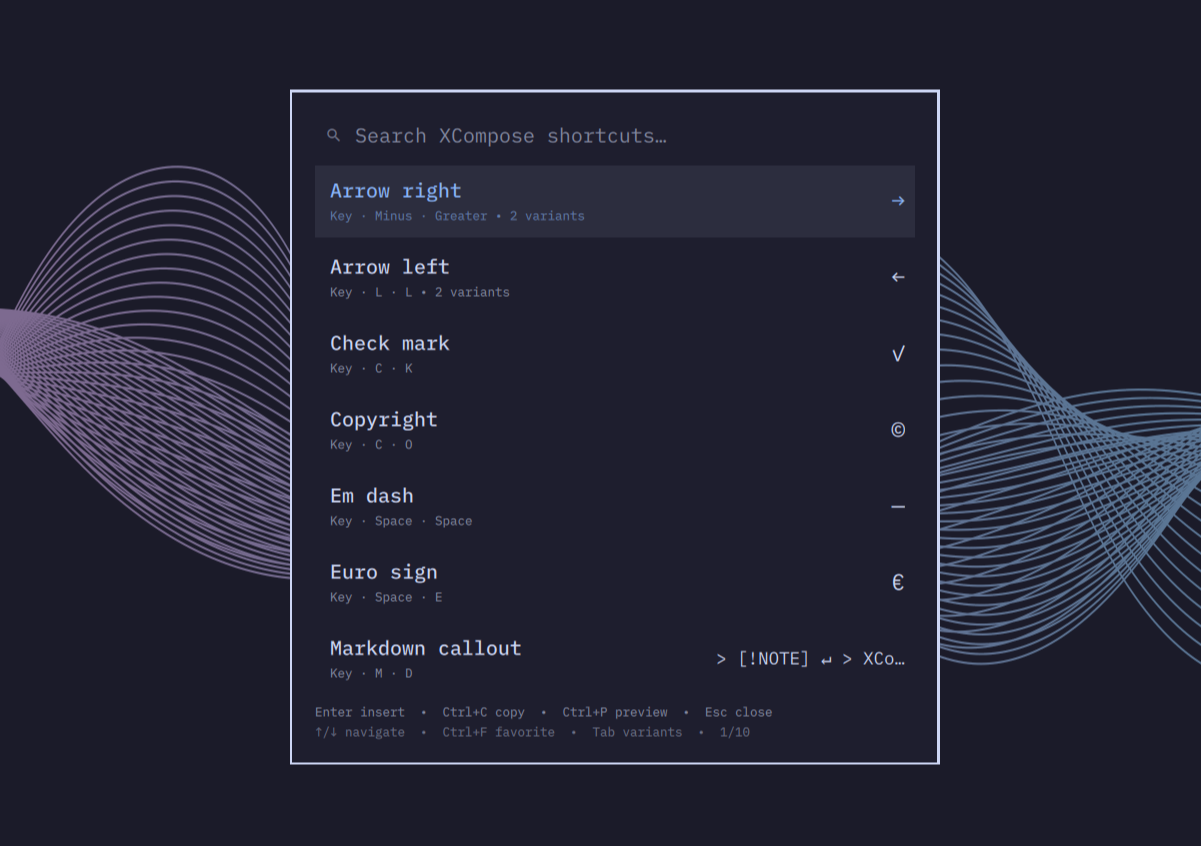
Search, inspect, and insert shortcuts from your personal XCompose file without leaving Omarchy Shell.
The picker reads $XCOMPOSEFILE when set, otherwise ~/.XCompose (or a
configured source). It indexes direct rules only by default, so system compose
tables referenced with include "%L" never overwhelm personal shortcuts;
includes can be enabled explicitly with roots and size caps.
Preview
Demo
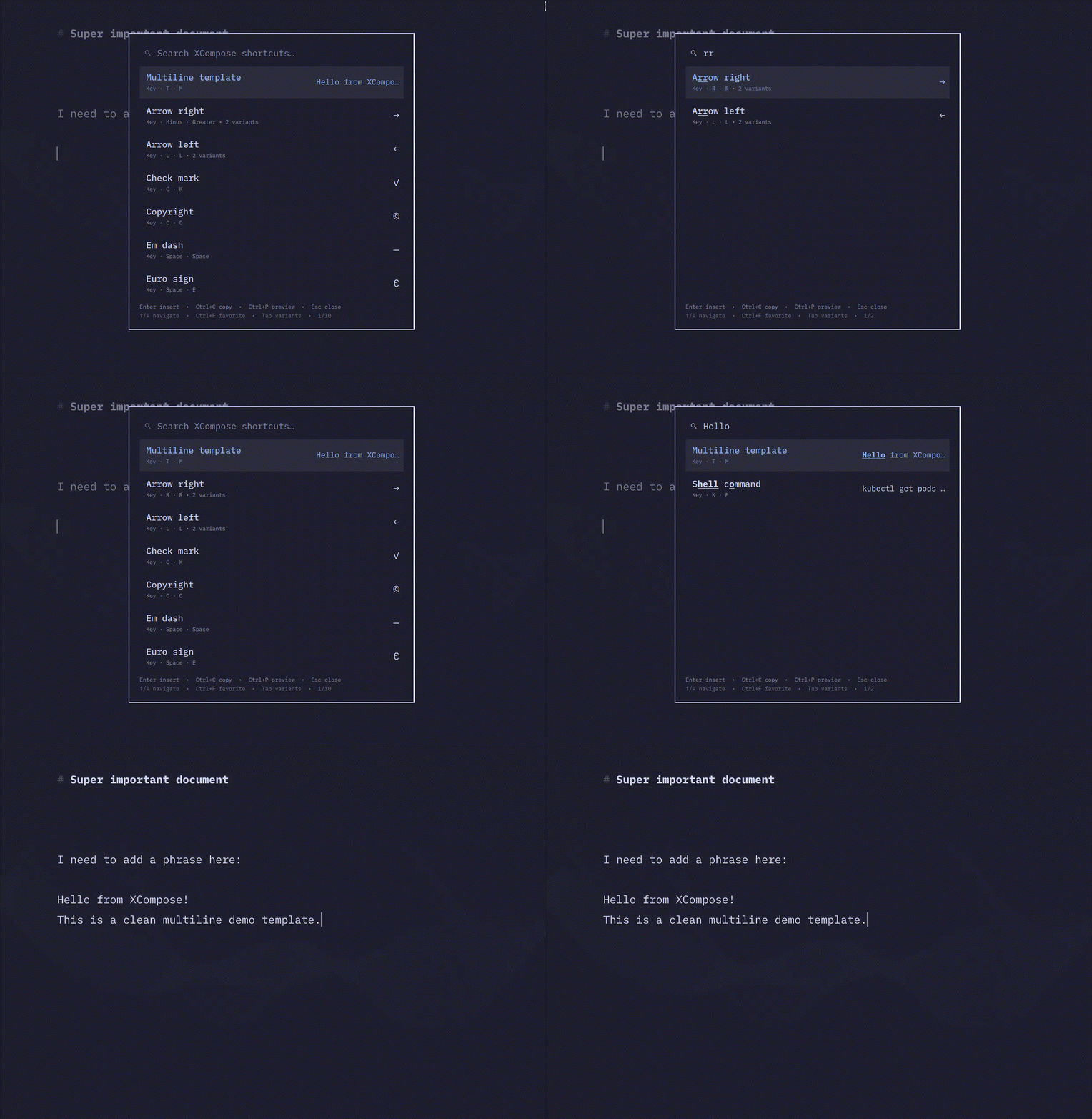
Open the included feature showcase with one command from the installed plugin:
~/.config/omarchy/plugins/dev.ilegna.xcompose/scripts/demo
From a repository checkout, scripts/demo --validate checks the example without
opening the picker. See examples/demo.XCompose for
names, tags, aliases, variants, escapes, multiline output, sensitive masking,
literal option-like values, and an optional include.
Features
- Search descriptions, output, key names, compact sequences such as
rr, Compose tokens such as<space> <e>, aliases, and#tags - Group all shortcuts that produce the same output
- Cycle variations with
TabandShift+Tab @name,@tags,@alias, and@sensitivemetadata in XCompose comments- Sensitive values hidden in the UI, revealed one selected entry at a time with
Ctrl+R, inserted through a0600file - Diagnostics pane (
Ctrl+D) for parse, config, and include problems - Optional
includesupport with roots, size caps, and cycle protection - Configuration file for source paths, named sources, search, UI, and security
- Live reload while the picker is open
- Local, opaque usage history with no telemetry
- Favorites, stored locally as opaque entry IDs
- Safe clipboard-and-paste insertion using
wl-copyandwtype - Configurable, reversible
SUPER + Qkeybind helper
Requirements
- Omarchy Quattro with shell plugin support
wl-clipboard,wtype, and Node.js (for bounded local-file reads)~/.XCompose, or anXCOMPOSEFILEenvironment variable
Install
Review third-party plugin code before enabling it: Omarchy plugins run inside the long-running, unsandboxed shell process.
omarchy plugin add https://github.com/marlonangeli/omarchy-xcompose.git --enable
Open it directly before configuring a keybind:
omarchy-shell shell summon dev.ilegna.xcompose
Usage
| Key | Action |
|---|---|
| Type | Search descriptions, output, or sequences |
| Up / Down | Move selection |
| Home / End | First / last result |
| Page Up / Page Down | Move by one page |
| Tab / Shift+Tab | Cycle shortcuts for the selected output |
| Enter | Insert the selected result |
| Ctrl+C | Copy the selected result without inserting |
| Ctrl+F | Toggle the selected shortcut as a favorite |
| Ctrl+P | Toggle the full result preview |
| Ctrl+D | Toggle the diagnostics pane |
| Ctrl+R | Reveal or hide the selected sensitive value; navigation remasks it |
| Escape | Close diagnostics or preview, clear search, then close |
Long or multiline values are inserted in full. The results list keeps a compact,
single-line preview so one entry cannot cover another; press Ctrl+P to inspect
the selected value in a wrapped, scrollable full preview before inserting it.
Favorites rank above history when the search is empty; exact and fuzzy search relevance still takes priority while filtering.
Compose tokens can be typed literally. For example, <space> <e> finds a rule
whose sequence contains Space followed by E; add ordinary words such as
euro to require both the tokens and the normal fuzzy search match.
A leading literal space is also a Space token: type space then n to find
<space> <n>. The search field renders literal spaces as ▁ for visibility,
while preserving the actual characters for matching; use explicit tokens such
as <space> <space> when searching for repeated spaces.
Common leading punctuation also searches its Compose key: ., ,, :, ;,
<, >, /, \, [, ], brackets, quotes, and standard symbol keys.
For example, typing / finds rules containing <slash>.
Visible matching text is bold and underlined directly in the description,
output, and Compose sequence. When @name supplies the displayed label, the
underlying description remains searchable even though that hidden text cannot be
highlighted.
XCompose descriptions and metadata
Comments immediately before a rule become its description. An inline comment overrides that inherited description for one rule. Comments also accept search tags, aliases, display names, and a sensitivity marker.
# Arrow right @tags: navigation @alias: seta
<Multi_key> <r> <r> : "→"
<Multi_key> <minus> <greater> : "→"

# @name: Euro sign @tags: currency
<Multi_key> <space> <e> : "€"

# Personal password @sensitive
<Multi_key> <space> <p> : "hunter2"
#navigation filters by tag. Sensitive values show as •••••• until Ctrl+R
reveals the selected entry. Navigation remasks it, and staging failures stop the
operation rather than putting the value in the process argument list.
See XCompose format for the full syntax and diagnostics.
Configure a keybind
The default is SUPER + Q.
~/.config/omarchy/plugins/dev.ilegna.xcompose/scripts/keybind install
Choose another binding explicitly:
~/.config/omarchy/plugins/dev.ilegna.xcompose/scripts/keybind install --binding "SUPER + CTRL + X"
The helper creates a timestamped backup, validates Hyprland, and restores the
previous file if validation fails. Re-running install replaces only the
plugin-managed block. Use --replace only after checking the current keybinding;
it adds the required hl.unbind() override.
Configuration
Everything is optional and lives in one file:
~/.config/omarchy-xcompose/config.json
It can set the preferred XCompose path, named sources, include roots, search
behaviour, UI toggles, clipboard clearing, and the allowed path roots. Without
it the picker uses $XCOMPOSEFILE and then ~/.XCompose.
See Configuration for the schema, source precedence, includes, sensitive values, and keybinding management.
Diagnose and remove
~/.config/omarchy/plugins/dev.ilegna.xcompose/scripts/doctor
~/.config/omarchy/plugins/dev.ilegna.xcompose/scripts/keybind uninstall
~/.config/omarchy/plugins/dev.ilegna.xcompose/scripts/uninstall
The uninstall wrapper removes only its marked keybind block before removing the plugin. Manually created bindings are untouched.
doctor checks required commands, resolves the same configured source as the
picker, checks plugin discovery and the managed keybinding, and reports duplicate
or conflicting XCompose sequences. See
Troubleshooting when a check fails.
Security and development
The plugin reads local XCompose files (plus opt-in includes) as regular files
only, invokes wl-copy and wtype, stores only opaque usage identifiers
locally, restricts summon payload paths to user-writable roots, and makes no
network requests or telemetry calls. See SECURITY.md.
For architecture, XCompose behavior, benchmarks, and local validation, see Architecture, XCompose format, and Benchmarks.
When a push to main changes manifest.json, the release workflow validates
manifest.json.version, creates the annotated v<version> tag, and publishes a
GitHub release from that tag. Missing releases for existing version tags are
published on the next successful main build, so release pull requests must bump
the manifest version before merging.