
Monitor Profiles
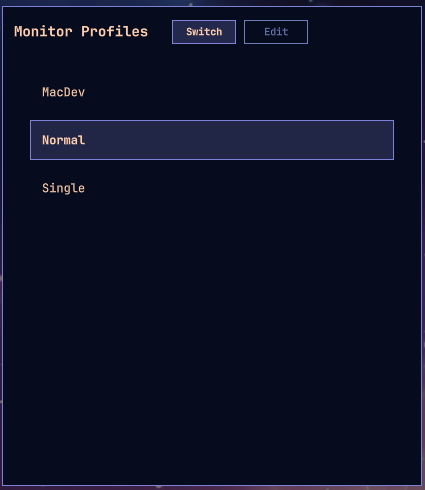
An Omarchy shell plugin for saving named Hyprland monitor layouts ("profiles") and switching between them — e.g. going from three monitors down to just the laptop panel and back.
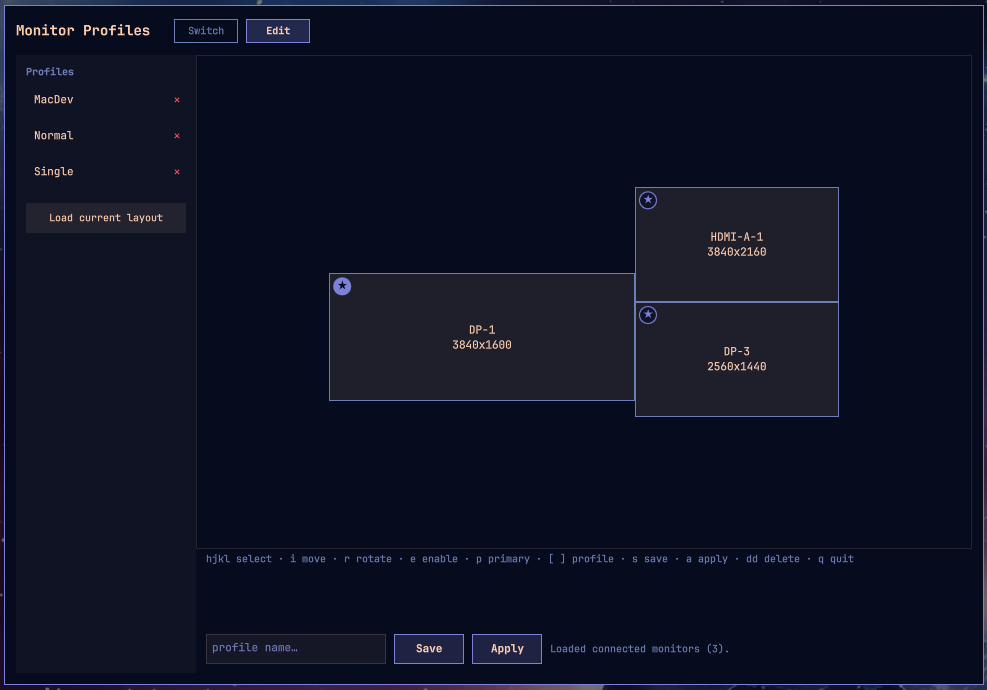
| Switch | Edit |
|---|---|
 |
 |
Quick start
omarchy plugin add https://github.com/steveandkureen/omarchy-monitor-profiles.git --enable
Open it via the Omarchy menu — search "monitors" (see "Getting to it without a mouse" below for a keybind too, if you want one).
The first time it opens, if nothing has told Hyprland to actually load the layouts this plugin writes, you'll see a setup banner instead of the switcher/editor. Click Add it for me on "Apply monitor layouts" — that's the one step that lets the plugin actually control your monitors. The banner's other item (an Omarchy menu entry) is only about finding the plugin again later, not required for it to work. Do that once and you're done: search "monitors" any time after to switch profiles or open the editor.
Requirements
- Omarchy quattro or later — specifically, a Lua-based Hyprland config
(
~/.config/hypr/hyprland.lua, requiringhypr.monitorsetc.). Earlier Omarchy releases used a plain-texthyprland.conf/monitors.conf, which this plugin doesn't target. - No other dependencies beyond what a working Omarchy install already has:
bash,hyprctl, and standard coreutils (grep,sed,ls,mkdir,rm), all invoked locally — no network access, no additional packages, no privilege escalation.
What it does
One panel, two modes:
- Switch — a compact, keyboard-driven list of saved profiles. Up/Down
(or j/k) to move the selection, Enter to apply it. An optional auto-advance
timer applies the current selection if left idle (default 10 seconds) —
pass
{"timeout": 0}to disable it. - Edit — a drag-and-drop canvas: monitors are drawn to scale and positioned proportionally to their real layout. Drag a tile to reposition it, click one to edit its resolution/refresh/scale/rotation/enabled state, then Save as a named profile or Apply immediately. One monitor is always "primary" (pin badge, the (0,0) anchor everything else is stored relative to); dragging it pans the canvas instead of moving it, so a layout with more monitors than fit comfortably on screen can still be recentered without disturbing the actual arrangement. Click another tile's pin to make it primary instead.
Applying a profile writes ~/.config/hypr/hypr_screen.lua as hl.monitor(...)
calls (the format Hyprland's Lua config actually understands — see
"Applying a profile", below) and runs hyprctl reload.
Optional: take over the Display bar widget
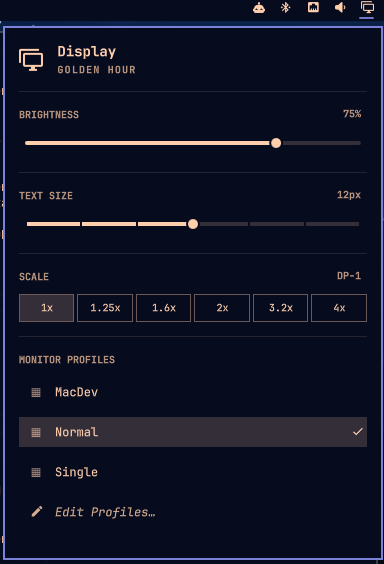
A second, separate plugin — dev.shantzware.monitor-profiles-display,
bundled in this same repo under display-takeover/ — can take over
Omarchy's first-party Display bar widget (SUPER+CTRL+D) entirely: same
bar icon, same brightness/text-size/scale controls, same keybind, but with
its "Displays" list (enable/disable a connected monitor) replaced by a
"Monitor Profiles" list. j/k/arrows to move, Enter or click to apply, a
checkmark next to the currently active one, and a trailing "Edit
Profiles…" row that opens this plugin's full editor. Esc closes, Tab
jumps to the next bar widget's dropdown.
It's a genuinely separate plugin id (not a second kind on this one) on
purpose — Omarchy's shell routes every toggle/summon/hide for a plugin
that's also kind:"panel" to the panel, never a bar widget, so
SUPER+CTRL+D would keep opening the full editor instead of the dropdown
if it lived on this plugin's own id. See
display-takeover/README.md for the full
explanation.
Opt-in, not automatic: the setup banner's third item ("Take over the
Display widget (optional)") does it for you in one click — copies
display-takeover/ into its own installed plugin directory and enables
it, the same way omarchy plugin clone copies a built-in plugin into an
editable one. It uses omarchy.clonedFrom in its manifest, the same field
omarchy plugin clone itself writes, to replace Display's exact slot in
the bar rather than adding a second icon next to it.
omarchy plugin disable dev.shantzware.monitor-profiles-display restores
the original Display widget; this plugin's own full editor is unaffected
either way, since it's a separate id.
Keyboard-only editing
Everything in the editor works without a mouse, in three vim-style modes (a hint row under the canvas always shows the current one's bindings):
Normal (default)
| Key | Action |
|---|---|
h j k l / arrows |
select the nearest tile in that direction |
i |
enter Move mode on the selected tile |
e |
toggle enabled/disabled |
r |
rotate 90° |
Shift+R |
save as a new name (enter Naming mode, current name pre-filled) |
p |
make the selected tile primary |
[ / ] |
previous/next saved profile |
n |
load connected monitors (including ones currently disabled) |
s |
save (immediate if named, else enters Naming mode) |
a |
apply now |
dd |
delete the current profile |
Tab |
switch between Switch/Edit panel modes |
q / Esc |
close the panel (works from either mode) |
Move (i from Normal) — h/j/k/l/arrows nudge the selected tile
(or pan the canvas, if it's the primary — same distinction as dragging it
with the mouse); hold Shift for a finer step. Esc returns to Normal.
Naming (s with no name yet, or Shift+R) — type to edit the name;
Enter saves, Esc cancels.
Install
omarchy plugin add https://github.com/steveandkureen/omarchy-monitor-profiles.git --enable
Or for local development, symlink this checkout into place and let Omarchy discover it:
ln -s "$(pwd)" ~/.config/omarchy/plugins/dev.shantzware.monitor-profiles
omarchy-shell shell rescanPlugins
omarchy plugin enable dev.shantzware.monitor-profiles
Getting to it without a mouse
There's no bar icon (this plugin declares kind: "panel", the same as
Omarchy's own first-party wifiqr/speedtest/disk-speedtest), so it
needs one of these:
- Omarchy menu — the idiomatic path for this class of plugin; none of
those three first-party ones use a dedicated keybind either. Search
"monitors" in the Omarchy menu, or run
omarchy menu summon monitor-profilesdirectly. Registered as a row in~/.config/omarchy/extensions/omarchy-menu.jsonc:"trigger.monitor-profiles": {"icon":"","label":"Monitor Profiles","aliases":["monitor-profiles","monitors"],"description":"Switch to a saved monitor layout","action":"omarchy-shell shell summon dev.shantzware.monitor-profiles '{\"mode\":\"switcher\"}'"} - A direct keybind, if you'd rather have one — faster once you've
picked a key, but not suggested by the plugin itself: picking one risks
colliding with an existing default the way this exact combo collided
with one of Omarchy's own. Add to
~/.config/hypr/bindings.luaby hand:
(Or bind a second key tohl.unbind("SUPER + SHIFT + P") o.bind("SUPER + SHIFT + P", "Monitor Profiles switcher", "omarchy-shell shell summon dev.shantzware.monitor-profiles '{\"mode\":\"switcher\"}'"){"mode":"editor"}— that's also the default when no mode is given.)
Omarchy has no manifest-level way for a plugin to declare or register a menu entry either, so it's suggested rather than automatic: the setup banner below offers to add it for you the first time it's missing (detected by looking for this plugin's id in the extensions file, not by which label you end up with — change it freely afterward).
The first time you open it, if hyprland.lua doesn't yet load what this
plugin writes (see "Applying a profile" below), and/or there's no Omarchy
menu entry yet, it shows a setup banner instead of the switcher/editor
with one checklist item per thing that's outstanding — Save and Apply
still work regardless (they're just file writes), but nothing reaches the
screen until hyprland.lua is wired up; the menu entry is just suggested,
not required. Each item's own "Add it for me" button does it for you;
"Skip for now" dismisses the whole banner for the rest of the session so
it won't re-nag on every keypress before you get to it.
Profile storage
Profiles live in ~/.config/hypr/profiles/*.conf, one monitor = ... line
per monitor. This is just the plugin's own storage format; Hyprland never
reads these files directly.
The first time the panel opens with no profiles saved anywhere yet, it
saves your live layout as one called current — so the switcher isn't
empty and there's a known-good fallback to revert to while you set up the
rest. This only happens once; delete current and it stays deleted unless
every other profile is gone too.
Applying a profile
Omarchy quattro moved Hyprland's own config from hyprland.conf/
monitors.conf to a Lua config chain (hyprland.lua → monitors.lua,
using hl.monitor({...}) calls). For a profile to actually take effect,
hyprland.lua needs to load what this plugin writes:
-- after require("hypr.monitors")
pcall(require, "hypr.hypr_screen")
(pcall so a fresh install — before any profile has been applied and the
file doesn't exist yet — doesn't break config parsing.)
Uninstall
omarchy plugin remove dev.shantzware.monitor-profiles
If you also took over the Display bar widget (above), that's a separate plugin id and removing this one doesn't touch it — it'd be left running on its own, orphaned but harmless. Remove it too if you want Display back:
omarchy plugin remove dev.shantzware.monitor-profiles-display
omarchy plugin remove unloads a plugin and removes it from
~/.config/omarchy/plugins/ (or, for a symlinked dev checkout, just
unlinks it — your clone is untouched either way). It does not remove,
and you may want to clean up by hand:
- The
pcall(require, "hypr.hypr_screen")line in~/.config/hypr/hyprland.lua(harmless to leave — thepcallno-ops once the file it requires is gone — but it's dead weight). ~/.config/hypr/hypr_screen.lua, the last-applied layout.~/.config/hypr/profiles/*.conf, your saved profiles.- Your own keybind in
~/.config/hypr/bindings.lua, if you added one.
Development
omarchy plugin validate .                                  # manifest schema
omarchy plugin validate display-takeover                   # ditto, for the second plugin
qmllint -I "$OMARCHY_PATH/shell" *.qml display-takeover/*.qml   # syntax
node test/model-security.test.js                           # profile-name/Lua-injection safety
node test/model-copy-sync.test.js                           # display-takeover/Model.js hasn't drifted
omarchy-shell shell summon dev.shantzware.monitor-profiles '{"mode":"editor"}'
omarchy-shell shell hide dev.shantzware.monitor-profiles
Editing a file under ~/.config/omarchy/plugins/<id>/ usually hot-reloads;
if changes don't seem to take (stale QML component cache), force a clean
reload with omarchy-restart-shell.
Files
manifest.json— plugin manifest (kind: panel)Panel.qml— the full switcher/editor entry point: layer-shell overlay, mode switch, dismiss, and the setup banner's wire-up logic (including installingdisplay-takeover/, below)SwitcherView.qml— the quick-switch list (inside Panel.qml)EditorView.qml— the visual editor (sidebar + canvas + inspector)MonitorRect.qml,InspectorField.qml,ActionButton.qml,ModeTab.qml— small shared componentsSetupBanner.qml,SetupItem.qml— first-run checklist (config wiring, Omarchy menu entry, optional Display takeover)Model.js— profile parsing/serialization, Lua translation, live-monitor mappingdisplay-takeover/— a second, separate plugin (kind: bar-widget) that takes over Omarchy's Display bar widget; see "Optional: take over the Display bar widget" above anddisplay-takeover/README.mdtest/model-security.test.js— adversarial tests for profile-name path traversal and Lua-injection escaping (node test/model-security.test.js)test/model-copy-sync.test.js— fails ifdisplay-takeover/Model.jsdrifts fromModel.js(node test/model-copy-sync.test.js)
License
MIT