
dev.windscribe — Windscribe bar widget for Omarchy
A native Omarchy shell bar widget for Windscribe: connection state at a glance in the bar, and a panel to connect, disconnect, guard the firewall, and pick from every location the CLI knows about.
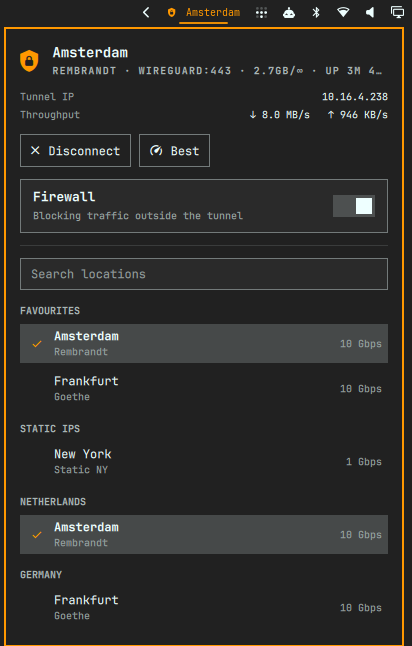
Features
- State in the bar — one icon, tinted by connection state, with the connected city beside it. It breathes slowly while a connect or disconnect is in flight, and carries a dot when something needs you (a failed action, or a session that is signed out).
- The connection, in full — city and server nickname, protocol, uptime, tunnel IP, live throughput, and data used against your plan's allowance.
- Controls — connect, disconnect, jump to the fastest location, and a firewall toggle.
- Every location, searchable — favourites and static IPs first, then all regions. Type to filter across region, city and nickname; the connected location is checked; unavailable ones are greyed out and inert.
- Keyboard driven throughout (see below).
Requirements
windscribe-clionPATH, signed in (windscribe-cli login).bash,ipandawk— used to read the tunnel interface's byte counters.
Nothing is compiled or installed. The widget never asks for or handles your credentials; signing in stays a terminal job.
Install
omarchy plugin add https://github.com/ariadev/dev.windscribe --enable --yes
omarchy bar put dev.windscribe --after omarchy.network
Or, for a copy already sitting in ~/.config/omarchy/plugins/dev.windscribe/:
omarchy-shell shell rescanPlugins
omarchy plugin enable dev.windscribe
omarchy bar put dev.windscribe --after omarchy.network
Settings
Set from the Omarchy setup UI, or with omarchy bar set dev.windscribe <key> <value>.
| Key | Default | What it does |
|---|---|---|
pollIntervalSec |
10 |
Status poll interval while idle. Transitions always poll every 2s. |
showLabel |
true |
Draw the connected city next to the icon. |
hideWhenDisconnected |
false |
Collapse the bar slot unless connected, connecting, or in trouble. |
showPublicIp |
false |
Look up the egress IP once per connection change. |
protocol |
"" |
protocol[:port] passed to every connect, e.g. tcp:80. |
Leave protocol empty and the CLI picks its own default, WireGuard:443. Some
networks drop that quietly: the connect never fails, it just sits at
"Connecting" forever. If windscribe-cli connect <place> tcp:80 works in a
terminal where the widget stalls, pin the same protocol here:
omarchy bar set dev.windscribe protocol tcp:80
showPublicIp is off by default because it is the only thing this widget does
that leaves your machine: it fetches your address from api.ipify.org. Every
other reading comes from windscribe-cli and /sys/class/net.
Mouse
| Action | Effect |
|---|---|
| Left click | Open the panel |
| Right click | Connect / disconnect |
| Middle click | Refresh status and locations |
Keyboard
| Key | Action |
|---|---|
j / k |
Move down / up the location list |
Enter |
Connect to the selected location |
/ |
Focus the search box |
Escape |
Clear the search, then leave it |
g / G |
First / last location |
c |
Connect to the last used location |
b |
Connect to the best location |
d |
Disconnect |
f |
Toggle the firewall |
r |
Refresh now |
Tab |
Switch to the neighbouring panel |
IPC
omarchy-shell dev.windscribe status      # "Connected — Copenhagen - LEGO"
omarchy-shell dev.windscribe toggle      # open/close the panel
omarchy-shell dev.windscribe connect     # last used location
omarchy-shell dev.windscribe disconnect
omarchy-shell dev.windscribe refresh
Notes on the CLI
Two behaviours of windscribe-cli shape how this widget is written, and are
worth knowing if you hack on it:
- It always exits 0 — even for an unknown subcommand. Exit codes carry no
information, so success is judged by re-reading
status, and failures are recognised from the text it printed. - It is single-instance. A second invocation prints
Windscribe CLI is already runninginstead of doing its job, and the lock outlives the process by a moment. Every call this widget makes goes through one gate with a short gap between calls, and a collision retries rather than being reported as a VPN problem.
Uptime is tracked client-side, because the CLI does not report it — so it is only shown for a connection this widget watched come up.
License
MIT