
Zavu Inbox for Omarchy
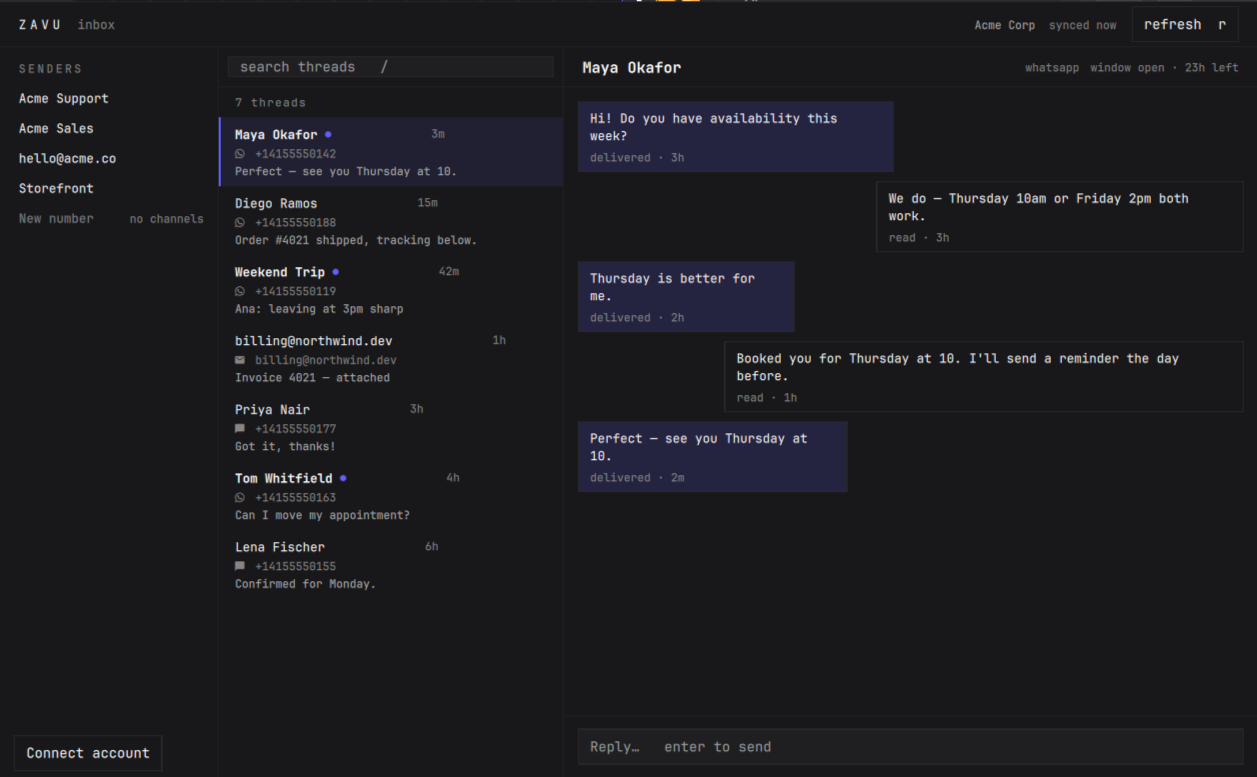
Every conversation your business numbers are having — WhatsApp, SMS, email, Telegram — one keystroke away, inside the shell you already live in.
No browser. No tab. No context switch.
What is Zavu
Zavu is one API for every messaging channel: WhatsApp, SMS,
Telegram, Email, Instagram, Messenger and voice. One send() call, and Zavu
picks the channel, transforms the content for it, and falls back when one fails.
Businesses use it to run support, sales and notifications across channels without wiring up five different providers. This plugin puts the conversation side of that — the human part — into your desktop.
One API. Every message. → zavu.dev
What it lets you do
- Read and reply to every channel in one place. WhatsApp, SMS, email and Telegram threads land in the same list. Replies leave from the number the contact already knows.
- Know when something arrives without a browser open. A quiet dot in the bar, a desktop notification when you want one, and a count when there is more than one.
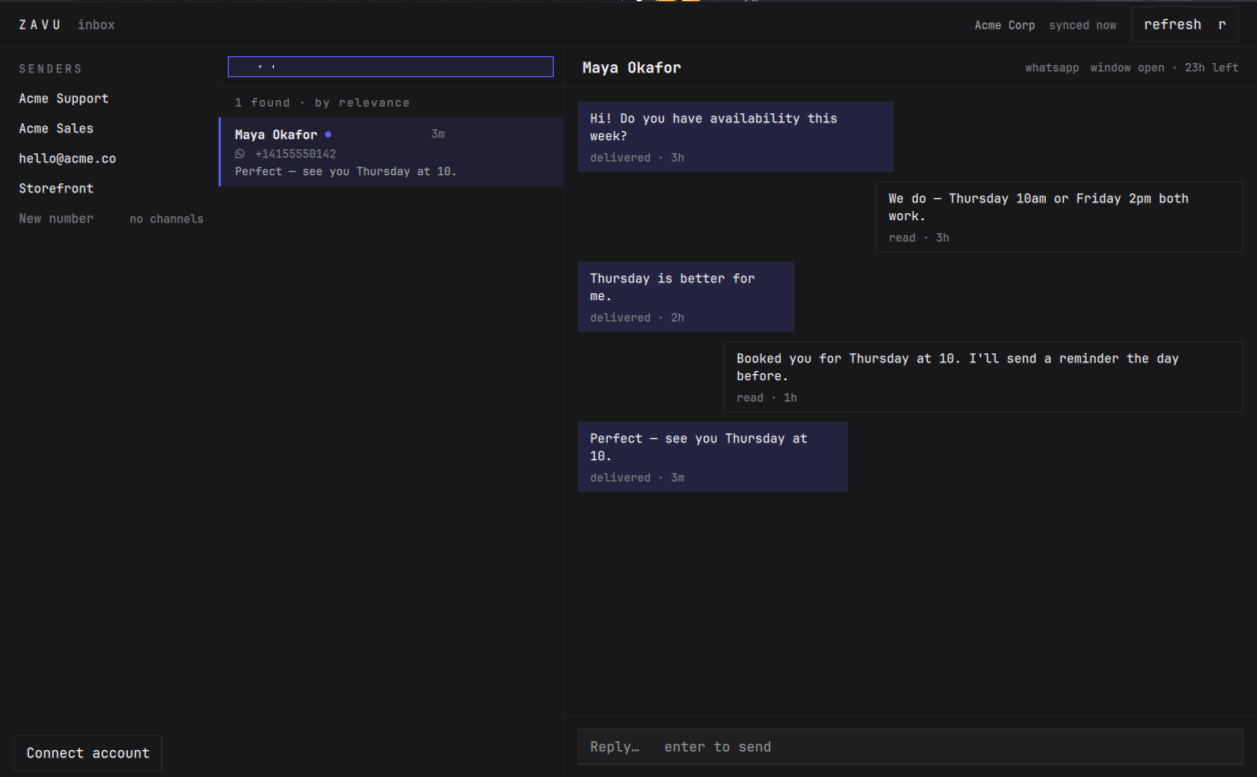
- Find a conversation by who it is with — phone number in any format, email,
group name or WhatsApp username. Paste
+1 (555) 123-4567and it finds the thread stored as+15551234567. - Work from the keyboard.
Super+Mto open,j/kthrough threads,/to search,Enterto reply,Escto get out. - See what the channel actually allows. WhatsApp's 24-hour window is shown as it counts down, and the composer closes when it lapses instead of letting you write something that would be refused.
Requirements
- Omarchy 4.x (Quickshell shell).
- A Zavu account and a one-time
npx zavudev login, which needs Node available throughnpx. Nothing else is installed and nothing is compiled — the plugin talks to the Zavu REST API directly. notify-send(libnotify) for desktop notifications. Optional: turn notifications off in settings and everything else still works.xdg-open, used only when you click a link to open the dashboard.
Install
omarchy plugin add https://github.com/zavudev/zavu-omarchy.git --enable
Remove
omarchy plugin remove dev.zavu.inbox
That is all of it. The plugin creates no files of its own, so removing it leaves
nothing behind but its entry in shell.json, which the command clears too. Your
~/.zavu/credentials.json belongs to the Zavu CLI and is left untouched —
run zavudev logout if you want that gone as well.
Sign in
There is no separate login. If you have ever run zavudev login on this
machine, the plugin is already signed in — it reads the CLI's own credentials
and never writes to them.
npx zavudev login
Your browser opens, you pick a project, and the bar picks it up the moment you are done. No key to copy or paste.
The plugin's own Sign in button runs the same command, pinned to an exact
CLI version rather than @latest, so what it executes is the code that was
reviewed and not whatever npm serves later.
Don't have an account yet? Create one at zavu.dev — the free plan is enough to try this.
Hotkey
Add to ~/.config/hypr/bindings.lua:
o.bind("SUPER, M", "Zavu inbox", function()
  hl.dispatch(hl.dsp.exec("omarchy-shell shell toggle dev.zavu.inbox '{}'"))
end)
Keys
| Key | Action |
|---|---|
Super+M |
Open or close the inbox |
j / k · arrows |
Move through threads |
Enter |
Focus the composer, then send |
/ |
Search threads |
r |
Refresh now |
Esc |
Clear the search, then close |
Settings
Click the gear in the bar panel, or use Omarchy's settings screen. Everything applies immediately — no restart:
| Setting | Default | |
|---|---|---|
| Desktop notifications | on | Off silences notifications; the unread dot stays |
| Refresh every | 30s | Faster while a panel is open |
| Threads per refresh | 25 | |
| Messages per thread | 25 |
Good to know
- It checks for messages on a timer, it does not hold a live connection —
the status line always tells you how long ago it synced, so you never have to
guess whether what you are looking at is current. Press
rfor a refresh now. - Search matches who the thread is with, not the words inside it.
- A sender with no channels can't send. Those show greyed and labelled rather than looking ready — a phone number on its own does not enable SMS.
Security
This plugin runs inside the Omarchy shell with your user's permissions, so it keeps its reach as small as it can:
- It never writes your API key — it only reads the one
zavudev loginalready created, and only shows its last four characters. - It talks to one host, your Zavu API endpoint, over TLS. No telemetry, no analytics, no third party.
- It only writes its own settings, and only when you change one — that
single entry in
shell.json, through Omarchy's ownomarchy bar set. It touches no other configuration, yours or anyone else's. - It never builds a shell command. Every process the plugin starts — opening
a conversation in your browser, saving a setting, posting a notification,
signing in — is launched as an argv array. There is no string handed to
bash -lcanywhere in the plugin, so there is no quoting to get wrong and nothing the API returns can be interpreted as a command. - Message text is rendered as plain text. Every label in both surfaces sets
textFormat: Text.PlainText, so a message someone sends you cannot be interpreted as rich text — no markup, no fonts, and no images fetched from a URL a stranger chose. Notification bodies are escaped for the same reason.
License
MIT