
Omarchy Control Docker
devgtv.docker — bar widget for the Omarchy Shell (Quickshell) that shows running Docker containers and lets you control the RAM limit of each one.
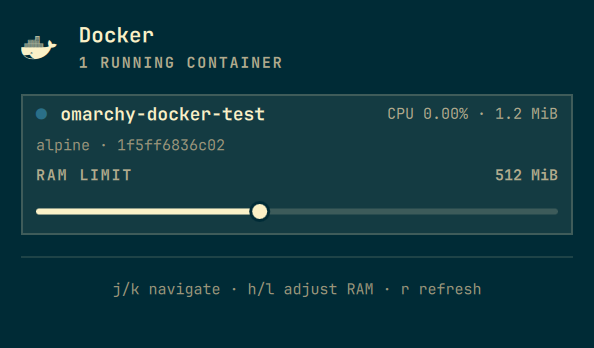
What it does
- Adds a Docker icon to the bar.
- Click the icon to open a popup with the running containers and the host's memory usage.
- For each container you can see its status, CPU and used memory.
- A slider sets the RAM limit of the selected container (
docker update --memory ... --memory-swap -1). - The popup auto-refreshes every 3 seconds.
Installation
The plugin lives in ~/.config/omarchy/plugins/devgtv.docker/. Enable it with:
omarchy plugin enable devgtv.docker right
The bar hot-reloads on save. To summon the popup from the keyboard you can bind the devgtv.docker IPC target to a Hyprland key.
Removal
Disable the widget and remove the plugin checkout:
omarchy plugin disable devgtv.docker
omarchy plugin remove devgtv.docker
Usage
- Click the Docker icon in the bar to open the popup.
- Click a container row to select it, or use the keyboard:
j/kmove between containersh/ladjust the RAM limit (300 ms debounce)rforce refreshEscclose
- The slider range goes from 128 MiB up to the host's total RAM in 128 MiB steps; the value is applied to the selected container.
Configuration
In ~/.config/omarchy/shell.json, the widget entry accepts a custom refreshMs:
{
  "id": "devgtv.docker",
  "refreshMs": 5000
}
Default is 3000 ms.
Implementation details
- Data is collected by a Quickshell
Processrunningdocker ps,docker inspectanddocker stats. - The limit change uses
docker update --memory <MB>m --memory-swap -1 <container>. - The user must be a member of the
dockergroup so no elevated permissions are required.
Testing Model.js locally
You can test the parser with Node.js:
node -e '
const M = require("./Model.js");
console.log(M.snapshotScript);
console.log(M.parseSnapshot(require("child_process").execSync(M.snapshotScript, {encoding:"utf8"})));
'
License
MIT