
Wazuh Server View
Every agent on a Wazuh manager, a brief server overview, per-agent drill-down (SCA, FIM, rootcheck, effective config, recent alerts), threat hunting, and breached MITRE ATT&CK techniques, all inside the Omarchy Quickshell bar, no separate GUI window and no need to open the Wazuh dashboard.
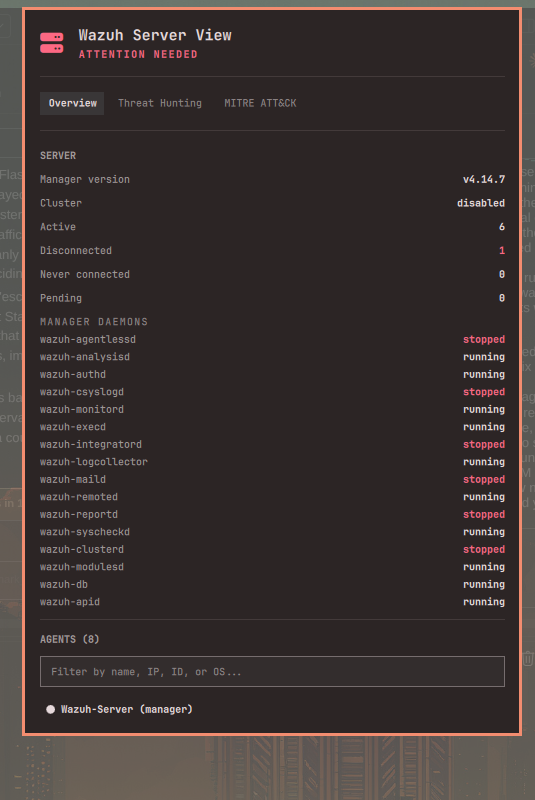
This is the server-side counterpart to Wazuh View, which shows a single local agent's own state. This plugin instead shows what a security engineer would otherwise have to open the Wazuh dashboard to see: every agent reporting to a manager, from one panel.
How it works
This plugin does not need to run on the Wazuh manager. It talks to:
- The Wazuh manager REST API (default port
55000) for the agent roster, server/cluster health, SCA, FIM, rootcheck, and each agent's effective configuration. - The Wazuh indexer (OpenSearch, default port
9200) for recent alerts, which back both the threat hunting feed and the MITRE ATT&CK view. The manager API itself does not serve alert search, so this is a second, independent connection.
Both are queried directly, read-only. Nothing is written to either system, and no data leaves your machine other than the requests needed to read this information.
Features
-
Overview: manager version, cluster status, manager daemon status, agent counts by connection state, and a searchable roster of every agent (name, IP, OS, version, group, last keepalive)
-
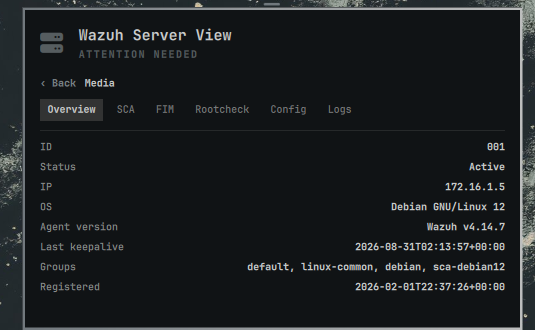
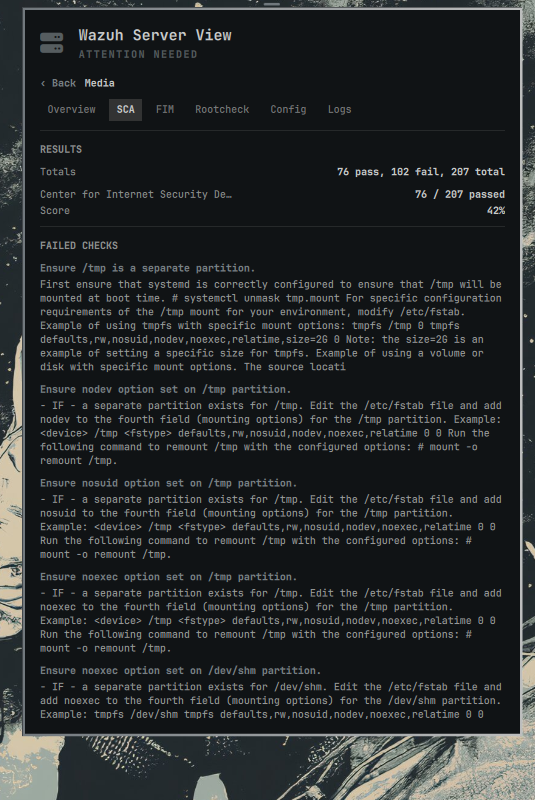
Agent drill-down (click any agent): connection status, SCA policy results with failed checks and remediation text, FIM monitored-path count and sample, rootcheck findings, effective FIM/log-collection/active-response configuration, and that agent's recent alerts
-
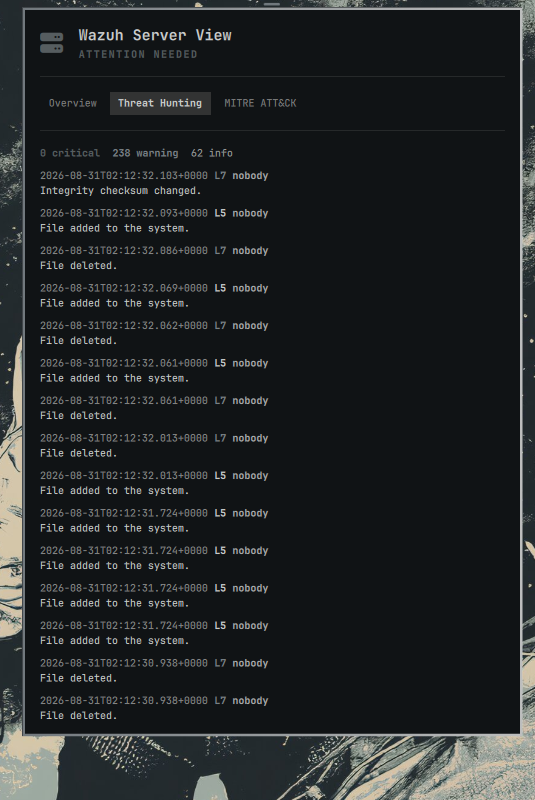
Threat hunting: a simple, chronological feed of recent alerts across every agent, with level and MITRE tags, and a critical/warning/info count
-
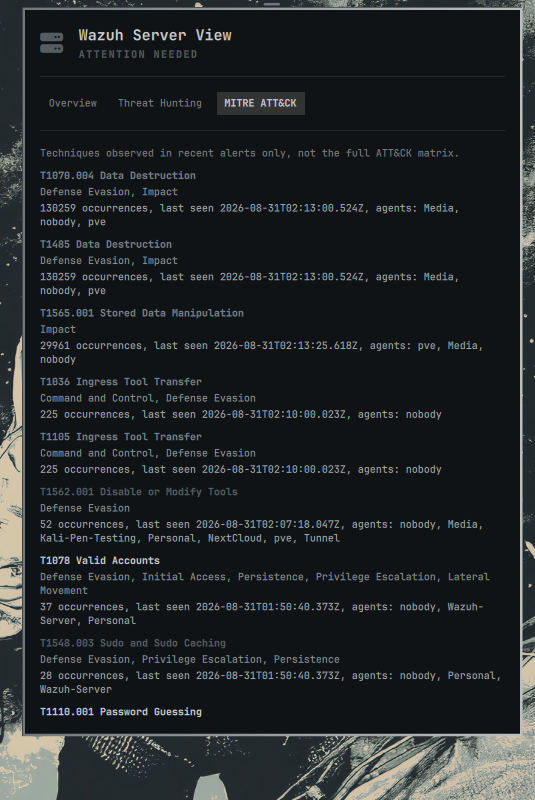
MITRE ATT&CK (breached only): not the full framework, only techniques that actually appear in alerts from the last 7 days, with occurrence count, last-seen time, and which agents triggered them
Requirements
- Omarchy with Quickshell
- Python 3
- A reachable Wazuh manager API and (for threat hunting/MITRE) Wazuh indexer
- API/indexer credentials with read access
Setup
Credentials and URLs are never hardcoded and never bundled with this plugin. They come from environment variables, checked first, with an optional credentials file as a fallback:
export WAZUH_API_URL="https://your-manager:55000"
export WAZUH_API_USER="your-api-user"
export WAZUH_API_PASSWORD="your-api-password"

# Needed for Threat Hunting and MITRE ATT&CK only:
export WAZUH_INDEXER_URL="https://your-manager:9200"
export WAZUH_INDEXER_USER="your-indexer-user"
export WAZUH_INDEXER_PASSWORD="your-indexer-password"
Optional, per subsystem:
WAZUH_API_VERIFY_TLS/WAZUH_INDEXER_VERIFY_TLS(trueby default; set tofalseonly if you understand the risk of a self-signed cert you can't otherwise verify)WAZUH_API_CA_BUNDLE/WAZUH_INDEXER_CA_BUNDLE(path to a CA bundle, the better option for a self-signed deployment instead of disabling verification)
If you'd rather not put credentials in your shell environment, point
WAZUH_SERVER_VIEW_CREDENTIALS at a JSON file instead:
{
  "apiUrl": "https://your-manager:55000",
  "apiUser": "your-api-user",
  "apiPassword": "your-api-password",
  "apiVerifyTls": true,
  "indexerUrl": "https://your-manager:9200",
  "indexerUser": "your-indexer-user",
  "indexerPassword": "your-indexer-password",
  "indexerVerifyTls": true
}
This file is only ever read from the path you name in
WAZUH_SERVER_VIEW_CREDENTIALS (never a guessed default location), and it
must be owned by you and mode 600:
chmod 600 /path/to/your/credentials.json
Anything less strict is refused outright, the same way an SSH private key
would be, rather than silently trusted. Both API and indexer URLs must be
https://; a plaintext http:// URL is refused before any credential is
ever sent.
Environment variables are visible to any process you run and, depending on
your system's configuration, potentially to other users via /proc. If
that matters on your machine, prefer the credentials file over exporting
passwords in your shell profile.
The manager API user needs read access to agents, syscheck, sca, rootcheck,
and agent configuration. The indexer user needs read access to the
wazuh-alerts-* index pattern. Neither needs write access to anything.
Installation
omarchy plugin add https://github.com/DevInBlack001/Omarchy-Wazuh-Server-View --enable
Or manually:
git clone https://github.com/DevInBlack001/Omarchy-Wazuh-Server-View ~/.config/omarchy/plugins/devinblack001.wazuh-server-view
omarchy plugin enable devinblack001.wazuh-server-view right
Then reload the shell:
omarchy restart shell
Updating
omarchy plugin update devinblack001.wazuh-server-view
Removing
omarchy plugin remove devinblack001.wazuh-server-view
Usage
Click the server icon in the bar to open the panel. Use the Overview / Threat Hunting / MITRE ATT&CK tabs to switch views. Click any agent in the Overview roster to drill into its SCA/FIM/Rootcheck/Config/Logs detail; use Back to return to the roster. The overview refreshes every 10 seconds while open (30 seconds in the background); an open agent detail view refreshes every 15 seconds. This is network-bound, not a local file read, so it polls more conservatively than a purely local plugin would.
What this plugin never does
- Never hardcodes a manager URL, port, or credential
- Never sends credentials over a plaintext connection (HTTPS is required)
- Never disables TLS verification unless you explicitly opt in
- Never writes to the manager API or the indexer; every call is a read
- Never runs a shell command or invokes a local subprocess at all
Scope
The MITRE ATT&CK view is intentionally not the full ATT&CK matrix: it shows only techniques observed in alerts from the last 7 days, aggregated server-side by the indexer, so it stays a short, actionable list rather than a static reference you'd look up elsewhere.
Version differences
The Wazuh REST API's shape (field names, per-component configuration response structure) is not fully consistent across manager versions; rootcheck in particular was deprecated in some Wazuh releases. Every section degrades independently: a missing endpoint or a schema mismatch in one section is reported there, without blocking the rest of the panel.
License
MIT, see LICENSE.