
RGB Lighting — Omarchy shell plugin
Control your RGB lighting from the Omarchy bar: a widget icon tinted with the current colour, and a popout with on/off, preset swatches, a hue slider, a brightness slider, and a follow-theme toggle that keeps your lighting matched to your Omarchy theme accent.
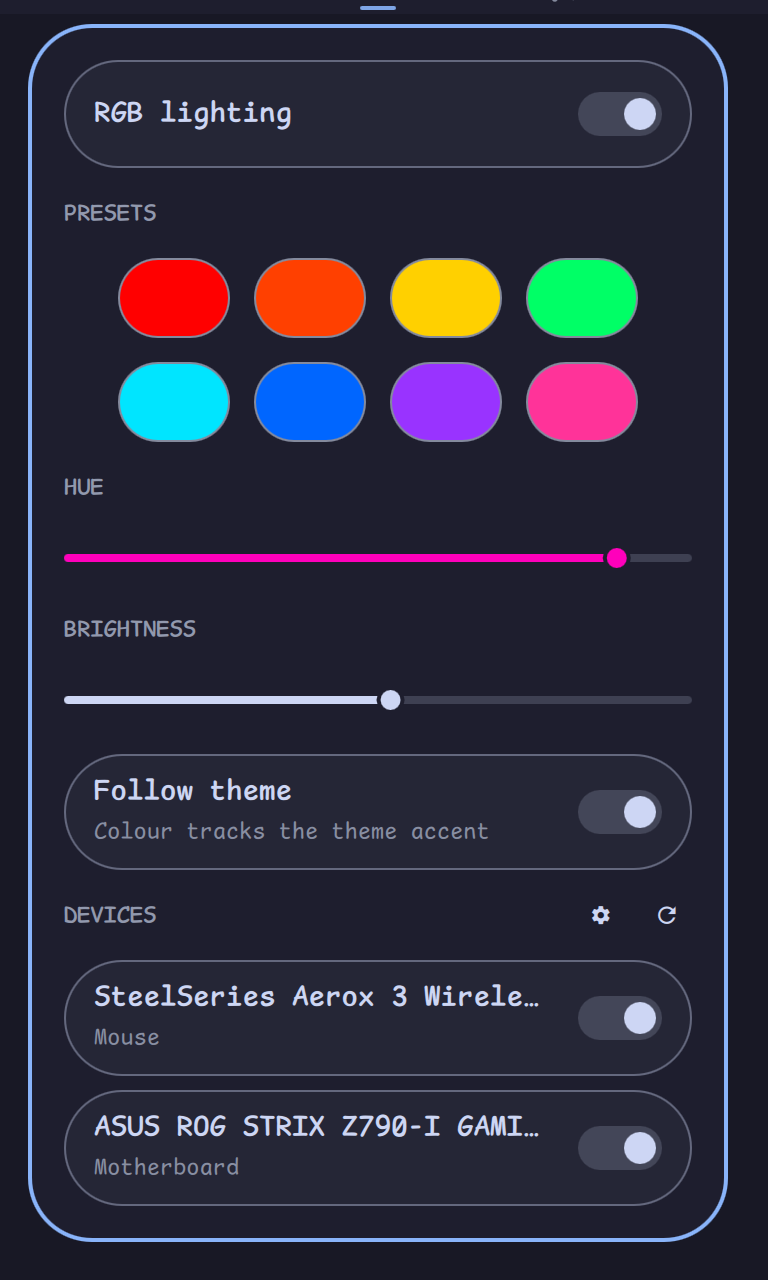
Works with any RGB controller OpenRGB supports — motherboard ARGB headers, case controllers, and the rest.
How it works
keybindings ──┐
menu entries ─┼──▶ omarchy-rgb (bundled CLI) ──▶ OpenRGB SDK server (systemd --user)
theme hook ───┘         │ writes
                        ▼
        ~/.local/state/omarchy-rgb/state.json
                        │ watched
                        ▼
              bar widget (this plugin)
One state file is the single source of truth. The widget, keybindings and menu all act through the same CLI, so they can never disagree — and your lighting is restored on every boot by the systemd unit.
Install
omarchy plugin add https://github.com/didlix/omarchy-openrgb.git --enable
~/.config/omarchy/plugins/didlix.case-rgb/bin/omarchy-rgb setup
setup is interactive and idempotent. It:
- offers to install the
openrgbpackage (viaomarchy pkg add) if missing; - creates a private venv and installs openrgb-python into it (GPL-3.0, fetched from PyPI at setup time — not distributed with this MIT-licensed plugin);
- writes and enables the
openrgb-serversystemd user unit (SDK server on 127.0.0.1, restores your lighting state after every start); - symlinks
~/.local/bin/omarchy-rgbso keybindings and menu entries can call it by name; - with
--with-theme-hook, installs a theme-set hook so the case follows your theme accent.
Usage
- Left-click the bar icon: open the control popout.
- Right-click: toggle lighting on/off.
- The DEVICES section at the bottom of the popout lists every controller
OpenRGB can see — toggle which ones the plugin manages, including none at
all (
omarchy-rgb set-device --nonefrom the CLI). - CLI:
omarchy-rgb status | jq .— pluson,off,toggle,set-color '#RRGGBB',set-hue 0-359,brightness 0-100|+N|-N,cycle-preset,follow-theme on|off|toggle,theme-color.
Presets are user-editable: edit the presets array in
~/.local/state/omarchy-rgb/state.json.
Which devices does it control?
Auto-detected: the first OpenRGB device of type motherboard, falling back
to device 0. To control a different device — or several at once (case +
mouse, say) — use the DEVICES toggles in the popout, or pin them by name
substring from the CLI (check openrgb --list-devices):
omarchy-rgb set-device "ASUS ROG STRIX" "Aerox"
omarchy-rgb set-device        # no names: back to auto
Every listed device gets the same colour, all zones alike. Brightness is implemented by scaling the RGB value in software, so it works on controllers with no native brightness. "Off" uses the device's native Off mode when it has one, and black otherwise.
Per-device quirks are handled: devices without a Static mode (many mice) fall back to Direct, which holds for as long as the SDK server runs — that is what the systemd unit is for. A device that fails to apply (a sleeping wireless mouse, say) is skipped with a warning rather than blocking the rest. Note that lighting a wireless mouse costs battery.
Per-theme colours
With follow-theme on, the lighting colour is resolved per theme, first match wins:
-
Your override —
~/.config/omarchy-rgb/themes.toml, easiest set via the CLI:omarchy-rgb theme-color '#d7827e' # for the current theme omarchy-rgb theme-color rose-pine '#d7827e' # for any theme by slug omarchy-rgb theme-color rose-pine --unset omarchy-rgb theme-color # list overrides -
The theme's own
[rgb]table — theme authors (or a theme overlay in~/.config/omarchy/themes/<slug>/) can declare the colour the theme wants RGB hardware lit with, right incolors.toml:[rgb] primary = "#d7827e" secondary = "#56949f" accent = "#ebbcba"All three keys are optional.
accentoverrides the theme's UI accent for lighting only — useful when the UI accent renders poorly on LEDs.Unknown tables are ignored by every other Omarchy component, so this is safe to add to any theme.
-
Curated defaults — a small built-in table for stock themes whose accent is not the colour the theme is known by (Rose Pine's accent is the pine teal, not the rose). PRs welcome.
-
The theme accent — the fallback that always exists.
A change made with theme-color relights the case immediately when it
affects the active theme.
Device roles
With several managed devices, each can follow a different slot of the theme
while follow-theme is on: primary (the default — the resolved colour
above), secondary (the secondary key in your themes.toml or a theme's
[rgb] table, falling back to primary), or accent (an accent key
resolved the same way, falling back to the theme's UI accent). A manually
picked colour still applies to every device alike.
Assign roles from the popout — managed device rows grow a role chip while
follow-theme is on; click it to cycle — or from the CLI (devices matched
like set-device, by case-insensitive substring):
omarchy-rgb device-role "Aerox" secondary
omarchy-rgb device-role                          # list assignments
omarchy-rgb theme-color rose-pine '#56949F' --secondary
Zones can override their device. A controller often carries several zones —
an ASUS board exposes its own LED plus the addressable headers your case
strips are on — and each can take its own role, inheriting the device's
until assigned. In the popout, multi-zone devices list their zones under the
device; from the CLI, target one as <device>/<zone> (both halves substring
matched):
omarchy-rgb device-role "STRIX/Addressable 1" secondary
Persisting colour to stubborn firmware
Where supported, discrete actions also save the mode to the device's onboard
memory (OpenRGB SaveMode); slider drags skip the save to spare the flash.
Some firmware ignores SaveMode — SteelSeries mice, for instance, only
persist through their own tool. For those, add persist_commands to
~/.local/state/omarchy-rgb/state.json: a list of argv templates run after
each save-worthy change, with {color} replaced by the brightness-scaled
hex (#000000 when off). Example for a SteelSeries Aerox via
rivalcfg:
"persist_commands": [
  ["rivalcfg", "--z1", "{color}", "--z2", "{color}", "--z3", "{color}"]
]
SteelSeries tip: the white flash on click is the mouse's own reactive
illumination, not OpenRGB — turn it off once with
rivalcfg --reactive-color off.
Vendor notes
Per-vendor setup and troubleshooting notes live in docs/vendors/:
- SteelSeries — colour persistence across sleep, reactive illumination
- Corsair — udev permissions, unregistered product IDs
- ASUS Aura — zones and device grouping, SMBus modules
Keybindings
Add to ~/.config/hypr/bindings.lua (adjust combos to taste — the CTRL+R
family is taken by Omarchy's reminders):
o.bind("SUPER + SHIFT + R", "RGB lighting panel", "omarchy-shell didlix.case-rgb toggle")
o.bind("SUPER + ALT + R", "RGB on/off", "omarchy-rgb toggle")
o.bind("SUPER + CTRL + BRACKETRIGHT", "RGB brighter", "omarchy-rgb brightness +10")
o.bind("SUPER + CTRL + BRACKETLEFT", "RGB dimmer", "omarchy-rgb brightness -10")
o.bind("SUPER + SHIFT + ALT + R", "RGB next preset", "omarchy-rgb cycle-preset")
Menu entries
Add to ~/.config/omarchy/extensions/omarchy-menu.jsonc:
"style.rgb": {"icon":"","label":"RGB Lighting","aliases":["rgb","lighting"]},
"style.rgb.toggle": {"icon":"","label":"Lighting","checked":"omarchy-rgb is-on","action":"omarchy-rgb toggle"},
"style.rgb.panel": {"icon":"","label":"Open Panel","action":"omarchy-shell didlix.case-rgb open"},
"style.rgb.preset": {"icon":"","label":"Next Preset","action":"omarchy-rgb cycle-preset"},
"style.rgb.brighter": {"icon":"","label":"Brighter","action":"omarchy-rgb brightness +10"},
"style.rgb.dimmer": {"icon":"","label":"Dimmer","action":"omarchy-rgb brightness -10"},
"style.rgb.follow": {"icon":"","label":"Follow Theme","checked":"omarchy-rgb status | jq -e .follow_theme","action":"omarchy-rgb follow-theme toggle"}
Troubleshooting
- Popout says it can't reach OpenRGB — run
setupagain; it re-checks every step. Thensystemctl --user status openrgb-server. - Wrong device lights up —
omarchy-rgb set-device <name-substring>. - Some devices missing — SMBus-attached RGB (DRAM, some boards) needs the
i2c-devkernel module; see the OpenRGB docs. USB controllers need OpenRGB's udev rules (shipped with the Arch package). - State vs reality drift —
omarchy-rgb restorere-applies the state file to the hardware.
Uninstall
systemctl --user disable --now openrgb-server
rm -f ~/.config/systemd/user/openrgb-server.service ~/.local/bin/omarchy-rgb \
      ~/.config/omarchy/hooks/theme-set.d/20-case-rgb
rm -rf ~/.local/share/omarchy-openrgb ~/.local/state/omarchy-rgb
omarchy plugin remove didlix.case-rgb
Licence
MIT. openrgb-python (GPL-3.0) is installed from PyPI onto your machine at
setup time and is not part of this distribution.