
Omahub
← All plugins
D

NVIDIA GPU

by dimapanov

GPU utilization, memory and temperature from nvidia-smi

Security review

Review recommended · 1 finding

Deterministic scan — not a security guarantee

Low
Risk level
Low
Analyzed commit
15b47a0
Scanned
1 month ago

Flagged patterns appear only in documentation files (README / docs) — descriptive examples, not executable code.

  • Docs external_hosts README.md:31

    Downloads or connects to an external HTTP(S) host.

    git clone https://github.com/hidimapanov/omarchy-nvidia ~/.config/omarchy/plugins/dimapanov.nvidia

Automated analysis only — not a security guarantee.

AI advisory review

No obvious issues detected

Language-model assessment · ~deepseek/deepseek-v4-flash-latest — advisory only

Low
AI risk level
Low
Recommendation
install
Model
~deepseek/deepseek-v4-flash-latest
Analyzed commit
15b47a0
Reviewed
1 month ago

The plugin is a simple NVIDIA GPU monitoring widget that runs nvidia-smi locally. The only external URL flagged by the scan is the GitHub repository link in the README, which is used for installation instructions and not part of the plugin's runtime behavior. No network calls, obfuscation, or harmful operations were found in the source code.

How this check works

This review combines the deterministic scan (the rule-based results above) with an independent look at the plugin's code by a language model. The model reads a trimmed sample of the repository's files, the manifest, and the README, then gives a plain-language risk level and a recommendation: install (no notable danger), review (look closer first), or avoid (clearly dangerous).

It runs on the same analyzed commit as the deterministic scan and is strictly advisory — it is not a security guarantee and never blocks a plugin by itself. A human moderator still reviews plugins before they are listed.

AI advisory only — automated analysis, not a security guarantee.

Install
$ omarchy plugin add https://github.com/dimapanov/omarchy-nvidia --enable
Hardware #bar #quickshell #system

NVIDIA GPU — Omarchy bar widget

A lightweight Omarchy shell bar widget that shows NVIDIA GPU stats straight from nvidia-smi: utilization, memory, temperature and power draw.

What you get

  • Bar glyph — NVIDIA icon with the current GPU temperature (e.g. 󰢮 41°).
  • Popup panel (click the glyph) with animated meters:
    • Utilization — GPU core load (%)
    • Memory — used / total (GiB)
    • Temperature — °C (0–100 scale)
    • Power — draw vs. power limit (W)
  • Stats refresh every 2 seconds via a single nvidia-smi --query-gpu call.
  • The widget hides itself automatically when no NVIDIA GPU / nvidia-smi is found.

Requirements

  • Omarchy with the Omarchy shell (Quickshell)
  • NVIDIA GPU with proprietary drivers and nvidia-smi on PATH

Install

omarchy plugin add https://github.com/hidimapanov/omarchy-nvidia --enable

or clone manually:

git clone https://github.com/hidimapanov/omarchy-nvidia ~/.config/omarchy/plugins/dimapanov.nvidia
omarchy plugin enable dimapanov.nvidia

Remove

omarchy plugin remove dimapanov.nvidia

Configuration

No configuration needed. To move the widget between bar sections:

omarchy bar move dimapanov.nvidia --section left

License

MIT

Preview
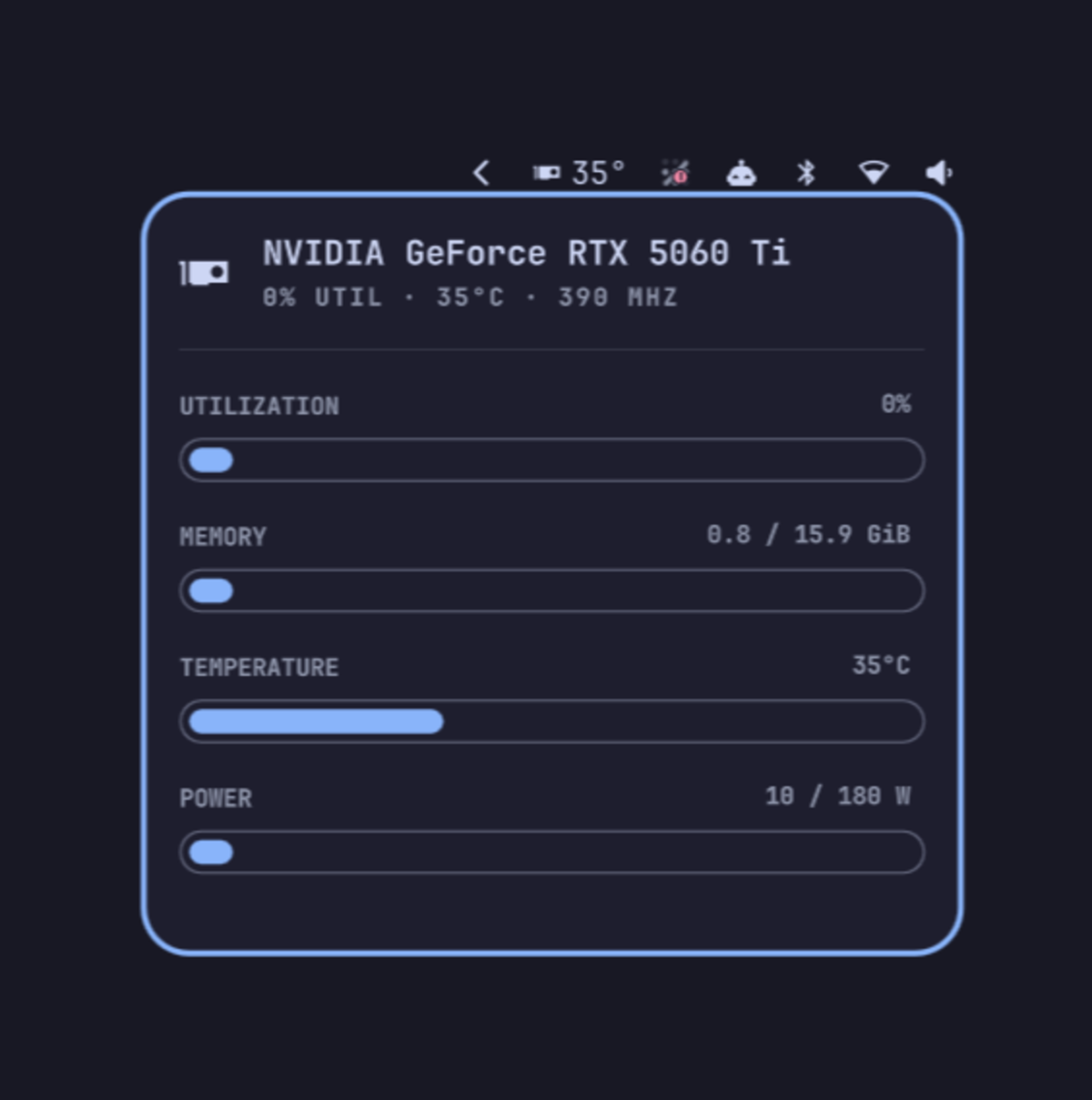
NVIDIA GPU widget