Omahub
← All plugins
D

OpenCode Usage

by Dizziee

OpenCode usage stats in the Omarchy bar.

Security review

No obvious issues detected

Deterministic scan — not a security guarantee

None
Risk level
None
Analyzed commit
aac777a
Scanned
2 weeks ago

No potentially dangerous behavior detected in the analyzed commit.

Automated analysis only — not a security guarantee.

AI advisory review

No obvious issues detected

Language-model assessment · ~deepseek/deepseek-v4-flash-latest — advisory only

None
AI risk level
None
Recommendation
install
Model
~deepseek/deepseek-v4-flash-latest
Analyzed commit
aac777a
Reviewed
2 weeks ago

This plugin is a passive bar widget that runs a bundled Python scanner against OpenCode's local SQLite database in read-only mode and caches the results under ~/.cache/omarchy. No install-time scripts, network calls, obfuscation, credential access, or destructive operations were found. The behavior matches the documented functionality and poses no notable risk to users.

How this check works

This review combines the deterministic scan (the rule-based results above) with an independent look at the plugin's code by a language model. The model reads a trimmed sample of the repository's files, the manifest, and the README, then gives a plain-language risk level and a recommendation: install (no notable danger), review (look closer first), or avoid (clearly dangerous).

It runs on the same analyzed commit as the deterministic scan and is strictly advisory — it is not a security guarantee and never blocks a plugin by itself. A human moderator still reviews plugins before they are listed.

AI advisory only — automated analysis, not a security guarantee.

Install
$ omarchy plugin add https://github.com/JJDizz1L/dizziee.opencode-model-usage --enable
Widgets #bar #quickshell #ai

dizziee.opencode-model-usage

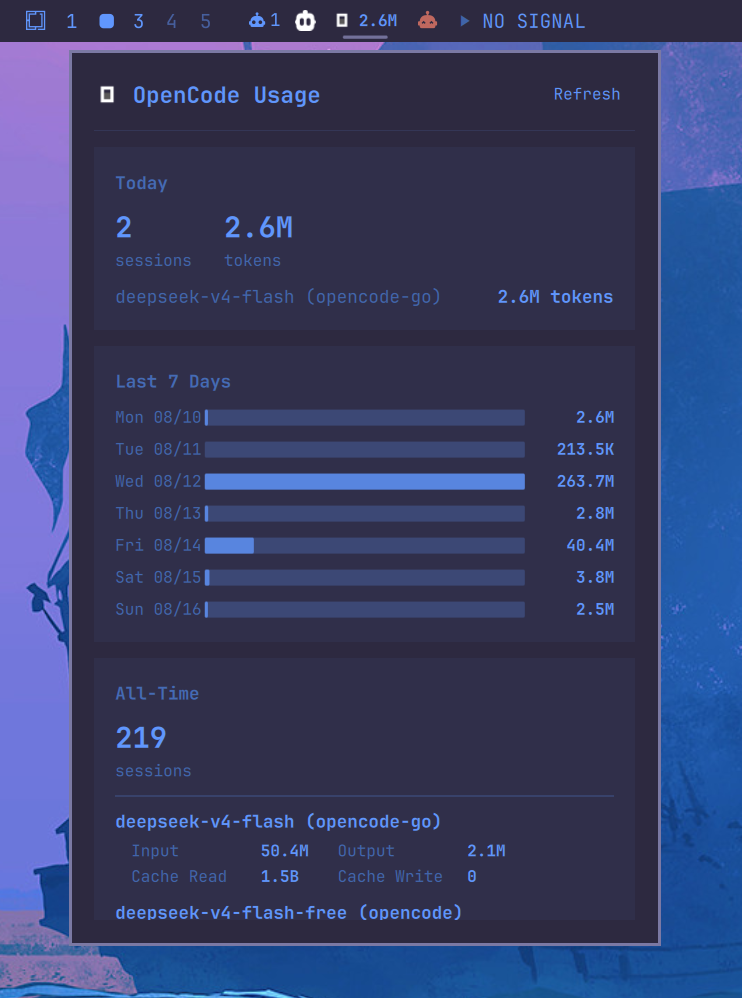
OpenCode token usage stats in the Omarchy bar. Displays today, weekly, and all-time token counts per model.

Requirements

Installation

omarchy plugin add https://github.com/JJDizz1L/dizziee.opencode-model-usage.git --enable

Then place it in your bar layout with

omarchy bar plugin add dizziee.opencode-model-usage [--section <left|center|right>]</br>

Suggested placement:

omarchy bar plugin add dizziee.opencode-model-usage --section left

You can validate the plugin at any time with:

omarchy plugin validate ~/.config/omarchy/plugins/dizziee.opencode-model-usage

Updating

To pull the latest version of the plugin:

omarchy plugin update dizziee.opencode-model-usage --yes

Configuration

Configuration lives in ~/.config/omarchy/shell.json.

Key Type Default Description
refreshIntervalSec integer (30–3600) 300 How often to re-query the OpenCode database (seconds)

Preview

preview

Uninstall

omarchy plugin remove dizziee.opencode-model-usage

License

MIT