
dizziee.system-updates
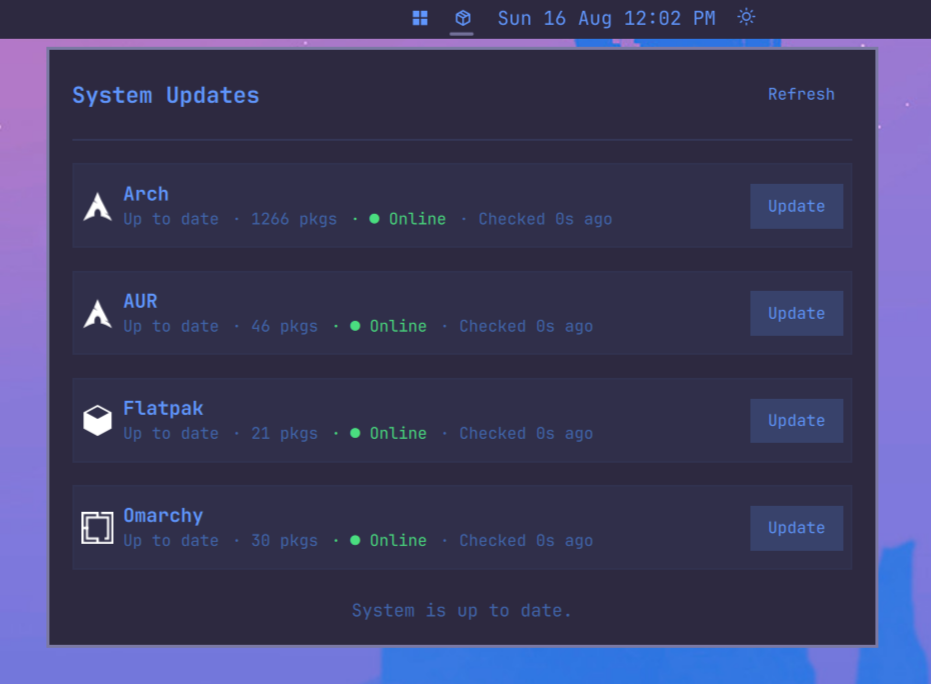
System update indicator for the Omarchy bar. Shows available updates from pacman, AUR, Flatpak, Omarchy, Omarchy shell plugins, and mise, with per-repo update buttons.
Requirements
checkupdates(frompacman-contrib)- AUR helper (
yay,paru, etc.) — optional, AUR detection is automatic flatpak— optionalmise— optional, ships with Omarchygit— optional, for the Plugins row (git-managed shell plugins)
Installation
omarchy plugin add https://github.com/JJDizz1L/dizziee.system-updates.git --enable
Then place it in your bar layout with
omarchy bar plugin add dizziee.system-updates [--section <left|center|right>]</br>
Suggested placement:
omarchy bar plugin add dizziee.system-updates --section center
You can validate the plugin at any time with:
omarchy plugin validate ~/.config/omarchy/plugins/dizziee.system-updates
Updating
To pull the latest version of the plugin:
omarchy plugin update dizziee.system-updates --yes
Configuration
Configuration lives in ~/.config/omarchy/shell.json.
| Key | Type | Default | Description |
|---|---|---|---|
refreshIntervalSec |
integer (300–7200) | 1800 | How often to check for updates (seconds) |
alwaysShow |
boolean | true | Keep icon visible even when no updates are available |
How updates work
The Arch update button runs a direct pacman system upgrade:
sudo env OMARCHY_ALLOW_DIRECT_PACMAN=1 pacman -Syu
Omarchy installs a pacman hook (omarchy-update-pacman-guard) that aborts a bare sudo pacman -Syu to route updates through omarchy update — which handles the transcript, snapshot, keyrings, migrations, and post-update hooks. The OMARCHY_ALLOW_DIRECT_PACMAN=1 env var opts this one transaction past that guard: it upgrades packages directly and skips Omarchy's update pipeline. For the full managed flow, run omarchy update instead.
AUR updates run through your helper (yay -Sua / paru -Sua), Flatpak through flatpak update, and mise through mise up.
The Omarchy update button opens your terminal and runs omarchy update — the full managed Omarchy update pipeline (transcript, snapshot, keyrings, migrations, and post-update hooks).
Plugins
The Plugins row tracks the git-managed Omarchy shell plugins under ~/.config/omarchy/plugins. For each one it fetches origin and counts how many commits HEAD is behind, mirroring what omarchy-plugin-update does. Its update button runs:
omarchy plugin update --yes
Only plugins that are git checkouts are considered; non-git plugins and plugins with no upstream are ignored. The row is hidden when no git-managed plugins are installed.
mise
The mise row counts the tools configured in your global ~/.config/mise/config.toml, so a stale claude, codex, or opencode pin shows up alongside your system packages. It mirrors what Omarchy's own omarchy-update-mise installs by dropping mise's release cooldown:
MISE_MINIMUM_RELEASE_AGE=0 mise up
The same override drives the count, so the number matches what that command will pull in. On mise builds that reject the override, the widget falls back to the plain mise outdated --json query instead of reporting a false "up to date".
Event-driven refresh
After clicking Update, the widget watches the Hyprland event socket (Quickshell.Hyprland) for the updater terminal to close, then rescans once immediately — no blind polling. A slow fallback poll (10s intervals) only runs if window tracking is unavailable. Repo reachability checks are consolidated into a single process and skipped entirely when NetworkManager reports no connectivity.
Package details
Click any repo row to expand it and list the packages with updates pending, with their version change. Each package links to its release notes when the upstream is a known code host (GitHub, GitLab, or Codeberg), and to its repo/homepage otherwise. GitHub plugin entries link to the default branch’s Commit history, matching the branch installed by the updater. Flatpak entries link to the Flathub app page, and rows with nothing pending are not expandable.
Links resolve offline from local package metadata (expac -Q '%n|%u', falling back to pacman -Qi), Flathub app IDs, the mise registry, and each plugin's git remote (SSH remotes are rewritten to https) — no per-package network calls. The upstream URL map rides the same 24h disk cache as the package counts.
Preview
Uninstall
omarchy plugin remove dizziee.system-updates
License
MIT