
Docker Monitor
An Omarchy Quattro bar widget for monitoring Docker containers.
Features
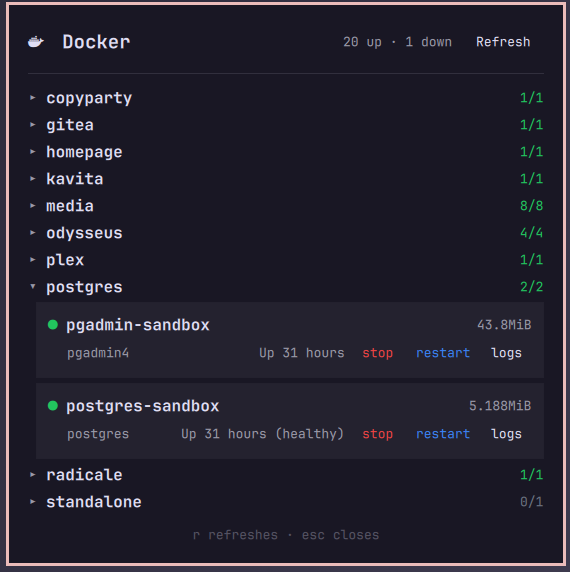
- Compose project grouping — containers are organized by their Docker Compose project with collapsible headers
- Live stats — CPU and memory usage for each running container
- Container actions — start, stop, restart, and unpause containers directly from the panel
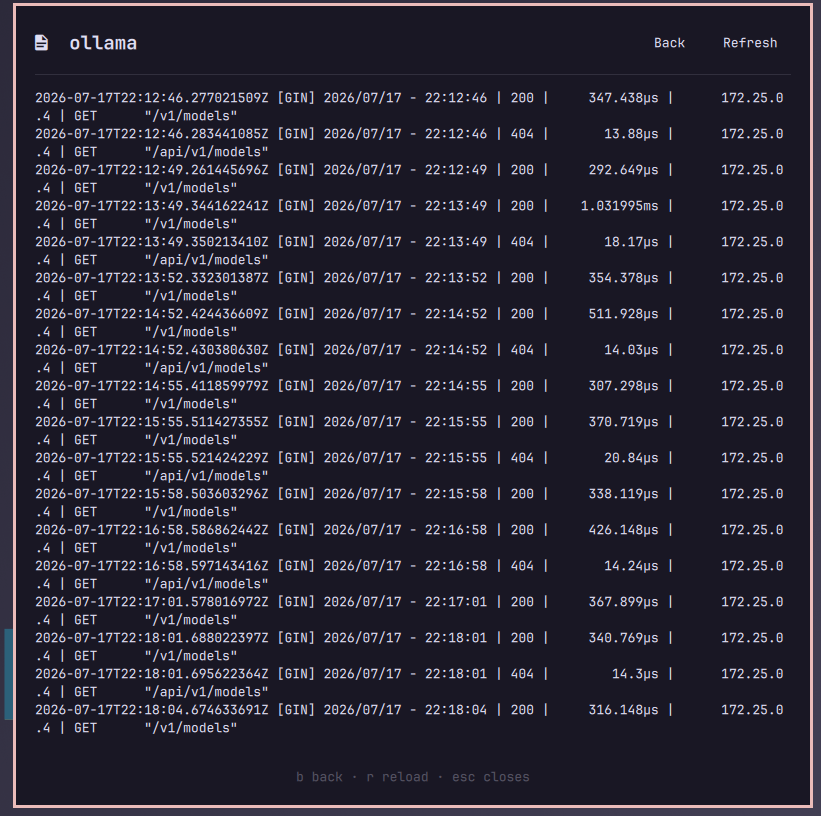
- Log viewer — view recent container logs with timestamps
- Desktop notifications — alerts when containers stop, become unhealthy, or start back up
- Configurable polling — adjustable refresh interval (default 10s)
Log Viewer
Install
omarchy plugin add https://github.com/djjeane/omarchy-docker-plugin.git
Remove
omarchy plugin remove djjeane.docker-monitor
Configuration
Available settings in shell.json:
| Setting | Type | Default | Description |
|---|---|---|---|
pollIntervalSec |
integer | 10 | Seconds between data refreshes (5–300) |
showStoppedContainers |
boolean | true | Show stopped/exited containers |
notificationsEnabled |
boolean | true | Desktop notifications on state changes |
logLines |
integer | 100 | Number of log lines to display (25–500) |
Example bar layout entry:
{
  "id": "djjeane.docker-monitor",
  "pollIntervalSec": 15,
  "notificationsEnabled": true
}
Keyboard shortcuts
| Key | List view | Log view |
|---|---|---|
r |
Refresh containers | Reload logs |
b |
— | Back to list |
esc |
Close panel | Back to list |
IPC
omarchy-shell shell toggle djjeane.docker-monitor
omarchy-shell shell summon djjeane.docker-monitor
omarchy-shell shell hide djjeane.docker-monitor
License
MIT
Requirements
- Docker CLI (
docker) accessible to the current user - Python 3 (for the data collection script)
notify-send(for desktop notifications)