
OmaDash
A malleable HUD / dashboard plugin for Omarchy. A compact bar pill — Pomodoro · clock · weather — expands into a full dashboard: quick actions, a launcher-style search, system shortcuts, and a dashboard of pinnable plugin cards.
Features
The compact pill
A single bar pill showing three slots at a glance — Pomodoro (left), clock (center), and weather (right). Click on the clock and weather on the pill to open the expanded dashboard. Click on the Pomodoro to start it. Right-click the clock and weather to cycle through formats.
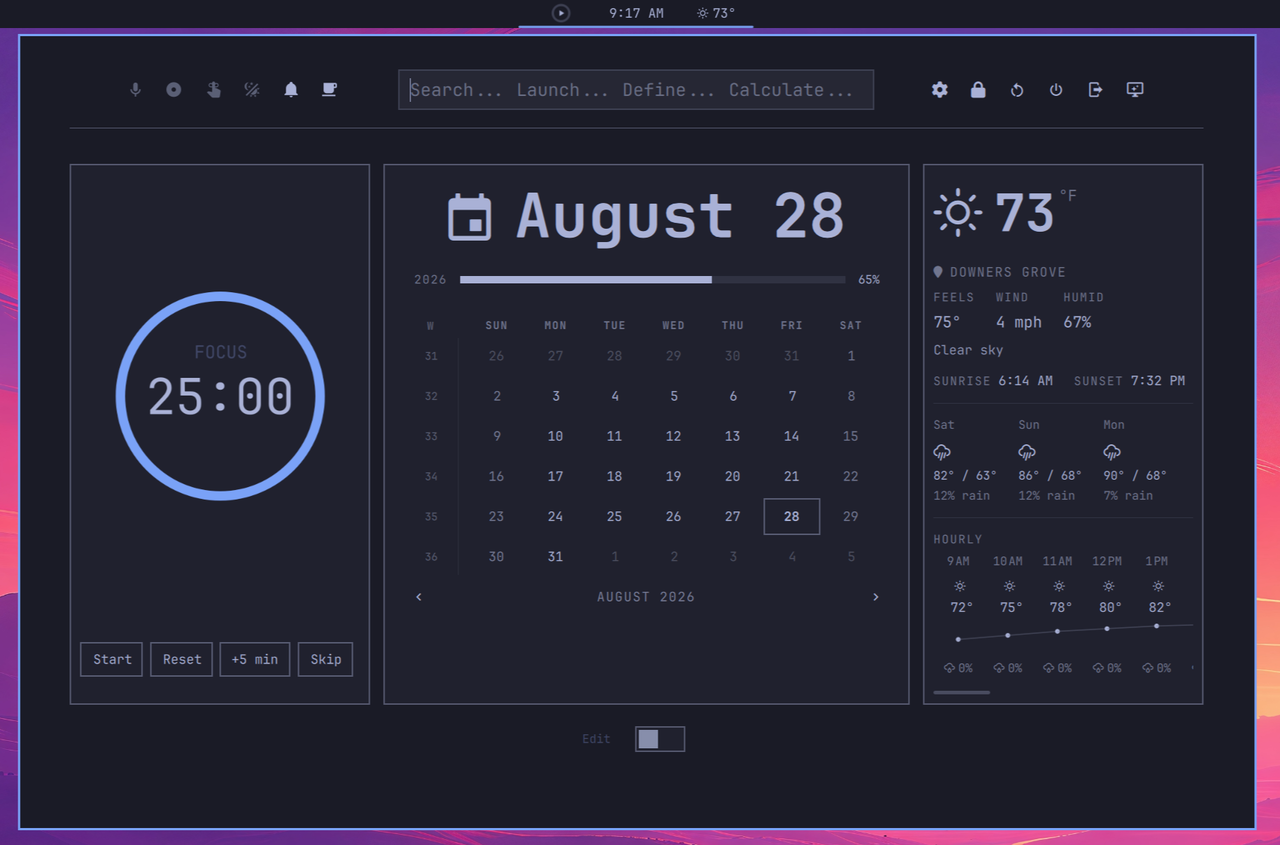
The expanded dashboard
A tiled card grid that autosizes to its content and opens centered on the bar.
Default Layout:
- Pomodoro — focus countdown with three compact display modes (ring, ring + clock, bare clock), persisted per preference.
- Calendar — Replica of the Omarchy built-in calendar with month view and year progress.
- Weather — current conditions, a 3-day forecast, a scrollable hourly list, sunrise/sunset, and live units toggle.
Launcher-style search
Apps, files, calculator (math), dictionary definitions, unit conversion, and web
keywords (gg: dd: wiki: gh:) — all
scored and merged into one list.
Dashboard of plugin cards
Pin any installed Omarchy plugin into a card:
- Live panels — the plugin's real popup UI (network, audio, bluetooth, power, …) embedded directly inside the card via content adoption.
- Launcher tiles — one-click summons for overlay / menu plugins via IPC.
Row-aware flex tiler
A Hyprland-style packer. Each plugin carries a persisted row; the grid starts
a new visual row on a row-number change or on overflow, so you decide where
rows break — not the width.
Edit mode
Drag cards between rows with animated push (half-split drop targets), remove them, and re-add from a scanned plugin list.
Header actions
A replica of Omarchy's built-in indicators (dictation, screen recording, reminder, night light, DND, stay awake) on the left, and system shortcuts (lock, reboot, shutdown, logout, screensaver, settings) on the right.
Live data
Weather via Open-Meteo (no API key, shares Omarchy's configured location) and a Pomodoro focus timer.
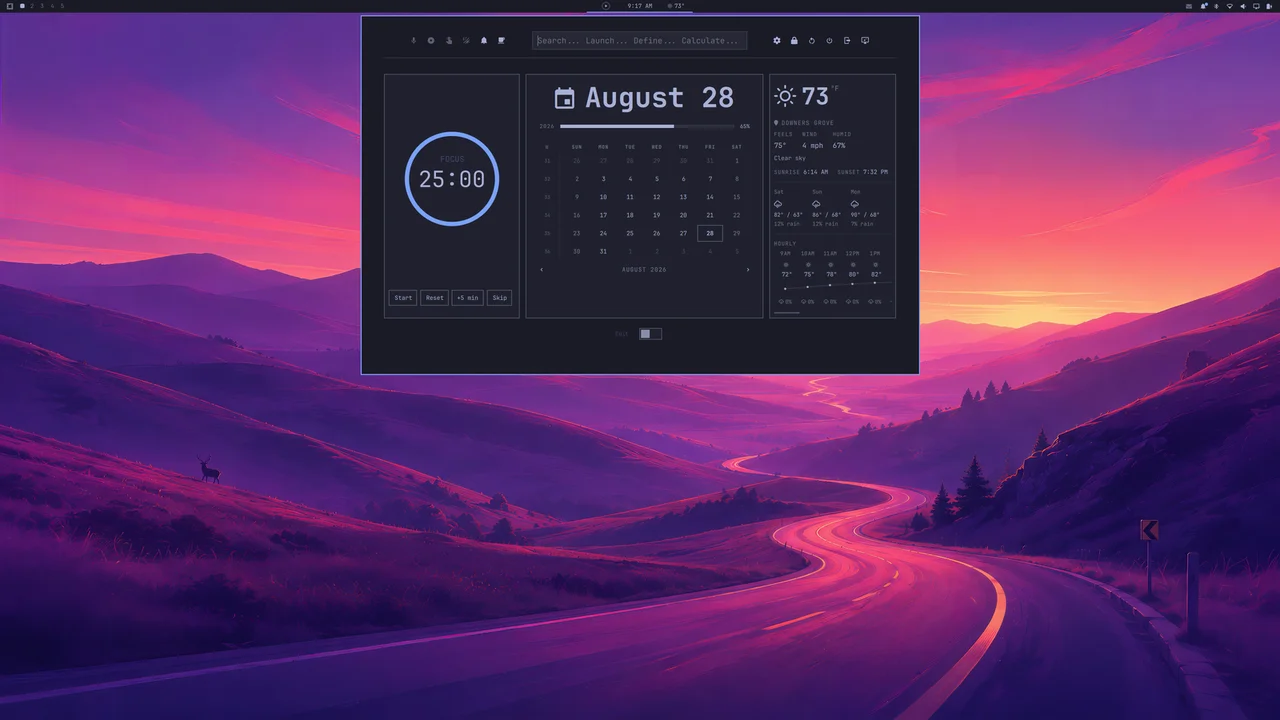
Full desktop context
Install
omarchy plugin add https://github.com/djmenig/omadash.git --enable
omarchy restart shell
If the pill lands somewhere other than the center of the bar:
omarchy bar move djmenig.omadash --section center
You can also clone / symlink the repo to
~/.config/omarchy/plugins/djmenig.omadash and restart the shell.
Removing
Take OmaDash off the bar but keep it installed:
omarchy plugin disable djmenig.omadash
Uninstall and remove it entirely (also removes it from the bar):
omarchy plugin remove djmenig.omadash --yes
Your saved layout and preferences live outside the plugin directory in
~/.config/omarchy/omadash/ and are left behind. To clear them too:
rm -rf ~/.config/omarchy/omadash
Usage
- Left-click the Clock on pill — open / close the dashboard.
- Left-click the Pomodoro on pill — start / pause the timer.
- Right-click the Pomodoro pill cycles its compact display mode.
- Right-click the Clock pill cycles through its display formats.
- Right-click the Weather pill cycles through its display formats °C/°F.
- Edit switch (Dashboard) — enter edit mode: drag cards (the left / right half of a card decides the drop side), remove them, or add new ones via the + button.
- Search (Dashboard) — type to search; ↑/↓ navigate, Enter activates, Esc clears.
- Layout and preferences persist across restarts
(
~/.config/omarchy/omadash/dashboard.jsonandsettings.json).
Requirements
- Omarchy (Quickshell-based shell).
- Network access for weather and online searches.
External services & data
- Open-Meteo — weather forecast and geocoding (no API key; shares Omarchy's configured location).
- ip-api.com and ipwho.is — IP geolocation fallback for weather when Omarchy has no configured location.
- Wiktionary (
en.wiktionary.org) — dictionary definitions in search.
These are only contacted when a relevant feature needs data (weather fetch, or a definition lookup); nothing else requires network access and everything else works offline.
Commands & privileges invoked
OmaDash runs as normal user and delegates privileged or system actions to Omarchy's own built-in commands rather than reimplementing them:
- Omarchy system actions:
omarchy system lock,omarchy system reboot,omarchy system shutdown,omarchy-launch-screensaver force,omarchy-reminder,omarchy launch editor, andomarchy-shell shell toggle/summon(plugin lifecycle / launcher). - Hyprland:
hyprctl dispatch exit(logout) andhyprctl dispatch focuswindow(window switching). - Search handling:
xdg-open(open results),wl-copy(copy to clipboard). - Calculator: a sandboxed
python3 -cexpression evaluator for math queries. - Sound:
paplayon/usr/share/sounds/freedesktop/stereo/bell.ogafor the Pomodoro completion chime (requires the freedesktop sound theme).
No action writes to or modifies your shell/Omarchy configuration — OmaDash only
persists its own state under ~/.config/omarchy/omadash/.
Architecture
djmenig.omadash/
├── BarWidget.qml            # bar entry point; owns the compact pill + panel
├── Panel.qml                # expanded dashboard surface (layer-shell)
├── components/
│   ├── CollapsedBar.qml     # compact pill: Pomodoro | Clock | Weather
│   ├── DashboardTiler.qml   # row-aware flex packer + drag/drop
│   ├── DashboardCard.qml    # one plugin card (panel host / view / tile)
│   ├── PanelHost.qml        # embeds a real plugin panel's UI in a card
│   ├── SearchLauncher.qml   # unified search/launcher
│   ├── ExpandedPanel.qml    # header (quick actions | search | shortcuts)
│   ├── AddPluginDialog.qml  # scanned-plugin picker
│   ├── WeatherExpanded.qml / PomodoroExpanded.qml / CalendarView.qml / …
│   └── DashboardRegistry.js # id → descriptor (view / launcher / panel)
└── engine/
    ├── WeatherEngine.qml    # shared weather singleton (Open-Meteo)
    ├── PomodoroEngine.qml   # shared focus-timer singleton
    └── DashboardConfig.qml  # persisted layout + settings (singletons)
Why state lives outside the plugin directory. Layout and settings are
written to ~/.config/omarchy/omadash/ (not inside plugins/djmenig.omadash/). Writing
inside the plugin directory trips Omarchy's plugin watcher, which reloads the
whole plugin and closes any open dashboard on every persist. Keeping state
outside avoids that.
Roadmap — Future Releases
v0.2.0 — Pages
The expanded dashboard will support three pages: a center page (the
current default landing page) plus a left page and a right page. A
dot paginator will sit at the bottom of the expanded dashboard, directly
above the edit button, letting you switch pages at a glance. Each page
keeps its own card layout and arrangement, persisted alongside the current
per-plugin row metadata. Edit mode will operate on the active page, so the
three pages function as independent, rearrangeable corkboards.
Later
- Power-options overlay — consolidate the header's per-action power shortcuts (lock, reboot, shutdown, logout, screensaver) into a single shortcut that opens a full-screen overlay presenting every power option at once (reboot, shutdown, sleep, logout, lock, and more). One trigger, one glanceable menu.
- Tiling system improvements — evolve the row-aware flex packer beyond the
current fixed
row-driven breaks toward a more fluid layout engine. Cards should reflow intelligently as the popup resizes, with content that adapts like a responsive web page: widgets scale, rewrap, and recompose to fill the available space instead of relying on manual row assignments. The goal is flexible card content with dynamic, website-style resizing rather than static, user-placed grids. - Compact-mode slot selection & bar-widget swapping — a per-card, edit-mode affordance to assign which plugin's compact widget occupies each pill slot, so you can, for example, drop the Notification Panel into Slot A in place of Pomodoro. Any added plugin that ships a bar widget becomes a candidate for a slot, with a safeguard that a slot holds exactly one plugin at a time (mutual exclusion). This requires a plugin-side "compact widget" contract before it can be fully generic.
- Curated add-plugin picker — filter the Add plugin selector down to
plugins that expose a live-embeddable
KeyboardPanel(the species OmaDash can actually render inside a card). Everything else, which would only ever be a static launcher tile or show nothing useful when pinned, is noise and will be hidden rather than cluttering the picker. - More card species — additional built-in views and richer live-panel embedding (e.g. scrolling / paged panel content).
- Theming & density controls — card sizing presets and accent behavior.
License
MIT — see LICENSE.