
Metronome
A small, low-latency metronome for the Omarchy bar. It generates its click locally through PipeWire and does not use the network.
Install
omarchy plugin add https://github.com/dlpwaters/omarchy-metronome.git --enable --yes
Use
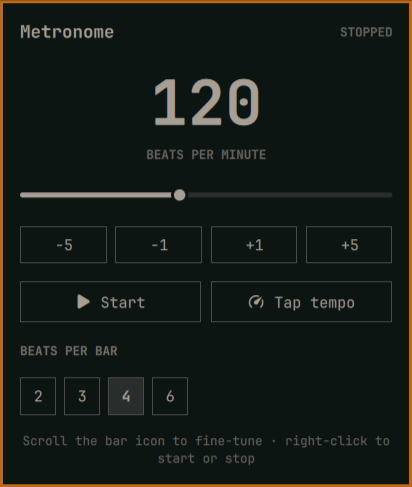
- Left-click the bar icon to open the controls.
- Choose a tempo from 30–240 BPM with the slider or step buttons.
- Use Tap tempo to measure a rhythm.
- Choose 2, 3, 4, or 6 beats per bar. The first beat is accented.
- Right-click the bar icon to start or stop without opening the panel.
- Scroll over the bar icon to change the tempo one BPM at a time.
With the panel open, Left/Right changes one BPM, Up/Down changes five BPM,
Space starts or stops, and T taps the tempo.
The audio engine uses Python's standard library and pw-play, both included
on Omarchy. It falls back to aplay when PipeWire's player is unavailable.
Dependencies and permissions
- Python 3
pw-playfrom PipeWire, withaplayas a fallback
The plugin runs entirely as your desktop user. It needs no network access, API keys, background service, installer, or elevated privileges. It does not overwrite user configuration; Omarchy manages its bar placement and settings.
Terminal control
omarchy-shell dlpwaters.metronome open
omarchy-shell dlpwaters.metronome play
omarchy-shell dlpwaters.metronome stop
Remove
omarchy plugin remove dlpwaters.metronome