
QRZ
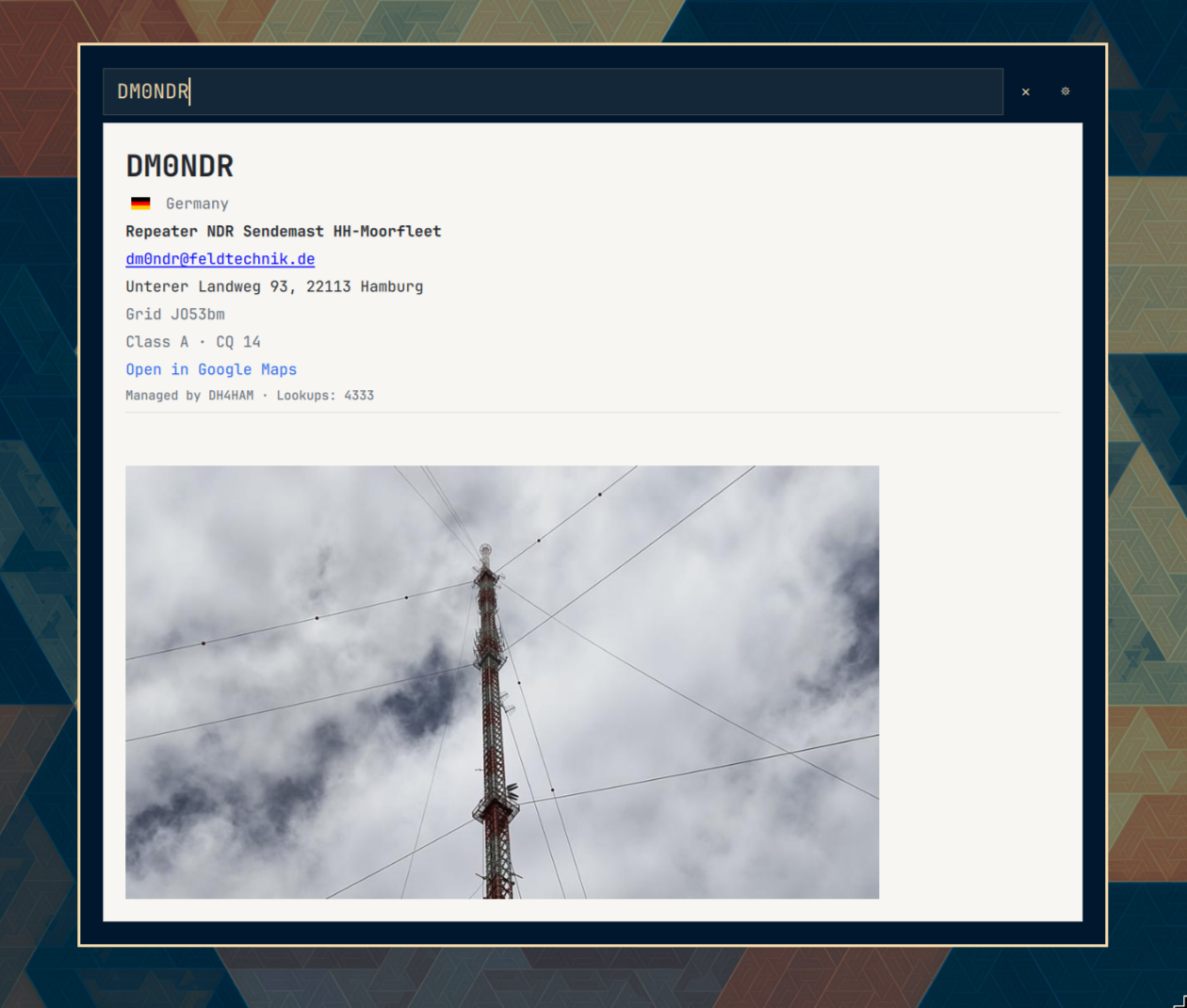
Look up amateur radio callsigns on QRZ.com from the Omarchy bar or a keyboard shortcut.
Omarchy 4/Quattro shell plugin. Plugin ID:
do1mj.qrz.
Features
- Bar widget that opens a focused callsign search overlay
- Keyboard shortcut activation (
SUPER + CTRL + SHIFT + Qby default) - Input field receives focus immediately so typing can start at once
- Looks up
https://www.qrz.com/db/CALLSIGN - Shows a spinner while a lookup is in progress
- Displays QRZ
table#jqdata and biography (#biodata) below the input field - Optional QRZ.com XML login (gear icon) for name, email, address, grid, and QSL prefs
- Hides the result as soon as the callsign is cleared or changed, then searches again
- Only auto-searches once 5+ characters are typed; Enter searches immediately regardless of length
- Renders a formatted “no results” page when QRZ reports no match
Compatibility
- Omarchy: 4/Quattro (
4.0.0.alphaand compatible) - Manifest schema:
1 - Plugin kinds:
overlay,bar-widget
Requirements
- Omarchy 4 /
omarchy-shell python3(used to fetch and extract the QRZ page)
Installation
From Git once published:
omarchy plugin add https://github.com/hirschnase/omarchy-do1mj.qrz.git
omarchy plugin enable do1mj.qrz --section right
Review the plugin source before enabling it. Omarchy plugins execute unsandboxed inside the long-running shell process.
From this source tree:
make install
make install copies the plugin into ~/.config/omarchy/plugins/do1mj.qrz/, enables the bar widget, and adds the Hyprland shortcut.
Configuration
Optional QRZ XML login is stored at ~/.config/do1mj.qrz/settings.json (directory mode 700, file mode 600):
{
  "username": "CALLSIGN",
  "password": "secret",
  "sessionKey": "…",
  "authError": ""
}
Open the overlay and click the gear icon to enter credentials, save them, or check the login. A valid session key is reused on later lookups and renewed automatically from the stored username/password when it expires. If that automatic renewal fails, the failure is recorded in authError and shown in the settings page instead of being retried on every subsequent lookup; renewal only resumes once you save or successfully check new credentials.
The widget is placed in the bar right section by default.
Optional Hyprland shortcut (also written by make install):
o.bind("SUPER + CTRL + SHIFT + Q", "QRZ callsign lookup", "omarchy-shell shell toggle do1mj.qrz '{}'")
Override the key while installing:
make install BIND_KEY='SUPER + ALT + Q'
Usage
- Click the QRZ bar icon, or press the shortcut
- Type a callsign; the overlay focuses the field on open
- Search runs on Enter or after a short pause when the callsign looks valid
- Changing or clearing the field hides the current page immediately
- Click the gear icon to save QRZ.com credentials and test the XML login
- Escape closes settings first, then clears the field, then dismisses the overlay
IPC
omarchy-shell shell toggle do1mj.qrz '{}'
omarchy-shell shell summon do1mj.qrz '{"callsign":"W1AW"}'
Makefile
| Target | Action |
|---|---|
make / make validate |
Validate the plugin manifest and files |
make build / make compile |
Validate only; there is no compile step |
make install |
Install, enable, and bind the shortcut |
make run |
Install and toggle the overlay |
make uninstall / make delete |
Disable, unbind, and remove the installed copy |
Security and privacy
- Launches
python3 scripts/qrz-lookup.py <CALLSIGN>andpython3 scripts/qrz-xml.py <load|save|check>with structured arguments (no shell interpolation) - Contacts
https://www.qrz.com/db/<CALLSIGN>andhttps://xmldata.qrz.com/xml/current/ - May load QRZ CDN/static images (photo, flag, biography) after scheme and host checks (
httpsonqrz.com/*.qrz.com) - Opens only allowlisted external URLs: QRZ
httpslinks,mailto:addresses, andhttps://www.google.com/maps?q=lat,lon - Stores QRZ username, password, and session key in
~/.config/do1mj.qrz/settings.json(directory mode700, file mode600) - Caches lookup results, including authenticated personal fields, in
~/.cache/do1mj.qrz(directory mode700, file mode600) - Does not log passwords or callsigns
make installwrites a marked block to~/.config/hypr/bindings.lua- No privileged actions
Development
make validate
omarchy plugin validate .
omarchy-shell shell rescanPlugins
Saving files under ~/.config/omarchy/plugins/ reloads plugin code automatically.
Troubleshooting
Plugin is not discovered
- Confirm
manifest.jsonis at the repository root - Run
omarchy plugin validate . - Confirm the plugin ID is
do1mj.qrzand is not in the reservedomarchy.*namespace - Confirm the repository contains no symlinks
Overlay does not open from the shortcut
- Confirm the plugin is enabled:
omarchy plugin list - Confirm
~/.config/hypr/bindings.luacontains thedo1mj.qrzbind block - Run
hyprctl reloadand tryomarchy-shell shell toggle do1mj.qrz '{}'
Result view is empty or unstyled
- Confirm network access to
qrz.com - Some QRZ fields require a QRZ login and will not appear on the public page
License
MIT. See LICENSE.