
omarchy-bw-headphones
Bar widget for Omarchy that controls Bowers & Wilkins headphones of the Px and Pi series.
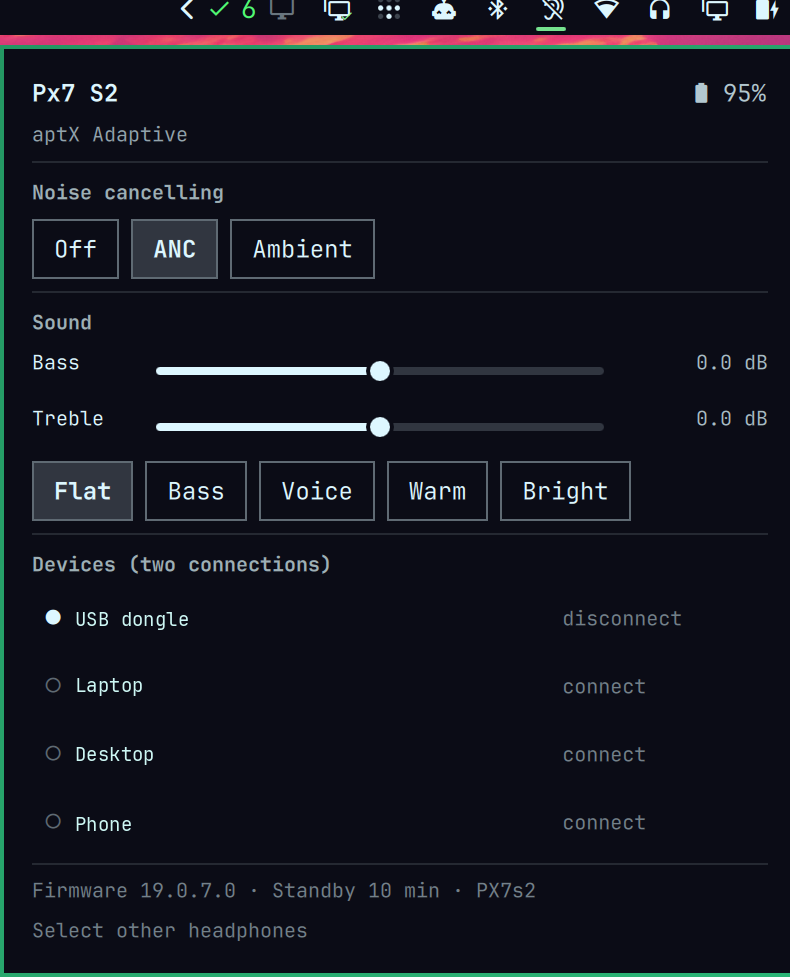
Features
- Noise cancelling: off, ANC, ambient. Older models additionally expose low, high and auto.
- Sound: bass and treble sliders plus five presets — flat, bass, voice, warm, bright.
- Battery level and charging state.
- Codec of the active link, for example
aptX Adaptive. - Connection management: connect, disconnect and remove paired devices. Multipoint models hold two audio connections at once.
- Keyboard shortcut for cycling noise cancelling.
Requirements
None. python3 and python-dbus are already hard dependencies of Omarchy by
way of uwsm, and BlueZ permits the required access in its default
configuration.
No udev rules, no group membership and no root are needed.
Installation
omarchy plugin add https://github.com/DominicBoettger/omarchy-bw-headphones.git --enable
Then open the panel, click Select headphones, let it scan and pick your
device. The choice is stored in ~/.config/omarchy-headphones/config.json.
Removal
omarchy plugin remove dob.headphones
Two things are left behind on purpose and can be deleted by hand:
~/.config/omarchy-headphones/config.json— the selected device- the
hpdbackground process, which exits at the next logout, or immediately withpkill -f bin/hpd
If you added the keyboard shortcut below, remove that line from
~/.config/hypr/bindings.lua as well.
Keyboard shortcut
Optional, in ~/.config/hypr/bindings.lua:
o.bind("SUPER + ALT + N", "Cycle ANC",
       os.getenv("HOME") .. "/.config/omarchy/plugins/dob.headphones/bin/hpctl anc cycle")
Usage
| Action | Effect |
|---|---|
| Left click the bar icon | open the panel |
| Right click the bar icon | cycle noise cancelling |
n in the panel |
same |
r in the panel |
reread state |
| Click a device row | connect or disconnect |
✕ in a device row |
remove the pairing, with confirmation |
The bar icon reflects the state: an open ear when noise cancelling is off, a crossed-out ear when it is active, waves for ambient mode. A magnifier appears while no device has been selected. When the selected device is out of range the icon dims to crossed-out headphones; the panel still opens, so another device can be chosen while the current one is away.
Command line
Everything works without the UI as well:
HP=~/.config/omarchy/plugins/dob.headphones/bin

$HP/hpctl scan                  # headphones in range
$HP/hpctl use d1b57b94          # select a device
$HP/hpctl state                 # full state as JSON
$HP/hpctl anc on|off|passthrough|cycle
$HP/hpctl bass 30               # tenths of a dB, -60 to 60
$HP/hpctl treble -20
$HP/hpctl eqset 40 0            # bass and treble together
$HP/hpctl devices
$HP/hpctl connect MAC
$HP/hpctl disconnect MAC
$HP/hpctl forget MAC --confirm
Supported models
Verified on the Px7 S2.
| Model | State |
|---|---|
| Px7 S2 | verified |
| Px7 S2e, Px8 | same values as the Px7 S2, untested |
| Px7 S3, Px8 S2, Px6, Pi6, Pi8 | noise cancelling yes, sound control missing |
| Px5, Px7, Pi4 | four ANC modes, untested |
| Pi5, Pi5 S2, Pi7, Pi7 S2 | one audio connection, no ambient mode |
| Pi3 | no noise cancelling |
Models with multiband sound control do not show the bass and treble sliders, because that variant is not implemented.
Known limitations
- Writing needs awake headphones. Left idle they fall asleep and reject changes; wearing them or starting audio is enough. Reading always works.
- The selected device has to advertise to be found. It does so even with an existing audio connection, but not while powered off.
- The control channel is exclusive. If the vendor app runs on a phone at the same time, one of the two sides may be left out.
- The first command takes a few seconds because the device has to be found and connected first. After that the connection is held and commands take roughly 0.4 seconds.
- Firmware updates and factory reset are deliberately unreachable.
How it works
Panel.qml --process--> bin/hpctl --socket--> bin/hpd --D-Bus--> BlueZ
hpd holds the connection permanently. That is a necessity rather than a
convenience: BlueZ ties device discovery and notification subscriptions to the
caller's D-Bus connection, so a process that ends after each command loses
both. The daemon starts on demand.
A note on security
The headphones themselves
The control service of these headphones requires no authentication. Anyone in radio range can change settings on any device of this series. That is a property of the hardware, not of this plugin. What the plugin can do is not make it worse: it pins its target device to an identifier from the advertisement and refuses every change while no device has been selected.
The local socket
The panel talks to a small background daemon over a unix socket in
$XDG_RUNTIME_DIR, because BlueZ ties an active scan and GATT notifications to
the D-Bus connection that started them -- a one-shot command cannot hold that
state. The socket is created with a 0600 umask, so there is no window in
which it is more permissive than intended, and the daemon additionally checks
SO_PEERCRED and serves only its own uid.
Every request is a single JSON line, capped at 64 KiB. Values that reach the
radio are range-checked before they get there: EQ values against the
protocol's own limits, the multiband array against the wire format's maximum
of 15 entries, the sleep timer to 0-240 minutes, a scan to at most 30 seconds
because it holds the radio for its whole duration. Removing a paired device
requires an explicit confirm.
The daemon has no privileges beyond the user's own, opens no network socket
and writes exactly one file. That file is written through a fresh temporary
file opened O_NOFOLLOW|O_EXCL and then renamed over the target, so a symlink
planted at the config path is replaced rather than followed.
Anything running as your user can reach the socket. Guarding against that would mean guarding against a process that could equally read the config, kill the daemon or drive BlueZ directly, so the boundary is deliberately the user account.
License
MIT