
Beacon
Accessibility for Omarchy.
Hyprland has shipped a screen magnifier and a full-screen shader hook for years. Omarchy exposes neither. So there is no way to enlarge the screen, correct for colour vision deficiency, or stop the motion without editing Lua by hand, and across the 949 plugins in the marketplace there is not one accessibility plugin. Beacon wires up what the compositor already has.
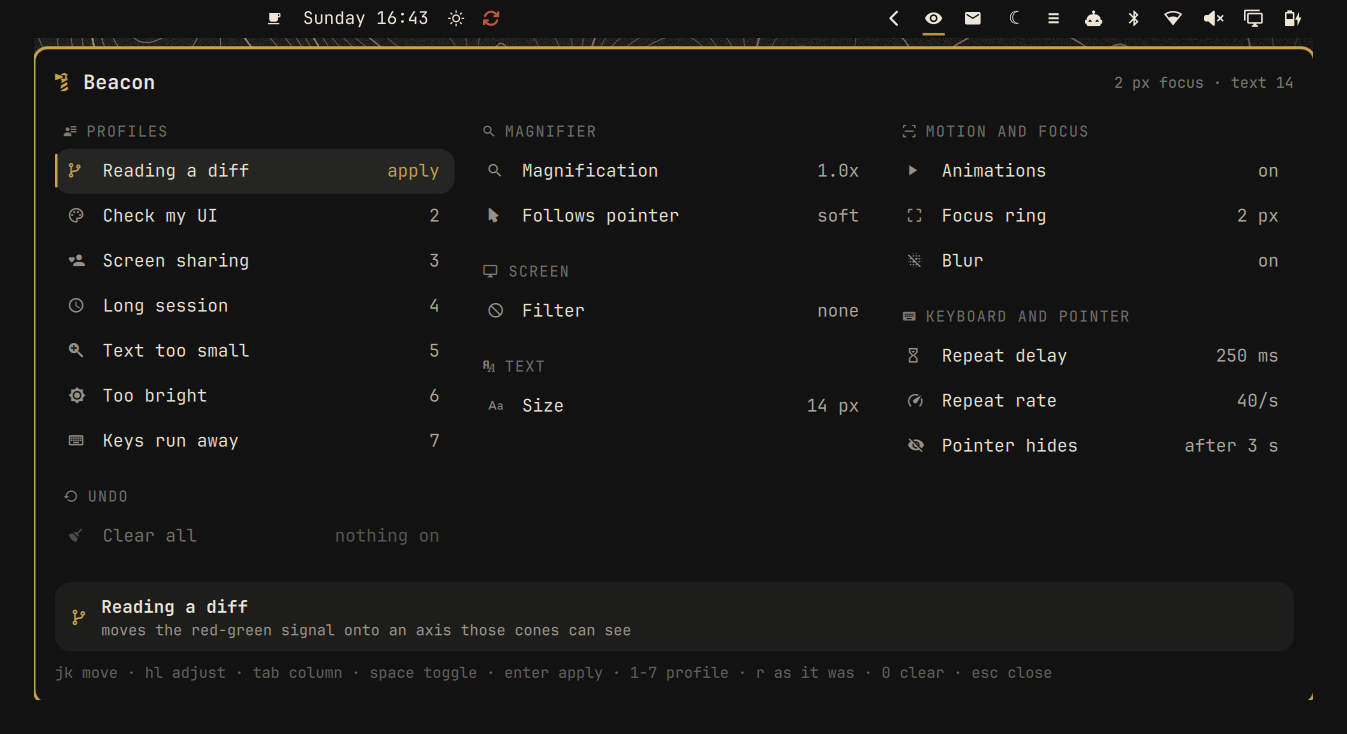
  Beacon                        2.0x magnifier · deuteranopia (separate) · 8 px focus

  PROFILES                     MAGNIFIER                      MOTION AND FOCUS
▎ Reading a diff      apply    Magnification     ◂ 2.0x ▸     Animations               on
  Check my UI             2    Follows pointer       soft     Focus ring             8 px
  Screen sharing          3                                   Blur                    off
  Long session            4    SCREEN
  Text too small          5    Filter  ◂ colour vision ▸      KEYBOARD AND POINTER
  Too bright              6    Type          Deuteranopia     Repeat delay         250 ms
  Keys run away           7    Strategy          Separate     Repeat rate            40/s
                               Strength               0.6     Pointer hides     after 3 s
  UNDO
  Clear all           clear    TEXT
                               Size                 14 px

  ┌──────────────────────────────────────────────────────────────────────────────────┐
  │ Reading a diff                                                                   │
  │ moves the red-green signal onto an axis those cones can see                       │
  └──────────────────────────────────────────────────────────────────────────────────┘
  jk move · hl adjust · tab column · space toggle · enter apply · 1-7 profile · 0 clear
Every row carries an icon in the real panel, as in the screenshot above. They are left out of this sketch because GitHub renders it in a font that does not have them.
The panel is laid out this way on purpose. It used to be one column that had to be scrolled, and scrolling is the wrong thing to ask of the person least able to go hunting for the half that is off screen. Three columns fit all of it at once, and each column is also a level of decision: the left one answers which situation am I in, the other two are the individual knobs for when a profile is not quite it. Usability here is cognitive as much as it is physical, so the explanation of whatever is selected always appears in the same place at the bottom, instead of unfolding inside the row and shifting everything under it.
What is in it
- Magnifier. Keyboard-driven, 1x to 4x in quarter steps, with a choice
between a rigid follow and a soft one. Uses Hyprland's own
cursor:zoom_factor. - Colour vision. The three deficiencies, each with three different things you might want: correct it, separate it, or simulate it to review a design through someone else's eyes. See the measurements below.
- Screen filters. Greyscale in linear light, a brightness inversion that keeps the colours (so photographs stay recognisable), a contrast boost, and a software dim that goes below the panel's minimum backlight.
- Reduced motion, visible focus. Animations off, a thicker window border, blur off.
- Keyboard and pointer. Repeat delay up to 1200 ms for a keypress that lingers, repeat rate down to 5/s, and a pointer that never hides.
- Text size, through Omarchy's own one-knob scaling.
- Seven profiles named after the situation, not after a diagnosis, because needs come in packages and nobody presses a key thinking "I have deuteranomaly". A profile replaces, it does not accumulate: pick one and you get that one, not it layered on top of the last.
- A way out you can see. The last row clears everything Beacon applied, and it is a row rather than only a key because a panel for people who cannot read a small legend should not hide its exit in one.
- An icon in the bar, because a panel you can only reach from a keybinding is a panel nobody finds.
The profiles
Named after the moment, because that is how the moment arrives. Someone ten hours into a terminal runs into these whether or not anything is diagnosed.
| # | Profile | The moment | What it does |
|---|---|---|---|
| 1 | Reading a diff | Red and green in a diff, a chart, a test summary | Translates the red-green signal onto an axis those cones can see. Nothing else: no magnifier, no text change |
| 2 | Check my UI | You are reviewing your own work for someone else | Simulates deuteranopia at full strength, so you see the worst case you are shipping |
| 3 | Screen sharing | Pairing, a review call, a demo | Text at 17 px, thick focus ring, and a pointer that never vanishes. Animations and blur off, which is as much about the video codec as about you |
| 4 | Long session | Hour ten | Larger text, nothing moving, sharp edges. Deliberately does not touch brightness or contrast |
| 5 | Text too small | You are leaning into the screen | 2x magnifier and larger text, and it leaves the brightness alone |
| 6 | Too bright | The room is dark, or light hurts | Attenuates below the panel's own minimum backlight, without compensating with contrast |
| 7 | Keys run away | A held key repeats on you | Longer delay before repeating, slower repeat, pointer stays put |
What the evidence actually supports, and what it does not. Three of these have real backing and the rest are design decisions, so they are labelled as such:
- Red-green deficiency runs at about 8% of men of European descent and 4 to 6.5% of men of Chinese and Japanese ethnicity (Birch 2012), around 4.4% of children in a 2025 meta-analysis of 1.7 million participants, with deutan roughly twice protan. That is ordinary in a population skewed male, which is why two of the seven profiles are about colour and why deuteranopia is the default. It is a continuum of severity, so the strength is a knob and not a constant.
- Dry eye odds nearly double above eight hours of screen a day (OR 1.94, Osaka study). It places the target user at the top of the exposure range. It says nothing about which knob helps, so Long session only makes text less work to read and keeps its hands off brightness.
- There is no warm-tint filter here on purpose. The Cochrane review of 17 randomised trials found no benefit of blue-light filtering on eye strain. Too bright is justified as a reduction in absolute luminance, not as circadian hygiene, and nothing here is sold as a remedy for tired eyes.
- More contrast is not a universal good. Some people need low brightness in the text as well, and strong screen light hurts them (W3C low-vision needs). So attenuation and contrast gain are separate levers and no profile solders them together. This changed the product: the magnifier profile used to apply a 1.4 contrast boost, which quietly raised perceived brightness for exactly the people it claimed to help. It no longer does.
- Screen sharing and Keys run away have no clinical evidence behind them. They are here because the situations are real and the levers were already sitting in the compositor.
What a screen shader cannot do. It is applied to the finished image, so it is
blind to meaning. It can make two colours in a diff look different; it cannot
know that green means added. The real fix for a diff lives in git config and in
your editor theme, where the colour still carries the semantics
(WCAG 1.4.1 Use of Color is a Level
A criterion for exactly this reason). For the same reason the contrast filter is
not a WCAG contrast remedy: it pushes tones apart around mid grey and produces no
particular ratio, so it cannot promise the 4.5:1 of
1.4.3 or the 7:1 of
1.4.6. Those are a theme's job.
Colour vision, measured
Two strategies, and they are not interchangeable. Correct redistributes the colour the retina cannot separate onto the axes it still has (Fidaner, Lin, Özgüven). Separate translates the missing signal onto a working cone axis: it does not try to look natural, it tries to make two things look different.
Perceived separation between colour pairs after each strategy, simulated through the deficiency (higher is more distinguishable, measured in linear RGB):
| pair | nothing | correct | separate |
|---|---|---|---|
git diff red/green |
0.506 | 0.544 | 0.655 |
| terminal ok/error | 0.159 | 0.209 | 0.181 |
| chart series 1/2 | 0.124 | 0.258 | 0.201 |
| link/visited | 0.269 | 0.387 | 0.327 |
| pure red/green | 0.587 | 0.494 | 0.749 |
| traffic light red/amber | 0.284 | 0.280 | 0.249 |
(deuteranopia; protanopia follows the same pattern.)
So: separate for primaries, diffs and charts; correct for photographs and subtle tones. And an honest one: the red/amber pair gets no better with either. Some confusions are not a filter away, and the panel does not pretend otherwise.
The pipeline is sRGB to linear, linear RGB to LMS (Hunt-Pointer-Estévez, D65), the deficiency projection, and back. The linearisation is not decoration: the LMS matrices are defined over linear light, and applying them to gamma-encoded values shifts the midtones, which is where the contrast someone needs actually lives.
The bar icon, and where the panel opens
An eye, on the right of the bar. It stays quiet until something is actually applied, and then it lights up and changes: a magnifying glass while the magnifier is up, a palette while a colour filter is on.
The panel opens under the icon, the way wifi, audio and bluetooth do. Those
are not panel plugins either: each is a single bar widget that owns its own
popup, and Beacon is built the same way, on the shell's own KeyboardPanel. It
used to be a panel kind, a full-screen surface with the card centred on the
display, and it was wrong in a way you feel before you can describe it, because
everything else in the bar drops its popup under its own icon and this one flew
to the middle of the screen.
KeyboardPanel is what makes that work for a panel driven by the keyboard: it
primes layer-shell focus when the popup opens, so a panel summoned from a
keybinding takes j/k straight away. A plain popup only gets keys after a
click routes focus through its parent surface, which is why keyboard-summoned
popups fell flat without it.
| Gesture | What it does |
|---|---|
| Left click | Opens the panel |
| Middle click | Clears everything Beacon applied |
| Wheel | Drives the magnifier, in quarter steps |
So enlarging the screen costs one gesture and no panel at all.
It lights up only for the three things that are unambiguously an intervention: the magnifier, a screen filter, and reduced motion. It stays dark for a pointer that never hides or a thicker focus border, because those are preferences somebody may have had for years, and an icon that is always lit means nothing.
The tooltip spells the state out in words, which is the part that matters if a 16 px glyph is not readable to you.
Install
git clone https://github.com/DonZ-tech/omarchy-beacon \
  ~/.config/omarchy/plugins/donz.beacon
omarchy plugin validate ~/.config/omarchy/plugins/donz.beacon
omarchy plugin enable donz.beacon
omarchy bar put donz.beacon right
omarchy restart shell
The bar put is not optional. The panel lives inside the bar widget now, so
with no icon on the bar there is no instance, and the keybinding below answers
Target not found. That is the trade for opening under the icon: the anchor has
to exist.
Two things that cost me time, in case they cost you any:
- Restart the shell, do not rescan.
omarchy-shell shell rescanPluginspicks up the service but not a new bar widget, and the widget is the whole panel. bar putis idempotent against the plugin list, not the layout. If the plugin already has an entry underplugins[](enabling it once is enough), the command answers "donz.beacon is on the bar" and inserts nothing. If the icon does not appear, that is why; adding{"id": "donz.beacon"}tobar.layout.rightin~/.config/omarchy/shell.jsondoes the job.
Then bind a key in ~/.config/hypr/bindings.lua:
o.bind("SUPER + SHIFT + A", "Accessibility", "omarchy-shell donz.beacon.panel toggle")
Worth binding too, while you experiment:
o.bind("SUPER + SHIFT + ESCAPE", "Clear screen filters", "beacon-reset")
Uninstall
~/.config/omarchy/plugins/donz.beacon/bin/beacon-reset
omarchy plugin remove donz.beacon
rm -rf ~/.local/state/beacon
omarchy restart shell
Run the reset first: it returns the compositor to Omarchy's values. Everything Beacon does is applied at runtime, so nothing survives that.
Keys
One gesture for the whole panel: move up and down a column, adjust left and
right. j/k rolls over into the next column at the end of one, so everything
is reachable with two keys.
| Key | Action |
|---|---|
j k or arrows |
Move between controls, wrapping into the next column |
h l |
Adjust the selected control; move between columns on a row with nothing to adjust |
Tab Shift+Tab |
Move between columns |
space |
Flip the selected switch |
Enter |
Apply the selected profile |
1–7 |
Jump straight to a profile |
r |
Back to how it was when the panel opened |
0 |
Clear everything, same as the last row |
Esc or q |
Close |
The mouse works too: hovering a row explains it at the bottom, clicking applies a profile or flips a switch, and the wheel slides a value.
The safety net
A shader that fails to compile leaves the screen black, and a high magnification leaves it unmanageable. Either way, the person who needs this panel is the one least able to undo it blind.
So a change that could do that is applied with a countdown: ten seconds, any key
keeps it, Esc undoes it now, and if nothing happens it reverts on its own.
Closing the panel with a change still unconfirmed reverts it too. And
beacon-reset is a plain script you can run from a TTY without seeing anything.
What it will not do
- It does not ask for root. Nothing here needs it.
- It does not touch your settings. It reads the desktop when it opens and shows what is already there. If you have run your text at 14 px for a year, it keeps it at 14. Text size in particular is Omarchy's knob, not Beacon's: it has no default for it and a reset leaves it alone.
- It does not take over another plugin's screen shader. If it finds one it does not recognise, it says so and leaves it be.
- It does not write to your Hyprland config. Everything is applied live over
hyprctl eval, and the state it remembers lives in~/.local/state/beacon/state.json. - It does not poll. The probe runs when the panel opens, and it takes 41 ms.
Requirements
Omarchy 4 and Hyprland 0.56 or newer, for cursor:zoom_factor and
decoration:screen_shader. Nothing else: no packages to install, no daemon, no
network. 136 KB on disk, of which 52 KB are the shaders.
Development
Everything that can be checked without a compositor, is:
test/run
794 checks in seven blocks:
| block | what it covers |
|---|---|
| logic | ranges, sanitising, shader plans, profiles, the icon table, the reset that must not touch your text |
| qml | reserved property names, aliases, the shape of the widget (anchored popup, focus target, no full-screen surface) and that the panel has not gone back to being one scrolling column |
| colour | the LMS matrices read out of the shaders themselves, and the README's own table |
| shaders | GLSL version and syntax, compilation of all thirteen across every range |
| scripts | the bin/ helpers, above all what they refuse, and that every icon exists in the shell font |
| manifest | the contract the shell enforces, and coherence with the README |
| runtime | that the compositor accepts the shaders and that they change the image |
The runtime block is the only one that needs a real machine, and it is the only place a rejected shader shows up. It skips itself rather than insisting if there is no compositor, if the session is locked, or if there is no frame to measure, and it says which of those it was: the lock screen in Omarchy is drawn by the shell, so poking the desktop while the session is locked can strand the lock and leave a black screen that only a compositor restart clears. It never restarts the shell and never touches the idle setting.
What it measures, on the real screen: greyscale takes screen saturation to zero, the dim filter drops luminance, the colour filter changes the image while keeping colour, and clearing the filter puts saturation back where it was.
Four of these blocks exist because of bugs that actually happened, and each one is worth knowing if you write Omarchy plugins:
Hyprland links your fragment shader with its own vertex shader, and demands the
same GLSL version. That version is #version 300 es, so varying,
gl_FragColor and texture2D are all out. A shader written in ES 2.0 compiles
perfectly on its own and the compositor still rejects it with "all shaders must
use same shading language version", and a rejected screen shader leaves the
screen black. test/shaders.sh checks the version, the ES 2.0 leftovers, and
compiles every template across its whole range.
qmllint does not catch reserved property names. Declaring
property var state on an Item stops the component loading with a
Cannot override FINAL property that only appears when the shell mounts it, and
the linter passes that file with exit 0. Verified. test/qml.js scans the
declarations against the QQuickItem names instead.
A colour shader can compile and be mathematically wrong. test/colour.js
extracts the matrices from the .frag files, checks that the forward and inverse
LMS transforms really are inverses, that each deficiency stops depending on the
cone it lacks, that grey stays grey, and that the numbers in the table above are
reproducible. Change a coefficient and the table stops matching.
The probe can also be read on its own, which is the same truth the panel sees:
./bin/beacon-probe
License
MIT. See LICENSE.