
⏳ Countdown
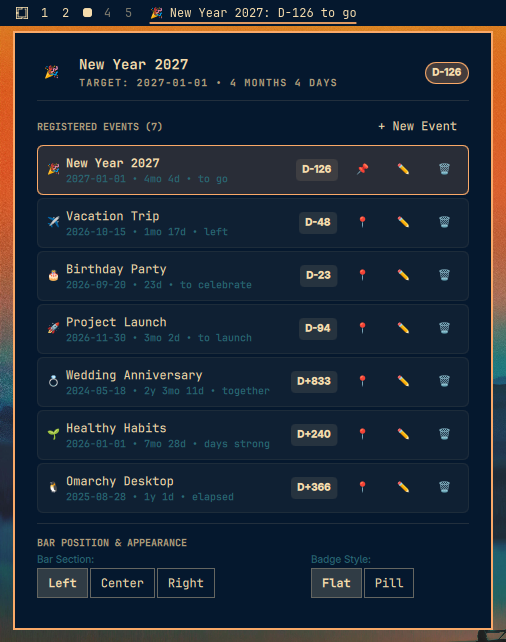
Countdown to your special date. Simple, intuitive day counting menubar app with multi-event management, customizable display formats, and seamless desktop integration for Omarchy and Quickshell. You will never miss the day!



✨ Features
- Multi-Date Support: Register, edit, delete, and manage multiple countdowns and count-up events simultaneously.
- Counting Down Days: Target date exclusive ($Days = \text{Target} - \text{Today}$). On the target date:
D-Day/0. - Counting Up Days: Target date inclusive ($Days = \text{Today} - \text{Target} + 1$). Perfect for tracking days since an anniversary, sobriety, or project launch.
- Menubar Display: Unobtrusive, seamless status bar widget styled with your active Omarchy theme colors.
- Prefix & Suffix Decorations: Decorate your countdowns with custom labels and emojis. Automatic spacing is handled seamlessly.
- Built-in Searchable Emoji Picker: Integrated Unicode library with 1,870+ emojis and real-time keyword search directly inside the Prefix and Suffix fields.
- Event Name Display: Displays the event name clearly on the status bar (e.g.
✈️ Vacation Trip: D-48 left). - Official Omarchy Panel: Interactive popup panel built with official design components (
PanelHero,PanelSectionHeader,ButtonGroup,TextField). - Instant Format Cycling: Middle-click directly on the menubar widget to walk through all display formats.
- Quick Event Cycling: Scroll the mouse wheel on the bar widget to cycle between your registered events.
- Built-in CLI & IPC Control: Fast command line interface (
countdown) for terminal automation and scripts.
🖥️ Display Methods
| Format Name | Option Key | Examples |
|---|---|---|
| Numeric day | numeric |
100, 99, 0 |
| D-day | dday |
D-100 (countdown), D+100 (count-up), D-Day (today) |
| Short descriptive | short_descriptive |
2y 5mo 3d, 5mo 12d, 3d, Today |
| Long descriptive | long_descriptive |
2 years 5 months 3 days, 5 months 12 days, 3 days, Today |
⌨️ Mouse & Keyboard Controls
| Action | Control | Description |
|---|---|---|
| Toggle Panel | Left-Click or Right-Click |
Opens the interactive event dashboard and editor |
| Cycle Format | Middle-Click |
Walks through D-Day ➔ Numeric ➔ Short ➔ Long formats |
| Cycle Events | Mouse Wheel Up / Down |
Steps through your registered events directly from the status bar |
| Dismiss Panel | Escape or Click Outside |
Smoothly closes the popup panel |
🚀 Installation
Run the automated installer script:
./install.sh
The installer will:
- Copy the plugin files to
~/.config/omarchy/plugins/dorneles.countdown. - Install the
countdownCLI tool to~/.local/bin/countdown. - Register the widget in your Omarchy
shell.jsonconfiguration. - Reload the shell.
To uninstall:
./uninstall.sh
🛠️ CLI Usage
The countdown CLI allows managing your dates directly from the terminal:
# List all registered events with live status
countdown list

# Add a future countdown (Exclusive)
countdown add --title "Trip to Tokyo" --date "2026-10-15" --prefix "✈️" --suffix "to go" --pin

# Add a past count-up tracker (Inclusive)
countdown add --title "No Smoking" --date "2026-01-01" --mode countup --prefix "🌱" --suffix "days strong"

# Pin an event to the status bar by ID
countdown pin evt_new_year

# Delete an event
countdown delete evt_100_days

# IPC triggers
countdown toggle
countdown refresh
countdown cycle-format
countdown cycle-event
🔒 Security Hardening
This plugin adheres to strict security and robustness standards:
- PlainText UI Enforcement: All
Textelements explicitly enforcetextFormat: Text.PlainTextto prevent RichText / HTML injection. - Control Character Stripping: All titles, prefixes, and suffixes are sanitized to strip non-printable ASCII and control characters (
\x00-\x1f). - Input Length Caps: Enforces strict bounds (
MAX_TITLE_LEN = 100,MAX_PREFIX_LEN = 30,MAX_EVENTS_COUNT = 50,MAX_CONFIG_SIZE = 64 KiB). - Atomic File Operations: State files are written atomically using temporary files and protected with
0o600file permissions and0o700directory permissions. - Zero-IO File Watchers: Quickshell
FileViewwatchers useblockAllReads: trueto eliminate disk stalls on the UI thread.
🧪 Testing
Run the automated test suite:
node tests/model.test.js